
Best Irrigation Controllers for Drip Irrigation: 9 Picks
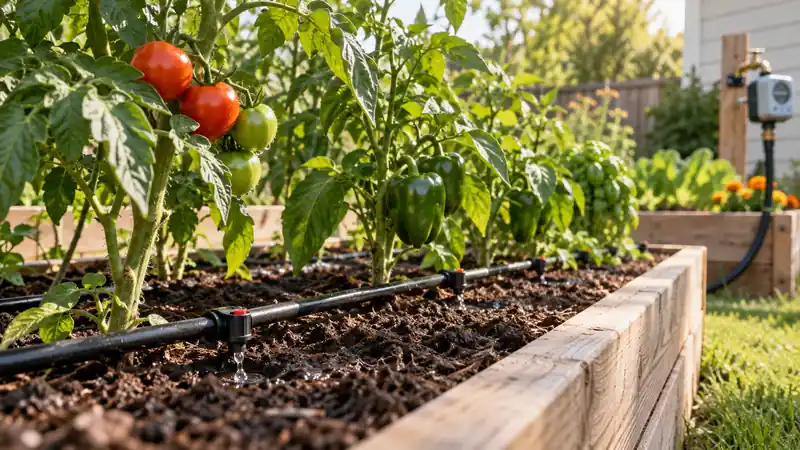
The best irrigation controllers for drip irrigation are the ones that let each valve run a schedule suited to its planting area. A timer opens the valve for a programmed period; the pressure regulator, filter, tubing, and emitters determine how water reaches roots. The right model fits the existing valve count and can be serviced without turning routine adjustment into a project.
That distinction matters in a yard where a lawn, raised beds, shrubs, and a row of containers share one water source. Those areas may need different run times and watering intervals. A controller cannot correct an undersized filter or a mismatched emitter, but it can keep the drip branch from inheriting a lawn schedule. The nine options below range from app-led systems to dial-based timers, with close attention to station count, local control, sensor support, and the setup each one asks of the owner.
Quick Answer
Start with the station map, then choose the control style that matches how you maintain the system. These four are the strongest starting points for different drip-irrigation situations:
- Orbit B-hyve Smart 12-Zone is a flexible fit when a larger valve map and indoor or outdoor mounting matter.
- Rachio 3 8-Zone suits an eight-zone property where adaptive schedules and cycle-and-soak controls are useful.
- Rain Bird ARC8 gives a connected Rain Bird system app access, physical controls, and an optional rain-sensor input.
- Rain Bird TRU6I favors buyers who prefer a local dial and a six-station schedule, with Wi-Fi available through a separately purchased module.
These controllers do not manage emitter pressure or detect a clogged drip line. Their job is to operate the valves at the times you choose or, for smart models, adjust a schedule using the information and settings supplied. A good match starts with how many independently controlled areas the landscape actually needs.
Comparison at a Glance
The table focuses on details that can change the installation or day-to-day routine. “Weather scheduling” means online conditions or a forecast are used by software. It is not the same as a physical sensor mounted at the property. Confirm exact compatibility and included accessories for the version being purchased.
| Controller | Stations | Control approach | Drip-system angle | Check before purchase |
|---|---|---|---|---|
| Orbit B-hyve Smart 12-Zone | 12 | App plus wall-mounted controls | Room to separate beds, lawn, trees, and future branches | Mounting, Wi-Fi reach, and sensor wiring |
| Rachio 3 8-Zone | 8 | App-led, with Quick Run | Zone settings and cycle-and-soak can help manage different schedules | Indoor placement and whether eight stations are enough |
| Rain Bird ARC8 | 8 | Wi-Fi app and controller controls | Multiple programs and rain/freeze-sensor support | Normally closed sensor type and wall location |
| Netro Spark | 8 in this listing | App, touch controls, and display | Weather-aware scheduling without a traditional add-on rain sensor | Network, zone count, and weather-data source |
| Netro Sprite 12-Zone | 12 | App-based smart and fixed programs | More room to split plant groups into separate zones | Power, installation surface, and account setup |
| Yardian Pro | 8 in this listing | App, buttons, Wi-Fi or Ethernet | Two configurable sensor ports and an optional master-valve/pump output | Indoor installation unless an outdoor enclosure is added |
| RAINPOINT Smart 8-Zone | 8 | App and on-unit buttons | Connected scheduling in a conventional station-based layout | Exact sensor bundle, Wi-Fi band, and wiring diagram |
| Hunter PRO-HC 6-Zone | 6 | Touchscreen with Hydrawise app | Weather-based program controls and professional wiring options | Six stations and a stable network at the mounting point |
| Rain Bird TRU6I | 6 | Dial and display; optional LNK2 module | Three local programs, rain-sensor support, and station bypass | Indoor-only mounting; Wi-Fi module sold separately |
What a Drip-Irrigation Controller Can and Cannot Do
It is tempting to treat “drip irrigation” as a controller feature. In a typical residential system, drip is a delivery method downstream from the valve. The controller energizes that valve for a programmed period. A pressure regulator limits pressure, a filter catches debris, and the selected tubing and emitters set the flow pattern. If pressure is wrong or an emitter is blocked, changing the controller will not repair it.
The controller still matters because a drip zone often has a different schedule from lawn spray heads. Beds may need longer, less frequent runs. Containers can dry faster than deep-rooted shrubs. A separate station lets those circuits follow different intervals instead of sharing a compromise program. The goal is a readable zone map that reflects what is planted and how the water is delivered.
Smart scheduling can help organize that routine, but its recommendations depend on the data entered. A program that assumes spray heads may calculate a different duration from one configured for drip line. Set each zone’s plant, soil, exposure, and irrigation method accurately when those fields are available. Then inspect the soil and adjust the schedule to local conditions. Software estimates are a starting point, not a substitute for observation.
How We Evaluated These Controllers
For this roundup, the useful comparison is not a broad count of app features. It is whether a homeowner can keep unlike watering needs separate and understand what will happen when the schedule runs. The criteria below prioritize physical fit and the controls most likely to affect a mixed garden.
Independent schedules for genuinely different areas
Count valves, not beds or individual emitters. A single valve may feed several containers, while one larger garden may have several valves because of elevation, distance, or flow limits. A controller should provide a separate station for each circuit that needs a distinct schedule. Buying extra capacity has little value if the cabinet will not fit or the future zones are only hypothetical; buying too little can force unlike areas together.
Programs and start times matter after station count. One program can group areas that share days and timing. Additional programs help when a newly planted bed, greenhouse, or tree line needs a different cadence. A large number of start times is not automatically useful. Too many overlapping programs can make it harder to see why a valve opened.
Weather data is not soil feedback
A forecast-based controller uses internet weather information to skip or modify scheduled irrigation. A physical rain sensor sends a signal from a device mounted outside. A soil-moisture sensor measures the condition at its probe. Those approaches answer different questions. Forecasts may be convenient, while a sensor at the property can reflect local rain or soil conditions. Neither one detects a broken emitter unless the system includes a suitable flow-monitoring device.
Check whether a model has actual sensor terminals, supports a particular wireless sensor, or relies on online data. If a sensor is a requirement, read the wiring guide for the exact controller and verify normally open or normally closed compatibility. Some controllers ship with a jumper in the sensor circuit. Removing it without installing a sensor can cause the controller to interpret the circuit as active and hold watering.
Local control can be valuable during service
App control makes remote changes easier, but irrigation maintenance often happens beside the controller. A physical dial, screen, or manual-run button can simplify a valve test when the phone is elsewhere or the network is down. The best interface is the one the person responsible for the yard will be comfortable using after setup day.
Orbit B-hyve Smart 12-Zone
On a property that already separates lawn, shrubs, and several planted areas, a twelve-station panel can keep those valves from sharing one watering calendar. Orbit’s 12-zone B-hyve is the capacity pick here; it does not alter pressure or emitter behavior, so the drip design still determines whether a bed needs its own valve.
The indoor/outdoor controller pairs a wall-mounted panel with app access. A person near the wiring can start a zone locally, while schedule changes can be made from a phone. Orbit documents a rain-sensor connection at the SENSOR terminals, but the sensor’s placement and enabled setting matter. A shaded wall or roof runoff can produce a reading that does not reflect the beds.
Twelve outputs are useful only when the plumbing map justifies them. A long bed with pressure differences, a fast-drying container line, and established shrubs may deserve separate valves. Two nearby beds with similar plants and emitters could share a circuit. The controller can keep those schedules separate only after the hydraulic layout does.
Outdoor placement is supported for the listed model, but the controller still needs a suitable power source, protected cable entry, and a location that does not collect water. Check Wi-Fi at the final mounting point rather than assuming the signal will pass through a masonry wall or metal cabinet.

Pros
- Twelve stations give a larger garden room to keep trees, beds, lawn, and future valve circuits on schedules that reflect their different needs.
- Local controls alongside the app make manual zone checks easier during maintenance at the controller.
- A schedule adjustment can be made from the phone rather than waiting until you return to the controller.
- Outdoor-rated placement can keep the panel near the valve wiring when an indoor cable route would be awkward.
Cons
- The twelve-station enclosure can be more controller than a compact yard needs, especially where wall space and wire organization are tight.
- Owners who rely on the rain input need to mount and enable a compatible sensor rather than assuming forecast delays perform the same job.
A growing valve map gives the 12-zone version a clear purpose, especially if local zone testing and phone scheduling both matter. On a compact property with four or five fixed circuits, its extra outputs add little to the watering result and take up more wall space.
To buy this product, click here.
Rachio 3 8-Zone
Rachio’s advantage is schedule control, not a special drip connection. The 8-zone model lets lawn and planted areas follow separate programs, while zone setup records the plant and irrigation details that shape its recommendations. Rachio documents fixed, Flex Daily, and Flex Monthly schedules, plus Smart Cycle, which splits longer runs to allow time for water to soak in. Those tools can help on sloped ground, though a drip line still needs enough runtime for water to reach its far emitters.
The app-centered interface suits an indoor utility room or garage with stable Wi-Fi. It is a poor choice for an exposed mounting point without an enclosure, and eight stations can fill quickly if a side garden or orchard row is planned. Before programming, map each bed to a valve rather than treating every planting area as one generic zone.
Weather skips use forecast information. They are separate from a sensor mounted in the yard, which matters for beds under an overhang or in a sheltered courtyard. A fixed schedule remains useful when the local forecast is a weak proxy for the conditions around a particular drip zone.

Pros
- Zone-specific settings and schedule choices help owners tailor separate drip, lawn, and planting circuits instead of copying one runtime across the yard.
- Smart Cycle can split a long run when the surface or soil needs soak time between cycles.
- Fixed, Flex Daily, and Flex Monthly modes let owners choose how much schedule automation suits each part of the yard.
- Forecast-based skips can avoid a scheduled cycle after rain on exposed beds, while a fixed plan remains available for sheltered drip zones.
Cons
- The indoor-only mounting approach rules it out for an exposed controller location without a suitable enclosure.
- Eight stations leave little headroom for a property already planning several new independently watered areas.
Smart Cycle gives Rachio a practical edge on longer runs that benefit from soak intervals. Choose it for those scheduling options and the indoor app setup, not on the assumption that software can detect a clogged emitter, weak flow, or dry soil.
To buy this product, click here.
Rain Bird ARC8
Rain Bird ARC8 offers two ways to work with the schedule: built-in Wi-Fi for app access and buttons with status indicators at the controller. That mix is useful when an owner wants to run a bed while standing by the valve wiring, then adjust start times remotely later. It controls up to eight stations.
The manual lists three automatic programs, four start times per program, manual watering, seasonal adjustment, rain delay, and rain/freeze sensor control. A normally closed compatible sensor is required, and the factory jumper should remain in place if no sensor is wired. Confirm the sensor type before reusing one from an older panel.
Program separation can make a mixed planting map easier to audit. A tree row and established shrubs can follow a stable schedule, while annual beds or containers get their own start times. Assign stations deliberately so a rain delay or seasonal adjustment does not change areas that should stay independent.
Eight stations work for many residential layouts, but a full valve box leaves little room for expansion. Follow the mounting and power instructions for the chosen indoor or outdoor location, and verify that the existing wiring and sensor terminals match before removing the old controller.

Pros
- Three programs and station-level control options make it easier to maintain separate schedules for established beds, lawn, and seasonal plantings.
- Built-in Wi-Fi plus physical controls lets a household choose between remote edits and a quick adjustment at the unit.
- Seasonal adjustment gives owners a quicker way to scale watering as conditions change than rebuilding a program from scratch.
- Rain delay offers a simple pause after a wet spell, with a compatible wired sensor available for ongoing local detection.
Cons
- The documented rain-sensor input is for normally closed sensors, so an existing sensor with another contact type needs a compatibility check.
- Eight stations may force a growing property to combine areas whose watering intervals are better kept separate.
For an owner who wants local buttons without giving up connected scheduling, ARC8 is a balanced retrofit. The decision hinges on the eight-station ceiling and the normally closed sensor requirement; either can outweigh its convenience if the property is already wired differently.
To buy this product, click here.
Netro Spark
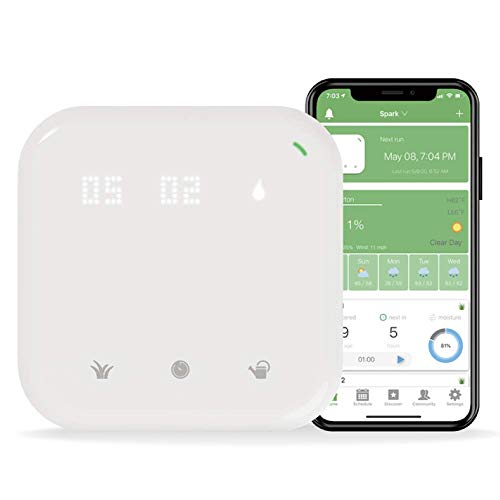
Netro Spark is the outlier for buyers who want touch controls and an automated schedule but do not need a wired rain-sensor terminal. The eight-zone listing combines an app, touch buttons, and an LED display, so local status and a manual zone run remain available at the panel.
There is a meaningful boundary here: Netro support says Spark does not accept a traditional add-on rain sensor. A nearby personal weather station can provide information through Weather Underground, but that is not the same as a switch wired to the controller. A physical sensor requirement points toward ARC8, Yardian, or another model with documented terminals.
For drip beds, the owner needs to enter plant and zone details and check the schedule against actual line performance. A programmed duration cannot confirm that the last emitter receives water. Touch controls do make a quick inspection simpler: start the circuit, check for leaks or weak output, then stop it without navigating an app.
Pros
- The on-device touch buttons and display offer a fast local way to check status or run a zone during garden maintenance.
- Smart schedules can use plant and weather information to reduce repetitive manual changes for owners who are comfortable reviewing the recommendations.
- A nearby personal weather station connected through Weather Underground can provide a local weather input without wiring a rain switch to the controller.
- App access makes schedule changes possible from a utility room or elsewhere on the property without returning to the panel.
Cons
- There is no traditional external rain-sensor input, which makes Spark the wrong match for a system that must react to a wired sensor.
- The smart schedule depends on the zone information and weather source being suitable for the garden’s microclimate.
Think of Spark as a forecast-led controller with useful local controls, not as a rain-sensor model. It fits when that distinction is acceptable and the owner will review the schedule against sheltered beds and the far end of each drip line.
To buy this product, click here.
Netro Sprite 12-Zone
Twelve outputs matter when the planting plan actually needs twelve independently scheduled valves. The Sprite 12-zone model gives a mixed garden space to distinguish lawn, raised beds, shrubs, trees, and a greenhouse line, but station count alone does not make those divisions useful. The valve layout has to support them.
Netro describes smart scheduling based on forecast, plant type, and soil-moisture settings. Those are inputs to a schedule, not a probe measuring every bed. A vegetable bed and an established shrub line may share drip hardware while needing different intervals, so enter the zone details carefully and check the result during normal operation.
Initial setup asks the owner to connect the controller, define zones, and select smart or fixed schedules. That work pays off more on a garden whose plant map changes by season than on a small yard with one stable program. If the person maintaining the system does not want to keep zone details current, a simpler local schedule may be easier to trust.
Weather-aware timing also has a microclimate problem. A covered porch, greenhouse, or sheltered bed may not receive the same rainfall as the open yard. Keep those zones on a fixed plan when forecast adjustments would be a poor proxy, and use the app’s override options when the actual planting conditions call for it.
When comparing the 12-zone version with an eight-zone controller, count planned valves rather than planting labels. Several beds can still share one valve if their plants, emitters, and exposure allow the same schedule; separate stations are worthwhile only when the watering decisions differ.

Pros
- Twelve stations can keep several plant groups on independent schedules as a garden expands beyond a basic lawn and border layout.
- Zone-specific plant and soil inputs give the owner a more relevant starting point than one shared runtime for every bed.
- Weather-aware scheduling can reduce routine calendar edits in a garden whose plant mix or conditions change through the season.
- Fixed scheduling remains useful for a sheltered greenhouse or porch bed that does not track the open-yard forecast.
Cons
- Smart scheduling asks for more initial zone setup than a simple dial timer, which may be needless work for an unchanging yard.
- Weather-based adjustments are a poor stand-in for a physical sensor where a covered or sheltered bed has conditions unlike the local forecast.
The Sprite’s capacity is valuable on a genuinely expanding garden, while its smart setup adds a layer of maintenance that a static yard may never use. Choose it for the plant-by-zone control you expect to maintain, not simply because twelve sounds future-proof.
To buy this product, click here.
Yardian Pro
Ethernet makes Yardian Pro a practical pick when Wi-Fi coverage at the controller is unreliable. The linked eight-zone model also lists an RJ45 port, a master-valve or pump output, and two configurable sensor ports. That makes its wiring options more specialized than the typical connected residential timer.
Those ports are useful only with compatible hardware. Yardian specifies pulse-output flow sensors, and its sensor documentation distinguishes normally open and normally closed inputs. Check the exact sensor model and wiring diagram before buying; a similarly named device is not automatically compatible because it measures flow or rain.
The controller is intended for indoor mounting. An outdoor location requires the optional weatherproof enclosure, with an appropriate place for the power adapter and cable entry. Flow monitoring can add information about a drip system, but without a compatible sensor the controller does not detect a broken line by itself.

Pros
- Ethernet gives owners a wired network option when dependable Wi-Fi coverage is difficult at the controller location.
- Two configurable sensor ports and the master-valve/pump output suit installations that already use compatible monitoring hardware.
- Owners with a matching pulse-output flow meter can keep using that sensor format for compatible flow monitoring.
- The dedicated master-valve or pump output is a practical fit for a system already wired around either control.
Cons
- The linked version is an indoor unit, so an exposed mounting point calls for the separate weatherproof enclosure.
- Flow-sensor support is specified for pulse-output devices, which narrows the choice of compatible monitoring equipment.
Where a wired network and compatible sensor hardware are already part of the plan, Yardian Pro offers a clear technical distinction. If the garden only needs ordinary schedules, the extra ports may be more configuration than benefit, and the indoor mounting requirement should be settled before purchase.
To buy this product, click here.
RAINPOINT Smart 8-Zone
An eight-station controller with app access and physical buttons can be enough for a conventional lawn-and-garden retrofit. RAINPOINT’s unit is aimed at that simpler job: label the circuits, set the days and runtimes, and use the panel when a quick manual check is easier than opening the app.
Drip still depends on how the garden is divided. Give a bed its own valve when plant type, exposure, or emitter layout calls for a different interval. If several beds share one circuit, no app setting can make them run on separate schedules. The product listing and included accessories can vary, so confirm the exact sensor bundle, wiring diagram, and network requirements for the version being purchased.
After wiring, run each station manually and check both the first and last emitter on a long line. Keep the schedule readable and the zone names tied to real locations. Those habits are more useful on an everyday controller than an advanced monitoring feature the system does not actually include.

Pros
- Eight station outputs can keep common lawn and garden circuits separate without requiring a larger professional-style panel.
- On-unit buttons provide a straightforward way to check or start watering when a phone is not convenient.
- App access lets an owner change a watering day or runtime without returning to the controller.
- For a conventional retrofit, the setup keeps attention on the valve map and runtimes rather than specialized network or sensor equipment.
Cons
- The exact rain-sensor bundle and wiring compatibility should be confirmed for the specific listing before buying an accessory.
- Owners who need Ethernet, extensive sensor integration, or a documented professional terminal layout may prefer a more specialized unit.
RAINPOINT is a sensible retrofit only after the eight-zone map and exact sensor package are confirmed. For a homeowner who needs a straightforward schedule and basic panel controls, that may be all the complexity the property requires.
To buy this product, click here.
Hunter PRO-HC 6-Zone
The PRO-HC’s color touchscreen and Hydrawise connection make the six-zone model more detailed than a basic dial timer. It can keep lawn, trees, and a dedicated drip branch separate when six outputs are enough. Check the existing valve count and likely expansions first; this version has a firm six-station limit.
Hydrawise becomes useful when the zone map is accurate and someone will review it. Weather-based adjustments can cut down on calendar edits, while the touchscreen leaves schedule access at the controller. Confirm the exact sensor options for the PRO-HC revision rather than assuming every Hunter sensor connects in the same way.
A drip station needs to run long enough for water to travel down the tubing. During setup, check the farthest emitter and inspect pressure regulation and filtration before extending every runtime. Slow output at the end of a line may come from plumbing or emitters, not the schedule. Mounting and network reception are also worth confirming before the old panel comes off.

Pros
- The touchscreen provides local schedule access for an owner who wants more visibility than a basic dial can offer.
- Hydrawise controls support detailed zone programming for a compact property with several distinct planting areas.
- Two sensor inputs leave room for compatible rain or flow hardware without using one of the six station outputs.
- Built-in wire-fault monitoring can help identify a problem circuit sooner when a valve stops responding.
Cons
- Six stations are a hard ceiling for the linked version, so a larger valve map may require a higher-capacity model.
- The Hydrawise setup has more settings to maintain than a simple fixed schedule, which can be unnecessary on a stable small yard.
The touchscreen and Hydrawise controls make sense when they will solve a real scheduling or service task on a six-zone layout. If the yard runs on a few fixed days and rarely needs adjustment, the simpler dial-based TRU6I may be easier to live with.
To buy this product, click here.
Rain Bird TRU6I
Prefer a dial you can read at the wall? Rain Bird TRU6I keeps programming local with a multifunction display, six stations, three programs, and four start times per program. This version is intended for indoor use, which rules it out for an exposed valve box unless a suitable protected location is available.
Rain or rain/freeze sensors are supported, with the option to bypass a sensor by station. Rain Bird specifies normally closed sensor compatibility. If a drip bed sits beneath an overhang while the lawn catches rainfall, a station-level bypass can keep the sheltered line from being paused with the open yard. Wire and configure that feature deliberately.
Wi-Fi is optional rather than built in. The separately sold LNK2 module adds remote monitoring and control, so the owner can start with the dial and decide later whether app access is worth the extra setup. This is a useful distinction for households that want local operation to remain the default.
Six circuits suit a modest property, but the count can fill once beds are split by sunlight, soil, or planting type. Before installation, confirm an indoor mounting spot, outlet access, wire reach, and enough room to label each station clearly.

Pros
- Three programs with four start times each make it easier to keep drip, lawn, and seasonal areas on distinct local schedules.
- The optional LNK2 module lets a buyer add remote access later while keeping the controller’s dial-and-display routine.
- Station-level sensor bypass can keep a sheltered drip bed from being paused along with a rain-exposed lawn zone.
- The dial and display keep routine programming local, so app access can remain optional rather than part of the basic setup.
Cons
- The controller must be installed indoors, which rules it out for a valve box or exposed exterior wall without a protected location.
- Wi-Fi monitoring requires a separately purchased LNK2 module, adding cost and another setup step for app control.
A dial-first household can run a dependable drip schedule on the TRU6I without making app access part of the daily routine. Add the LNK2 module only if remote control is a real need, and rule out this model if indoor mounting or six stations do not fit the site.
To buy this product, click here.
Choosing a Controller Around the Drip Layout
Once the product list is narrowed, work outward from the valves and the plants rather than inward from the app. A useful purchase avoids a mismatch that no schedule feature can repair.
Count stations and map the planting groups
Write down each valve and the area it serves. Note whether a station feeds lawn, a raised bed, mature shrubs, a tree line, or containers. The count you need is the number of valves that require independent control, plus a realistic reserve if a planned project is already on the calendar. Avoid paying for capacity that has no use, but do not assume one long drip zone can be split in software. New controller stations do not create extra valves or plumbing branches.
Group plants only when their watering needs and delivery hardware are reasonably similar. A vegetable bed and a row of drought-tolerant shrubs might be better on different schedules. If they share a valve, the controller cannot assign separate times to each plant. That may require a plumbing change, not a more expensive timer.
Match scheduling flexibility to the garden
Fixed schedules work well when the yard has stable needs and local restrictions specify watering days. Smart schedules can adapt to weather or zone settings, but their value depends on correct setup and a willingness to review changes. If the garden includes areas that respond differently to rain, a single weather skip can create a compromise. Use separate programs or station-level bypass options where the product supports them.
For drip, inspect start times and maximum runtimes. Long tubing can delay water reaching distant emitters. Multiple shorter runs may help in some soils, while other layouts are more reliable with one slow, long cycle. There is no universal runtime for “drip” because emitter flow, spacing, pressure, soil, and plant roots vary. Start from the irrigation design or emitter guidance, then observe the soil at the root zone.
Decide which kind of sensing actually matters
A local rain sensor can pause irrigation after rainfall at the mounting point. A forecast service uses weather data for the area. A soil sensor samples moisture near its probe. A flow sensor may detect abnormal water movement, depending on the controller and compatible hardware. None of these terms should be treated as interchangeable. If a sensor feature is the reason for buying, identify the device and verify the connection type before comparing app interfaces.
Physical placement can be as important as the input. A rain sensor below an eave may stay dry; one next to a sprinkler head may register overspray. A soil probe beside a thirsty plant can be unrepresentative of a shaded bed. Choose a location that reflects the circuit the sensor is intended to manage.
Check the mounting point and power route
Look at where the controller will live before choosing an indoor-only or outdoor-rated model. Measure the available surface, outlet distance, wire reach, and door clearance. Confirm whether the product needs an adapter, a separate Wi-Fi module, or a weatherproof enclosure. Outdoor placement should follow the manufacturer’s instructions for power and cable entry, not a general assumption that a smart controller is weather resistant.
Network reach belongs in the same check. Test Wi-Fi where the controller will remain, especially if the wall is concrete, brick, or metal. Ethernet may help in a suitable installation, but only if the cable route and controller version support it. Keep manual access in mind for outages or seasonal shutdown.
First Setup for a Drip Zone
Take a photo of the old wiring before disconnecting anything. Label the common wire, each station, the master valve or pump relay, and sensor leads separately. Compare the terminal diagrams for the old and new units instead of matching wires by position. A familiar brand does not guarantee identical terminal order.
After mounting the controller, test each valve on its own. Confirm that the correct bed or planting area opens, that the valve closes cleanly, and that the far end of a long drip line receives water. A weak zone may point to a filter, regulator, valve, or line issue. Avoid compensating for a physical fault by extending every schedule.
Build a short, conservative first schedule. Name stations by location rather than by a bare number, then assign a different program only where the planting or emitter setup calls for it. If the controller has weather features, watch how it records a skip and confirm that the affected stations are the intended ones. Test manual start and stop commands before leaving the installation.
Revisit the system after a few cycles. Check soil below the mulch, inspect for pooling near emitters, and look for dry plants at the end of long runs. Seasonal changes, new plantings, and repairs can all justify a schedule update. A simple written note with zone names, emitter type, and schedule purpose helps the next person understand the setup.
Frequently Asked Questions
Can one controller run both drip irrigation and lawn sprinklers?
Yes, if each type has a separate valve or station and the controller supports separate schedules. A shared valve must use one runtime and frequency, so a lawn and a drip bed with different needs may be difficult to manage together. The controller operates the valve; it does not change the pressure or flow requirements of the irrigation hardware.
Should a drip line run longer than a lawn zone?
It depends on emitter flow, spacing, plant roots, soil, pressure, and how much water the zone needs. Drip lines often use a different duration and interval from spray heads, but “longer” is not a rule for every installation. Follow the emitter or system guidance, then check moisture at the root area after a cycle.
Does a smart schedule measure soil moisture?
Not necessarily. Many controllers estimate watering needs from weather information and the zone details entered in the app. A physical soil-moisture sensor is separate hardware and must be supported by the controller. Check the product manual for the actual input and compatible sensor models.
Is a rain sensor better than a weather-based skip?
Each responds to different information. A physical sensor measures conditions at its own location; a weather skip relies on the forecast or local weather data. A rain sensor can reflect a specific property more directly, while forecast scheduling can pause irrigation ahead of expected rain. Consider sensor compatibility, placement, and the yard’s microclimates.
How many zones should a drip controller have?
Count the valves that need independent schedules, then allow capacity for projects that are actually planned. A controller’s station count is not the same as the number of plants, emitters, or beds. If several areas share one valve, the controller cannot separate them without a plumbing change.
Can a controller fix uneven watering at the end of a drip line?
No. Uneven output can come from pressure, tubing length, emitter spacing, clogging, elevation, or a valve problem. A longer schedule may mask the issue while wasting water elsewhere. Inspect the filter, regulator, line, and emitters before changing the controller program.
Do I need Wi-Fi for a reliable irrigation schedule?
No. A local timer can run programmed schedules without app access. Wi-Fi is useful for remote adjustment, notifications, and weather features, but it adds a network dependency and may require account setup or an accessory module. Choose it for a task you expect to use, not as a requirement for valve timing.
Final Verdict
For a growing drip system with several independent circuits, Orbit B-hyve Smart 12-Zone offers useful station capacity and both local and app control. Rachio 3 is stronger where schedule flexibility and cycle-and-soak matter, provided the indoor location and eight-zone count fit. Rain Bird ARC8 is the balanced connected Rain Bird choice, while TRU6I is the more straightforward local timer with an optional Wi-Fi route.
Netro Spark is a forecast-led option rather than a physical rain-sensor controller. Yardian Pro is the more specialized pick for Ethernet and compatible sensor hardware. That leaves the most important decision in plain terms: count the valves, decide which areas need separate timing, identify any required sensor, and confirm the mounting point. After that, choose the interface you will actually use to keep the drip system adjusted through the season.

- Ryan
Ryan Mitchell covers sprinkler controllers, smart irrigation, and watering technology at Best Sprinkler Controllers, with a focus on clear comparisons, practical features, and helping homeowners choose the right setup for their yard.
- Best Sprinkler Controllers Without Subscription Fees November 20, 2026
- Sprinkler Controller Has No Power: What to Check First November 18, 2026
- Best Local-Control Sprinkler Controllers: 9 Cloud-Light Picks November 16, 2026
- Best Smart Sprinkler Controllers With Physical Controls November 14, 2026
- Best Battery-Powered Sprinkler Controllers: 9 Picks in 2026 November 10, 2026