
Best Sprinkler Controllers Without Subscription Fees
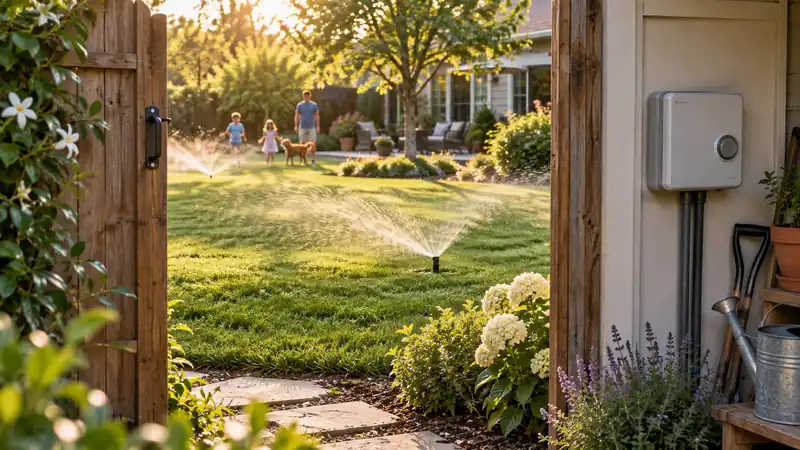
Best Sprinkler Controllers Without Subscription Fees should be judged by what keeps working after the first setup, not by the word “smart” on the box. Some controllers include their everyday app and schedule features without a monthly plan. Others reserve a few advanced reports, weather sources, or firmware capabilities for a paid tier. A separate purchase for a sensor or enclosure is another cost entirely. Keeping those categories apart makes it easier to compare long-term ownership rather than assume every connected feature is free forever.
This roundup includes nine controllers that suit different valve maps and maintenance habits. The strongest fee-conscious choices are the ones whose normal schedules remain useful without an ongoing charge, with a clear account of any optional upgrade. Two models below need extra checking because their current product information does not spell out every service condition. That uncertainty is part of the buying decision, not a detail to discover after installation.
Quick Answer
These four are the best starting points if recurring app or cloud fees are your main concern. Each has a different balance of local access, connected convenience, and optional upgrades.
- Rachio 3 8-Zone is the most straightforward app-first option, with no monthly app fee listed by its maker.
- Orbit B-hyve XR 8-Zone pairs a free app with eight-station capacity and outdoor-capable housing.
- Rain Bird ARC8 keeps programs in controller memory and provides direct buttons for basic operation.
- Hunter PRO-HC 12-Zone offers a free Hydrawise Home plan for typical use, while some advanced service features sit in a paid plan.
Subscription Cost Is Only One Part of Ownership
A controller advertised without a monthly charge can still require an app account, an internet connection, a compatible phone, or a separately purchased sensor. Those requirements do not automatically make it a poor value. They do change what “free” means. A useful comparison starts by separating recurring service from the one-time cost of hardware and from features that are optional.
Recurring plans
A recurring plan renews monthly or annually. It may add extra weather stations, longer histories, advanced alerts, or other capabilities beyond ordinary schedule control. If a feature matters to you, check whether it remains available on the lowest tier and how the provider describes cancellation or renewal. A no-fee base tier can be enough for a small yard, while a larger property may value the added monitoring and accept its cost.
One-time additions and package contents
A rain sensor, flow meter, outdoor enclosure, Wi-Fi module, or firmware upgrade can raise the initial outlay without creating a subscription. That distinction matters for long-term budgeting, but the item still needs to be counted. Check the exact model number and package photo. Product families often sell nearly identical station counts with different modules or enclosures, and a product title alone may not tell you which pieces arrive in the carton.
App access, accounts, and internet service
“No subscription” does not always mean “works without an account.” Several connected controllers rely on a phone app for setup or remote changes, even when they do not require a paid tier. A schedule saved in the controller may continue during an internet outage, but remote status, weather adjustments, and notifications can stop until the connection returns. Verify the offline behavior of the exact model, and keep a physical control route where that is important.
Weather intelligence is not a single feature
Rain delay, forecast skips, local station data, seasonal adjustment, and sensor-based watering are different tools. A basic rain delay can be manually set at no added service cost, while hyperlocal weather networks or long-term reports may be part of a premium plan. Ask which source drives an automatic adjustment and whether the controller still follows its saved schedule if weather services are unavailable.
How We Compared These Models
For this topic, station fit and ownership terms matter more than a long list of app features. We gave priority to controllers with usable ordinary schedules and looked for clear manufacturer information about ongoing charges. Where the maker describes a free tier plus optional paid services, the distinction is stated directly. If a maker does not clearly publish its current fee terms, the article flags that uncertainty instead of treating silence as proof that every feature is free.
- Core use: Can the controller run the zones and programs a typical homeowner needs without an ongoing service plan?
- Local fallback: Are manual starts, local buttons, stored schedules, or a direct connection available if the router or account is unavailable?
- Fee transparency: Does the manufacturer explain its free tier and identify paid features or upgrades?
- Installation match: Does the number of stations, cabinet style, power path, and sensor support suit the existing irrigation system?
- Maintenance burden: Will the person who manages the yard be able to test a valve and adjust a schedule without unnecessary account or network friction?
We did not treat “smart” as a synonym for better. A controller with a clear dial and a saved schedule can be the more sensible purchase if the homeowner rarely changes watering while away. Conversely, an app-centered unit may be worth choosing when remote pause and weather adjustments solve a real maintenance problem. The right balance depends on how the system is used, not on how many features appear in a menu.
Comparison at a Glance
| Controller | Stations | What the maker says about fees | Useful distinction |
|---|---|---|---|
| Rachio 3 | 8 | Maker lists no monthly app fee; Valve Monitoring is premium, so confirm its current access terms and price. | App-first setup and weather scheduling |
| Orbit B-hyve XR | 8 | B-hyve app is free to download and use. | Outdoor-capable controller with connected schedule tools |
| Rain Bird ARC8 | 8 | Controller and app manuals describe operation; confirm current app terms during setup. | Programs remain in nonvolatile memory and the face has direct controls |
| Hunter PRO-HC | 12 | Hydrawise Home is free for most users; Enthusiast adds paid features. | Room for a larger valve map and touchscreen access |
| Yardian Pro | 8 | Current firmware information lists a free essential upgrade and paid feature tiers. | Advanced local and sensor functions require careful tier review |
| Netro Spark | 8 or 16 | Maker advertises lifetime cloud service; confirm current terms for the exact model. | Touch controls and a backup program |
| RAINPOINT Smart | 8 | Current product information does not clearly state whether paid app tiers apply. | Rain-related app features; fee policy needs confirmation |
| Rain Bird ESP-TM2 with LNK | 6 | Verify the bundle contents and current app terms; the Wi-Fi module is hardware, not a recurring fee by itself. | Physical dial and display with connected access |
| Orbit B-hyve Smart | 6 | Maker describes a free app. | Waterproof panel and both app and local operation |
Plan details and package contents can change. Use the table to narrow your list, then confirm the current model number and terms before checkout. A retailer bundle may include a module that a standalone controller listing does not.
Choosing a Controller Without a Surprise Bill
Start with the station map
Count the active valve wires at the existing controller, then note any spare conductors or planned landscape zones. Six stations are enough for a compact property with a stable layout, but adding a drip bed, side yard, or vegetable garden can use the remaining capacity quickly. Buying extra stations is sensible only when there is a plausible expansion plan; unused capacity should not outweigh a better fit in control style or service terms.
List the features you would actually pay to keep
Before comparing plans, write down the one or two jobs that matter most. A homeowner might want an automatic rain skip, another might need longer reporting history, and a third might simply want a reliable manual run at the panel. If the desired feature appears only in a paid tier, decide whether it earns a recurring expense. If it does not, a simpler model may be preferable even when its specification sheet looks less impressive.
Check the fallback before relying on cloud features
Ask what happens to the saved program after a router outage, a service interruption, or a phone change. A controller that keeps its next watering event locally can carry on with the established schedule while remote features wait for connectivity. A model that needs an account for initial setup can still be a good choice, but the account and phone become part of the operating system. Record login recovery details privately and make sure another household member can take over routine irrigation if needed.
Read the exact package description
Some model names are shared across indoor, outdoor, and Wi-Fi-ready versions. A weather-resistant case may be standard on one SKU and sold separately on another. Likewise, “with Wi-Fi” can refer to a controller with built-in networking or a bundle that includes an accessory module. Match the station count and hardware in the item details to the wiring and mounting spot you already have.
Think in seasons, not setup day
The fee question is tied to how often you will revisit the controller. New sod, changing plantings, water restrictions, or a long absence can make weather and remote controls valuable. A settled landscape may call for one schedule adjustment each spring and a rain delay when storms pass. A feature that solves a once-a-year job might not warrant paying for a recurring plan, especially if the panel can perform the same task locally.
Installation Notes for Fee-Conscious Buyers
Take a clear photograph of the old terminal labels before disconnecting anything. Mark each station wire, the common terminal, and any sensor or pump-start connection. Station count alone does not prove wiring compatibility. Check the controller manual for the voltage and terminal requirements, and have a qualified irrigation or electrical professional assess wiring that is damaged, unfamiliar, or tied to a pump circuit.
Choose the permanent mounting location before pairing the app. A controller that reaches the router during setup may lose signal after it is mounted behind masonry or inside a metal cabinet. If the model offers a local panel, make sure it remains visible and reachable. If an enclosure or Wi-Fi module is sold separately, include it in the total purchase plan rather than discovering the omission at installation.
After wiring, run each zone briefly while standing where you can observe the heads or drip lines. Confirm that the named zone matches the physical area, that the valve closes, and that no adjacent zone starts unexpectedly. Keep the initial program conservative. The controller cannot repair poor sprinkler coverage, a leaking valve, clogged filters, or an incorrectly placed sensor.
For app-dependent units, complete a manual run and pause command from the panel or phone, then confirm what the schedule does when the internet connection is temporarily unavailable. Do not deliberately interrupt power during active irrigation. Use the manufacturer’s stated test procedure and restore the normal connection after checking the fallback behavior.
Who Benefits From Each Type?
An app-first controller fits a homeowner who routinely changes schedules from a phone, travels during watering season, or wants a quick way to skip a run after rain. A dial-and-display model suits someone who wants settings to remain understandable without opening an app. Larger station counts matter when separate landscape areas already have distinct valves, while expandable ecosystems are more valuable if new zones are genuinely planned.
For a strict zero-recurring-fee preference, focus on the base schedule and manual controls first. Treat premium weather services, extra reporting, and advanced automation as optional. Buyers who are comfortable with a limited free tier may still find a paid plan useful, but that is a choice to make with the actual feature list in front of them.
Rachio 3 8-Zone
Rachio’s clearest advantage for this roundup is that the manufacturer explicitly describes its app as having no monthly fees. The eight-zone version suits many established residential systems, and the app provides named zones, schedule editing, Quick Run, rain skips, and seasonal adjustment. That makes it a strong fit for someone who wants routine changes on a phone without turning basic watering into a recurring software expense.
There are still two different costs to keep in view. First, the Rachio 3 is primarily an app-connected controller, and the manufacturer says a mobile app is required to connect it to Wi-Fi. Second, some capabilities are labeled premium. Rachio identifies Valve Monitoring and Heat Wave Boost that way, while its product page does not state a one-time price for Valve Monitoring in the materials reviewed here. A homeowner who only needs schedules and ordinary weather adjustments can stay with the basic app experience; anyone relying on those extras should confirm the current access terms and price before comparing total cost.
The eight-zone ceiling is straightforward, but the housing affects placement. Rachio identifies the controller as an indoor product unless a separate weatherproof enclosure is added. Check the mounting location before choosing this version. A garage wall near the sprinkler wiring can be convenient, while an exposed side wall requires planning for the enclosure and a suitable power route.
Rachio’s schedules can respond to forecast and seasonal information, but automatic adjustments are still inputs to review rather than a substitute for inspecting the yard. A shaded bed and a sunny lawn may need different cycle patterns despite sharing the same forecast. Name each zone by its actual area, then compare the program with soil moisture and plant response during the first weeks.
Setup is easiest when the valve map is clear and the home Wi-Fi signal reaches the final mounting point. The controller is a sensible replacement for a homeowner who prefers remote adjustments and can accept an app-led operating style. If the person maintaining the system needs direct buttons during a service visit, one of the panel-based options below may feel more natural.

Pros
- The maker’s no-monthly-fee app policy keeps ordinary scheduling and remote adjustments outside a recurring service plan.
- Zone names and Quick Run make a valve-by-valve check easier to manage from the yard.
Cons
- Outdoor placement calls for a separate weatherproof enclosure, which adds hardware and mounting decisions.
- Valve Monitoring is marked premium, and its current access terms should be checked before relying on that diagnosis.
On a house where the controller can stay indoors, Rachio gives phone-first households a straightforward schedule manager with no monthly app fee. Routine changes sit within that baseline, while Valve Monitoring is labeled premium and deserves a separate price check. The 8-zone version is a neat fit for an established valve map; exposed mounting or a need for advanced diagnosis may point you toward another model.
To buy this product, click here.
Orbit B-hyve XR 8-Zone
For a yard with eight existing valves, the B-hyve XR offers room for a full station map while keeping the app free to download and use, according to Orbit. Its connected schedule and weather controls make it more useful than a bare timer for a homeowner who prefers phone-based adjustments. The fee appeal is simple: the routine app is not presented as a paid monthly service.
The XR also suits installations where the controller needs an indoor or outdoor position. That can make replacement planning easier than with a strictly indoor unit, although “outdoor capable” does not remove the need to follow the manual’s mounting and wiring guidance. Check for a proper power outlet, weather exposure, and adequate clearance before using an outdoor location.
One practical advantage of the B-hyve family is its program structure. Separate schedules can help keep turf and drip areas from being treated as if they had identical needs. During setup, resist the urge to enable every automatic option at once. First make sure each station name points to the right valve and that the run times match the actual coverage. Then add weather-related adjustments in a way that remains easy to audit.
Free app access does not answer every ownership question. A phone account, router, and cloud connection may still be involved in setup and remote changes, and the exact behavior of the XR during an outage should be checked in the current manual. If offline continuity is crucial, verify that the saved program remains active and identify how to pause it locally before relying on automatic operation.
Eight stations can leave outputs unused on a compact property. That spare room is worthwhile when a drip bed or side yard is actually planned, but it should not outweigh a better match in control style. A settled six-zone layout with no expansion on the horizon is better served by the standard B-hyve model later in this list.

Pros
- A free B-hyve app gives an eight-zone homeowner a connected schedule interface without a monthly app bill.
- Indoor or outdoor mounting flexibility helps the controller fit more existing utility-room and exterior layouts.
Cons
- Remote features still depend on a working account and network, so the local outage behavior deserves a pre-purchase check.
- Eight stations can leave capacity unused on a small, settled system with no realistic expansion plan.
Eight wired zones and a suitable exterior mounting point make the XR practical when a six-station panel would be tight. Its free app avoids a monthly app charge for connected scheduling, although remote control still needs a working account and network. If you need predictable watering through an outage, check the current manual’s saved-program behavior before choosing it over a local-first controller.
To buy this product, click here.
Rain Bird ARC8
The ARC8 is an appealing choice for buyers who want the schedule to live in the controller rather than exist only as a cloud setting. Rain Bird’s manual says programs are stored in nonvolatile memory, and the controller face includes automatic, off, manual, and next-zone controls. That local foundation can make ordinary seasonal care easier to understand, while the app remains useful for editing and connected features.
Capacity is eight zones, with up to three programs and multiple start times per program. That arrangement can help separate a weekly drip circuit from a lawn schedule, or divide sunny and shaded areas that dry at different rates. Multiple start times should be planned carefully: a start time applies to the program, and the zones in that program run in sequence. Keeping a written zone map prevents overlapping programs from becoming confusing.
Rain Bird’s documentation describes a Wi-Fi setup and weather-related controls, along with manual runs and rain delay. The manual also notes that some settings depend on Wi-Fi and that timekeeping after a power interruption can follow different paths depending on the setup mode. Those details are worth reading before installation if a dependable offline schedule is the main reason you are considering this model.
The ARC8 makes particular sense as a replacement where Rain Bird terminals and eight-zone capacity match the old installation. Photograph the wiring and check whether the existing enclosure and transformer arrangement remain suitable. A familiar brand can shorten the learning curve, but it does not replace checking terminal compatibility or the app’s current terms.
This is a more balanced option for a homeowner who wants app access without giving up a useful controller face. Its interface is not a large touchscreen, so programming a complex layout may take more attention than using a polished app. The tradeoff may be welcome if local manual control and stored programs matter more than a sleek display.

Pros
- Programs stored in nonvolatile memory help preserve the watering plan through a power interruption.
- Direct manual and off controls let a homeowner test or pause irrigation at the controller face.
Cons
- Rain Bird documents different time and connectivity behavior by setup mode, so the outage procedure deserves a careful read.
- Three program slots require thoughtful grouping when lawn, beds, and drip zones follow different schedules.
Picture the moment a router is being reset: the ARC8 still has programs stored in controller memory and direct controls on its face. That local footing is its strongest argument, particularly for a Rain Bird replacement where eight stations fit. App terms and timekeeping vary with setup details, so read those instructions before relying on it as a fully independent backup.
To buy this product, click here.
Hunter PRO-HC 12-Zone
Hunter’s PRO-HC 12-zone model makes the most sense on a property with more than a handful of independently watered areas. Twelve stations give a homeowner room to separate lawn, foundation beds, side yard, trees, and drip circuits without compressing them into a few mismatched programs. The controller’s touchscreen is useful here because the valve map may have enough detail to make a local display worthwhile.
The subscription question has a relatively clear answer, but it is not simply “everything is free.” Hydrawise lists a Home plan that is free for most users. The Enthusiast plan adds capabilities such as more weather stations, longer reporting history, additional users, and text alerts. Many homeowners may not need those extras. Someone managing several properties or wanting hyperlocal weather and expanded records should compare the paid tier before choosing the controller.
That distinction makes PRO-HC a good example of separating the hardware from the service tier. The controller can provide core connected irrigation under the Home plan, while advanced cloud features may change the value calculation. Confirm the latest feature table for your region and household. Keep the decision tied to the exact alert, data history, or weather source you expect to use, rather than upgrading because a plan name sounds more complete.
Before installation, verify that the 12-station capacity is justified and that the cabinet fits the mounting area. Hunter’s models have options with different station counts and enclosures, so match the product number to the planned location. The touchscreen and network features also mean a little more setup than a traditional dial timer. Label the stations and test every valve before building out weather-based schedules.
Flow, sensor, and pump-related features can be relevant to a large system, but compatibility depends on the actual accessories and wiring. Check the controller manual before assuming a sensor input can solve a particular irrigation problem. A controller can alert you to information from connected equipment; it cannot diagnose every broken head or blocked line by itself.

Pros
- Twelve stations let a larger property keep distinct planting areas on schedules that reflect their separate water needs.
- The free Hydrawise Home plan gives most homeowners connected control without requiring the paid Enthusiast features.
Cons
- Longer history, added users, SMS alerts, and broader hyperlocal weather access are associated with the paid Enthusiast tier.
- A touchscreen and detailed cloud setup may feel excessive for a small yard with a stable, simple schedule.
A 12-valve property can put the PRO-HC’s extra capacity to work, especially when turf, trees, and drip beds need separate schedules. Hydrawise Home covers core connected use for most users; Enthusiast is easier to justify when longer history, more logins, or text alerts solve a real maintenance need. If those extras are essential but a paid plan is not, compare local-control alternatives before settling on the Hunter.
To buy this product, click here.
Yardian Pro
Yardian Pro belongs in a fee-conscious comparison with a qualification: its current firmware information separates a free essential upgrade from paid feature tiers. That may still suit an owner who wants a modest local setup, but it is not a safe choice for someone who assumes every advertised automation feature comes with the controller at no extra cost. Read the current tier matrix against the functions you actually want before committing.
The device is aimed at homeowners who value more than one connection path. Yardian’s support material describes Wi-Fi and Ethernet, along with local buttons and sensor connections. A wired Ethernet path can be useful when wireless coverage near the controller is weak, provided the installation can bring a cable to that location. The physical buttons also make a basic manual task less dependent on opening an app.
The bigger issue is feature entitlement. The manufacturer’s current standalone-firmware page describes a free essential level, a paid multi-zone upgrade, and a higher-priced multifunctional tier for sensor-driven automation. The feature table and availability can change, so do not treat old reviews as proof of what an item includes today. Check whether the exact package and hardware revision support the firmware you want, what the upgrade costs, and whether the payment renews or is one-time.
That nuance changes the recommendation. For a buyer satisfied with the free essentials and a simple schedule, Yardian may still be considered. For someone seeking advanced automation without additional charges, it is a poor blind purchase until the manufacturer confirms those functions are included. This is the most important caveat in this product section, and it should be resolved before installation rather than after wires are already moved.
Also check the mounting environment and the installation path. If it will be placed outdoors, use the enclosure and protection specified for the exact model. If the feature you are buying it for depends on a sensor, confirm the sensor type and connection method. A strong network story is useful only when the desired automation tier is both compatible and affordable under the terms you accept.

Pros
- Ethernet as well as Wi-Fi gives a property with difficult wireless coverage another route to a connected controller.
- Local buttons provide a direct way to handle basic control without depending on a phone for every task.
Cons
- Current firmware tiers place some advanced multi-zone and sensor automation behind paid upgrades.
- Buyers need written confirmation of the exact included features and renewal terms before treating it as a no-fee system.
Ethernet can matter more than a long feature list when the controller sits beyond reliable Wi-Fi. Yardian’s cable option and local buttons suit that installation, but the current firmware tiers complicate a strict no-fee brief. Check the exact firmware level, included functions, and payment terms before selecting the Pro; without that confirmation, a controller with a clearer free-tier boundary is the safer choice.
To buy this product, click here.
Netro Spark
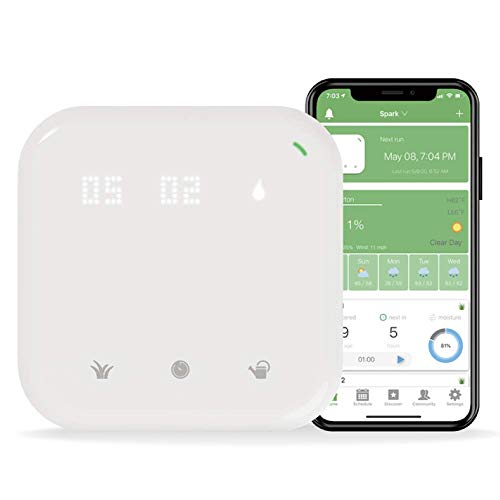
Netro Spark takes a different route from a conventional dial controller. The product page describes touch control, an LED display, a backup program, and cloud-based scheduling, with an eight- or sixteen-zone choice. Netro also advertises lifetime cloud service. For a buyer who wants connected features but dislikes recurring service plans, that public promise makes Spark worth a look.
The eight-zone configuration is the closer match for a typical replacement. The sixteen-zone version may suit a larger property, but confirm the specific item being considered because a shared product family can mix capacities. A touchscreen-style interface can make status and manual interaction easier to see than a phone-only design, especially during a first visit to the controller. It still uses Wi-Fi for cloud features, so check signal and account setup before mounting.
Netro’s plant-aware scheduling should be treated as a starting point, not a final irrigation diagnosis. A forecast does not know that a particular rotor head is clogged or that a new tree sits under a deep roof overhang. Enter accurate zone and plant information, then watch how water reaches each area. The advertised valve-diagnosis function is marked beta on the product page, so buyers should not depend on it as a guaranteed fault detector.
The phrase “lifetime cloud service” is a useful published distinction, but it is not a substitute for reviewing current terms, privacy settings, and the exact model’s support policy. Check what remains available if an account is changed or the internet is down. Netro lists a backup program, which may help with continuity, but a homeowner should confirm the behavior for the exact Spark model in its manual.
This controller is most compelling for a homeowner who wants a connected garden schedule and appreciates a touch interface. It is less suited to a strict local-only setup or to someone who expects a beta diagnostic tool to replace routine inspection. On a mixed landscape, its station flexibility can be useful if the zones are named and programmed with care.
Pros
- The maker’s lifetime-cloud-service claim offers a clear fee-conscious alternative to plans that renew each month.
- Touch controls and an LED display give the person near the panel a visible status and direct interaction point.
Cons
- Valve diagnosis is identified as beta, so it should not be counted on as a mature monitoring safeguard.
- Cloud scheduling still makes account and internet terms relevant even without an advertised recurring fee.
Touch controls, a visible status display, and Netro’s advertised lifetime cloud service give Spark a different feel from phone-only controllers. The cloud claim still belongs beside the current account and support terms, and valve diagnosis remains marked beta. It suits someone who values panel access and accepts those boundaries; proven fault alerts or local-only operation call for another pick.
To buy this product, click here.
RAINPOINT Smart 8-Zone
RAINPOINT’s eight-zone smart controller advertises app scheduling, weather intelligence, rain skips, and compatibility with a rain sensor. Its product description also says the saved schedule continues during a Wi-Fi interruption, which is a practical feature for a home where the router occasionally drops out. That combination may appeal to someone replacing a basic eight-station timer with a connected unit.
The fee policy is the point to verify before buying. The current product information explains app features but does not clearly set out whether all of them remain available without a paid account tier. That does not prove a subscription exists, and it does not prove none exists. If avoiding recurring charges is non-negotiable, ask the maker whether core schedules, weather intelligence, and remote control require any ongoing payment, then keep the answer with the model number you plan to purchase.
Wi-Fi compatibility also deserves a practical check. This model uses a 2.4 GHz connection, so confirm that the router’s band and password setup are available at the controller location. A strong phone signal in the kitchen does not guarantee the same coverage in a utility room or exterior enclosure. Pairing after the unit is mounted can reveal a weak spot before the system is ready for automatic schedules.
Rain skips can reduce unnecessary watering, but they are most useful when the yard’s own conditions are understood. A forecasted shower may miss one side of a property, while a shaded bed may remain damp after a sunny lawn dries. Add the sensor only if its type and wiring suit the installation, and do not assume the feature is included in the controller package.
Because the service terms are less transparent than those of several alternatives, this is not my first recommendation for a buyer whose only criterion is a verified no-fee ownership path. It remains a candidate for someone who likes its connected feature set and can confirm the account terms directly before ordering.

Pros
- The saved-schedule behavior described for a Wi-Fi interruption helps keep the irrigation plan from depending on constant router access.
- Rain skips and a compatible sensor give a homeowner more than one way to pause watering after wet weather.
Cons
- The current product details do not clearly state whether advanced app features carry an ongoing fee, so confirm the policy before purchase.
- Its 2.4 GHz requirement can complicate setup where the controller is outside the router’s reliable coverage.
An eight-valve layout could make RAINPOINT’s saved-schedule and rain-skip features useful, provided the controller’s service terms match your expectations. Its public product information still does not settle whether every app function remains free. Get that answer for the exact model before ordering; if the policy cannot be confirmed, the documented fee terms of another controller make for a lower-risk purchase.
To buy this product, click here.
Rain Bird ESP-TM2 with LNK, 6-Station
The ESP-TM2 is the more traditional option in this group: six stations, a dial, a display, and a connected path through the LNK module included with this bundle. The key ownership distinction is that the module is hardware. Its price belongs in the initial package cost, while a recurring fee would be a separate service question. Confirm what this exact bundle contains so you do not pay twice for connectivity.
The physical controls are helpful when a phone is not handy or when someone else needs to start a short test run. A dial-driven interface also gives the homeowner a visible map of how the controller is organized. For a compact property with a stable six-zone layout, that can be a less fussy way to manage watering than an app-first system with a larger cloud feature set.
Adding the LNK path can bring schedule access into the app, but the controller remains a model with a local programming structure. That hybrid setup suits a homeowner who wants remote convenience while retaining an interface at the panel. Before purchase, check that the listed LNK package matches your phone and the controller revision, and confirm any current app-account requirements.
The six-station limit is important. If all six outputs are already used and a landscape expansion is planned, another model with spare capacity may avoid an early replacement. If two stations are unused and unlikely to be needed, a larger unit can add cost without improving the current watering plan. Station count should be based on the valve map, not on a general preference for more numbers.
Sensor and pump connections should be checked against the ESP-TM2 manual and the actual wiring. The presence of a Wi-Fi module does not guarantee every accessory is included, and a connected schedule is not the same thing as flow monitoring. Keep a printed photo of the original terminals and verify the bundle before mounting.

Pros
- The dial and display preserve a visible local setup for homeowners who do not want every adjustment to start in an app.
- The included LNK hardware gives a six-zone replacement an app route without treating the module itself as a renewal fee.
Cons
- The six-station ceiling can become restrictive if a new drip or planting zone is likely soon.
- Bundle contents and app-account requirements should be confirmed because the Wi-Fi path depends on the LNK version supplied.
A stable six-zone system is where the TM2/LNK bundle makes the most sense: the dial remains available at the panel, and app access can handle occasional changes from elsewhere. Verify that the listing includes the intended LNK module and check the app’s current terms. A full valve map with a planned addition is reason enough to move to a higher-capacity controller now.
To buy this product, click here.
Orbit B-hyve Smart 6-Zone
For a six-zone system, the standard B-hyve Smart controller has a tangible advantage over phone-only designs: Orbit describes a waterproof wall-mounted panel alongside the free smartphone app. The two routes suit a household where one person prefers the app and another wants to see the controls at the equipment. The current model also supports Wi-Fi and Bluetooth, so setup and day-to-day access are not limited to a single connection method.
That local panel can make the first few weeks easier. A homeowner can run one zone, observe the sprinkler heads, then return to the controller to advance or stop the test. After the schedule is stable, remote adjustments become more useful for rain delays or travel. This simple division of labor can be more practical than buying a feature-rich controller whose only benefit is an app dashboard.
Six stations will suit a smaller property that has a fixed lawn, front bed, and a few side or rear zones. It is less forgiving if the valve map is close to full. Count wires before ordering and check whether the installation includes a master valve, pump relay, or rain sensor that needs a compatible terminal. The family supports a range of standard irrigation connections, but the exact configuration should be confirmed against the manual.
The B-hyve app is listed as free, which helps keep ordinary connected use outside a monthly subscription. Account creation may still be required, and remote access still relies on the home network. If the router goes out, the homeowner should know whether and how the saved schedule continues for this specific unit. A physical panel reduces some dependence on a phone but does not make every network feature local.
There is a real tradeoff between accessible controls and expansion. A 6-zone unit can be a smart cost-saving replacement when the existing valves match. It is a poor fit for a growing landscape if new zones are likely within a season or two. Spending a little more on capacity is justified only when it avoids a plausible second project, not as a hedge against every hypothetical change.

Pros
- A free app paired with a waterproof physical panel gives a small-system owner two convenient ways to manage routine watering.
- Wi-Fi and Bluetooth support make initial pairing and later remote access more flexible than a Wi-Fi-only setup.
Cons
- Six stations leave little room for a new drip circuit or landscape addition on a fully occupied valve map.
- Remote app functions still rely on an account and internet connection; local panel controls remain available for direct tasks.
On a compact property with a stable six-valve map, the B-hyve Smart pairs app access with a waterproof local panel another household member can use. Orbit describes its app as free, though an account and internet connection still matter for remote features. That mix is strongest when direct hand control has real value; a growing garden or strict offline requirement argues for a different controller.
To buy this product, click here.
Questions Buyers Ask
Can a sprinkler controller work without paying a monthly fee?
Yes. Several models in this guide describe free app or basic cloud access, while a few reserve extra weather, history, or automation functions for optional tiers. Check the exact feature you need instead of assuming every connected feature uses the same billing policy.
Does no subscription mean I can skip creating an account?
No. A free app can still require an account for setup, device sharing, or remote control. If you prefer not to create an account, prioritize a controller with direct panel programming and verify which tasks remain available locally.
Will a saved watering schedule run if Wi-Fi stops working?
That depends on the model and how it is configured. Some manuals say schedules are stored in the controller; other features, including remote commands and weather updates, may need internet access. Confirm the outage behavior in the product manual before relying on it through an extended service interruption.
Are weather-based schedules always free?
No. A basic rain delay, forecast skip, sensor input, and premium hyperlocal forecast are different services. Compare the plan table and see whether the specific weather source you want is part of the base level.
Is a paid one-time upgrade the same as a subscription?
No, but it still affects the initial cost and may be tied to one device or firmware version. Confirm the payment type, renewal policy, and transfer rules before buying an add-on. Yardian’s current tier information is a good reason to review the exact terms rather than infer them from older product discussions.
Should I choose more zones than I currently use?
Choose extra capacity when a real expansion is likely, such as a planned drip bed or a new side-yard circuit. Otherwise, a station count that closely matches your valve map may be easier to install and less expensive. Keep one or two spare conductors in the wiring plan where possible, but do not pay for capacity with no likely use.
Which controller is the safest pick if fee terms are my top concern?
Rachio states that its app has no monthly fees, Orbit describes the B-hyve app as free, and Hydrawise identifies a free Home plan for most users. The best one among them still depends on station count, physical controls, and mounting conditions. Review optional feature limits before relying on a particular weather or monitoring function.
Final Recommendation
For an easy-to-understand no-monthly-app-fee setup, start with the Rachio 3 if indoor placement works, the B-hyve XR if you need eight stations and an outdoor-capable unit, or the Rain Bird ARC8 if local buttons and stored programs matter. The Hunter PRO-HC earns a place for a larger valve map when Hydrawise Home covers your needs. Treat Yardian and RAINPOINT as verify-first candidates because their current public information leaves meaningful fee details to confirm.
Before ordering, match the station count, wiring, enclosure, network location, and service tier to your actual system. A carefully chosen base plan can keep recurring costs at zero without giving up a reliable watering routine, and it is easier to maintain when every zone and fallback control is understood.

- Ryan
Ryan Mitchell covers sprinkler controllers, smart irrigation, and watering technology at Best Sprinkler Controllers, with a focus on clear comparisons, practical features, and helping homeowners choose the right setup for their yard.
- Best Sprinkler Controllers Without Subscription Fees November 20, 2026
- Sprinkler Controller Has No Power: What to Check First November 18, 2026
- Best Local-Control Sprinkler Controllers: 9 Cloud-Light Picks November 16, 2026
- Best Smart Sprinkler Controllers With Physical Controls November 14, 2026
- Best Battery-Powered Sprinkler Controllers: 9 Picks in 2026 November 10, 2026