
Best Smart Sprinkler Controllers With Physical Controls
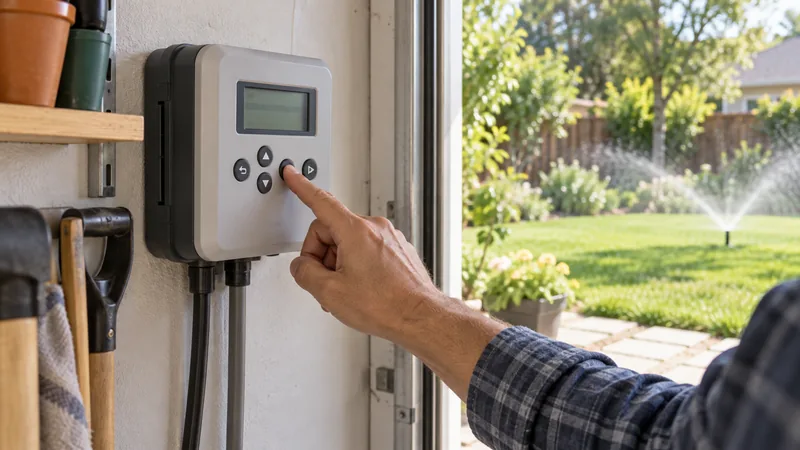
Best smart sprinkler controllers with physical controls give a homeowner two useful service paths: connected scheduling for routine changes and a panel, dial, button, or screen that remains available beside the wiring. That matters during a valve test, a router outage, a handoff to another person, or a quick adjustment before leaving home. The term “physical controls” covers very different interfaces, though. Some controllers can create a complete schedule at the unit; others provide only start, stop, and station-advance buttons while detailed programming stays in an app.
This guide separates those experiences instead of treating every screen or button as equivalent. Seven choices pair a smart control path with some direct operation, while two conventional timers are included as clearly labeled local-control alternatives for readers who decide they would rather keep irrigation off the network. Match the station count, mounting location, electrical setup, and offline behavior to the valves already on the property before comparing app features.
Quick Answer
For the most complete combination of smart scheduling and visible programming, compare the Rain Bird TRU8IW and the Hunter PRO-HC. Choose the TRU8O or ESP-TM2 if physical controls and a planned Wi-Fi add-on suit the installation. If your priority is direct dial-based operation with no connected setup, the final two products are conventional alternatives, not smart controllers.
- Rain Bird TRU8IW suits an eight-station indoor installation where an included Wi-Fi module and a programming dial belong together.
- Hunter PRO-HC 12-Zone is the stronger fit for a larger valve map, touchscreen programming, and sensor or flow-monitoring plans.
- Rain Bird TRU8O puts eight stations in an indoor/outdoor cabinet, with connected access available through a separately sold module.
- Rain Bird SST600IN is a local-only alternative for six zones when a simple dial and zone-by-zone setup matter more than app control.
Read the panel descriptions carefully. A manual-run button is useful, but it does not mean you can build or edit a full program without the app.
Comparison at a Glance
| Controller | Stations | Local operation | Connected path | Placement / buying check |
|---|---|---|---|---|
| Rain Bird TRU8IW | 8 | Dial, display, manual watering | Wi-Fi module included with this model | Indoor only; confirm the wall and outlet |
| Rain Bird TRU8O | 8 | Dial, display, manual watering | LNK2 module sold separately | Indoor/outdoor cabinet; check module bundle |
| Rain Bird ESP-TM2 with LNK, 6-Station | 6 | Dial and screen for programming and tests | Bundle listing identifies LNK Wi-Fi | Verify the exact package includes the module |
| Rain Bird ESP-TM2 8-Station | 8 | Dial and screen | Optional LNK2 upgrade | Do not assume Wi-Fi hardware is in the box |
| Hunter PRO-HC 12-Zone | 12 | Full-color touchscreen and local station control | Built-in Wi-Fi and Hydrawise | Indoor/outdoor version, sensor and flow needs |
| Orbit B-hyve XR 8-Zone | 8 | Local panel controls for basic operation | App and Wi-Fi | Test signal at the final mounting point |
| Rain Bird ARC8 | 8 | Manual run, stop, and zone advance | Rain Bird app and built-in Wi-Fi | Local buttons do not replace full app setup |
| Rain Bird SST600IN | 6 | Dial, screen, zone-by-zone schedule | None | Indoor only; traditional timer alternative |
| Orbit Easy-Set Logic 6-Station | 6 | Dial, display, manual watering | None | Traditional 24 VAC timer; confirm exact SKU |
“Local control” is not one standardized feature. Before purchase, confirm whether the front panel can edit start times and watering days, or whether it is limited to basic operation once the schedule has been created in an app. The difference is central to this roundup.
What Physical Controls Actually Let You Do
Full schedule editing versus a manual run
A dial-and-display controller can expose settings such as run days, start times, duration, seasonal adjustment, and manual watering at the unit. A touchscreen can make those choices easier to read, but the word “touchscreen” alone says little about what works without a network. At the other end, a few buttons may start the automatic program, pause watering, or advance to the next station while every detailed schedule change remains in the app.
That distinction affects the owner who keeps the controller in a garage or utility area and expects a family member, landscaper, or future homeowner to understand it. A visible interface can shorten a service visit, yet a panel with limited functions will not provide complete independence if account access is lost. Check the manual for the exact unit and model revision rather than relying on a product-family description.
Before comparing models, write down the tasks that must remain possible at the cabinet: changing watering days, adjusting a run time, starting one zone, stopping an active cycle, and checking the clock after an outage. Those are separate capabilities. A stored schedule may continue while Wi-Fi is unavailable even when a new start time cannot be entered locally. Ask the manual a task-by-task question rather than relying on a broad claim such as “manual operation.”
Think about who may need to use the controller six months from now. A clear zone label and a short note showing which station serves each area can make an on-site adjustment safer than relying on memory. This is especially useful when the person checking a valve is not the person who originally programmed the system.
Smart features still depend on the irrigation system
Connected weather adjustment can change scheduled runtimes based on local conditions, but it does not inspect the actual lawn. It cannot tell whether a head is blocked, a valve is stuck, a drip filter is clogged, or a new tree has different root needs from the turf beside it. Use automatic adjustments as one input, then inspect soil and coverage after schedule changes.
Sensor support also varies. A terminal for a rain sensor is not the same thing as forecast-based adjustment. A flow meter can report unusual use only when the controller supports the compatible meter and the plumbing is arranged for it. Before paying for a connected feature, identify the sensor, accessory, wiring, and setup steps it requires.
Count valves, not landscape labels
One station energizes one valve circuit at a time. “Front yard,” “garden,” or “drip” can each describe multiple valves, but those labels do not add outputs. Walk the existing system and list the wires or valves that need independent schedules. A six-station timer cannot independently manage eight valves unless the system is changed, and an unused station has little value unless it supports a real expansion plan.
Also note whether the current controller has a master valve, pump-start relay, rain sensor, or flow meter connected. Photograph the terminal layout before removing an old panel. A new controller with the same station count may arrange accessories differently, so verify wiring diagrams before moving wires.
Access around the cabinet matters more than it first appears. If the controller sits behind stored tools or above a workbench, a readable screen and reachable dial can speed up a test, while a large touchscreen may need enough clearance to open and operate comfortably. Measure the mounting height and check the door swing along with the controller dimensions. A panel that is technically available but awkward to reach is unlikely to become the convenient offline control you expect.
How We Evaluated the Picks
This list is organized around control at the unit, not a claim that every physical interface offers the same independence. The main factors are whether the product is genuinely smart, what tasks remain available at the controller, the number and type of stations, the intended enclosure, and the work needed to activate remote access. For the two local-only models, the article labels them as alternatives instead of passing them off as smart devices.
Panel usefulness during service
Starting a short manual run, stopping a zone, and seeing which station is active are practical tasks during installation. Full local schedule editing has a different value, particularly if the property is maintained by someone who may not have the app login. The profiles below distinguish these capabilities instead of awarding the same credit for every button.
Connection costs and setup obligations
Some products include connected hardware; others require a module. A listing can describe a bundle whose contents vary by seller or revision, so check the box contents before treating a Wi-Fi accessory as included. A controller that works locally without an app can remain useful, but it should not be described as remotely adjustable unless that path is present and configured.
Installation fit before feature count
Indoor-only, indoor/outdoor, and outdoor cabinets are not interchangeable labels. Check the model number, power supply, enclosure, conduit or cord path, and weather exposure. For a replacement, a matching station count is not enough if the new controller cannot be installed at the old location or lacks a terminal required by the system.
Product Reviews
Rain Bird TRU8IW: Best Eight-Station Indoor Smart Controller with a Dial
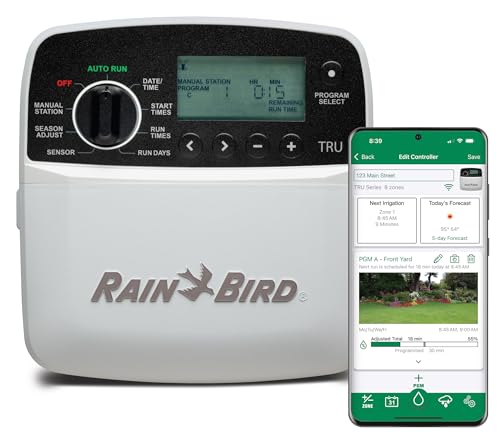
Rain Bird gives the TRU8IW an unusual middle ground: this eight-station indoor controller can be programmed at its dial, and the Wi-Fi module comes with this version. That makes the physical panel a genuine part of the product rather than a temporary setup aid for an app-led timer.
Three programs with four start times each leave room for separate routines across turf, shrubs, and drip circuits. A manual run can help identify a valve during a service visit, while the supported rain sensor and master-valve or pump-start connections cover common residential wiring layouts. The controller still needs a clear zone map; its display cannot identify an unlabeled wire.
Rain Bird lists nonvolatile schedule memory and an internal battery that maintains time and date through a power interruption. A network outage removes the remote route, but local programming and the stored schedule remain the useful distinction. Someone at the cabinet can see what the timer is set to without relying on account access.
Location is the firm limit. TRU8IW is indoor-only, so plan for a protected garage or utility wall, suitable power, wire access, and a stable signal where the module will operate. An exposed mounting point calls for the TRU8O or another appropriately rated enclosure.
Pros
- Eight independently scheduled stations give a medium-size yard room to separate turf, planting beds, and drip lines.
- The dial and display keep basic programming and a manual zone test accessible at the indoor cabinet.
Cons
- Indoor-only placement rules it out for an exposed outdoor controller location without a protected mounting area.
- Remote access depends on a working network and the included module being present in the delivered package.
When the controller will be indoors and the household has a reason to use both the dial and app, TRU8IW brings those paths together in one package. Its eight-station ceiling and indoor-only case are easy checks against the valve map and mounting spot. A larger or exposed installation points elsewhere in the lineup.
To buy this product, click here.
Rain Bird TRU8O: Best for an Outdoor Eight-Station Installation
The TRU8O earns its place before the Wi-Fi question comes up: it is the eight-station member of this family rated for indoor or outdoor mounting. The dial and multifunction display keep schedule entry and manual watering at the unit, which is useful when the person testing a valve is standing beside the wires.
Rain Bird specifies three programs and four start times per program, with support for a rain or rain-freeze sensor and a master valve or pump-start relay. Those features are enough to organize a varied home landscape, provided each station maps to an actual valve that needs its own timing.
Connected use requires the compatible LNK2 module, sold separately unless a bundle explicitly includes it. The module uses 2.4 GHz Wi-Fi, so the added cost and signal at the permanent location belong in the decision. The controller remains a conventional dial-driven timer without it.

Pros
- The indoor/outdoor cabinet lets a homeowner place an eight-station controller near the wiring instead of reserving an indoor wall.
- On-unit schedule controls remain useful for setup and service even before a Wi-Fi module is added.
Cons
- Remote adjustments require the separate LNK2 module unless the exact package explicitly includes it.
- Eight fixed stations leave no direct capacity for a larger valve map without changing controller models.
For a replacement that must sit in an exposed service area, the TRU8O solves the enclosure question while retaining full programming at the cabinet. Remote access is available if the LNK2 purchase is worthwhile, but it is not built into the basic unit. Confirm both the mounting rating and module contents before treating it as a connected package.
To buy this product, click here.
Rain Bird ESP-TM2 with LNK, 6-Station: Best Six-Zone Upgrade Bundle
The detail to settle first is whether the six-station package actually includes the LNK module. Rain Bird sells ESP-TM2 controllers with the module as an upgrade, and the linked bundle is being considered here for its combination of local programming and app access. Match the box contents to that expectation before installation.
At the wall, the TM2 uses a dial and backlit screen for schedule entry. Its three programs and four start times per program can keep a lawn routine apart from a bed or drip schedule, and manual watering gives an installer a direct way to check a valve. Six outputs are appropriate only if six independent circuits cover the present plan.
The connected path brings remote operation through the Rain Bird app, but LNK2 requires a 2.4 GHz network. Test signal beside the mounted timer and verify the package’s exact controller voltage and enclosure. If a future seventh valve is likely, the six-station limit should carry more weight than the convenience of this bundle.
Once powered, program and test each station at the cabinet before depending on automated schedules. A named valve map makes later adjustments easier for anyone who maintains the property, including a person who never uses the app.

Pros
- Six stations suit a settled six-valve layout without adding two unused outputs to a smaller replacement project.
- The local dial and screen make it possible to review a schedule or test a zone at the cabinet.
Cons
- The included LNK module must be verified for the exact bundle because the standard controller can be sold without it.
- A six-valve system that later expands will need another controller or a different station-capacity model.
A settled six-valve system with a real need for remote schedule changes is the natural audience for this bundle. It keeps the dial-based setup familiar and adds a connected route, provided the LNK accessory is in the box and the network reaches the controller. Skip the bundle if either condition is uncertain.
To buy this product, click here.
Rain Bird ESP-TM2 8-Station: Best Traditional Panel with a Wi-Fi Upgrade Path
Local programming is the ESP-TM2 8-Station’s default strength. A dial and display handle the schedule without a network, and the fixed eight outputs can give separate lawn, bed, and drip valves their own routines when the plumbing supports that division.
Rain Bird’s family documentation lists three programs and four start times per program. The programs organize schedules, while the physical station count still limits how many valve circuits can be controlled independently. A station left unused is no problem; a ninth valve is.
Indoor/outdoor variants exist across the ESP-TM2 line, so check the exact eight-station model, power cord, and enclosure for the intended site. LNK2 is also a separate decision. The module provides an app route over 2.4 GHz Wi-Fi, but buying the base controller does not mean remote control is ready.

Pros
- The eight-zone layout and three-program structure let a homeowner keep unlike watering areas on separate routines.
- Local schedule entry works without a network, while the optional module leaves a documented connected upgrade path.
Cons
- Wi-Fi control is not ready out of the box unless the compatible module is purchased separately or included in a bundle.
- Eight fixed stations can be restrictive if the valve map already exceeds that count or is likely to grow.
Choose the eight-station TM2 for the panel and capacity, then add LNK2 only if remote access has a clear job. That order keeps the purchase grounded in the valve map instead of a feature bundle. The base schedule remains manageable at the cabinet.
To buy this product, click here.
Hunter PRO-HC 12-Zone: Best Touchscreen Choice for a Larger Valve Map
Hunter’s clearest distinction here is offline programming at the touchscreen. The PRO-HC 12-Zone can be programmed with or without Wi-Fi, and its full-color screen also supports manual station starts. That gives a service person more to work with at the enclosure than a controller whose local buttons only start or stop watering.
Twelve fixed outputs suit a property with several independent turf, tree, bed, and drip circuits. The PRO-HC has built-in Wi-Fi for Hydrawise and supports six standard programs with multiple start times. Hydrawise adds remote management and forecast-based adjustment, while local scheduling remains available if connectivity is down.
The two sensor inputs can accept compatible sensors or an HC flow meter, but those accessories are additional hardware. A flow meter can support usage tracking and alerts; it does not arrive by implication just because the controller has terminals. Confirm the sensor type and plumbing plan before assigning value to the monitoring features.
The U.S. 12-station unit uses an indoor/outdoor wall cabinet and a 120-volt power lead. Its Wi-Fi specification is 2.4 GHz, so check the router setup at the final location. On a compact yard, the display and sensor capacity may add setup work without solving a day-to-day problem.

Pros
- The touchscreen can handle setup and station tests at the cabinet, which helps when a larger system is being serviced zone by zone.
- Twelve stations and supported sensor or flow accessories give a complex landscape room to separate circuits and monitor operation.
Cons
- The Hydrawise setup and sensor choices add configuration work that a small, stable irrigation system may never need.
- Confirm the precise 12-station enclosure variant before buying because placement requirements differ across versions.
When a larger valve map and on-unit programming both matter, the PRO-HC offers an unusually capable panel for a connected model. It can also be used without Wi-Fi, a practical distinction for service work or network interruptions. The case weakens if twelve stations and optional monitoring hardware would sit mostly idle.
To buy this product, click here.
Orbit B-hyve XR 8-Zone: Best App-and-Panel Option for an Eight-Zone Yard
Orbit built the B-hyve XR around visibility: three color displays and a light ring show weather and watering status by zone. The unit also has a physical control for manual watering, so a quick valve check does not require recreating the whole task in the app.
The XR 57985 is the eight-station version, with four program slots and multiple start times for cycle-and-soak scheduling. Orbit supports both 2.4 and 5 GHz Wi-Fi, a useful detail for homes whose router broadcasts the two bands separately. Its connected weather adjustments and history are app features, not functions of the light ring.
For an installation with pump-start wiring or a rain/freeze sensor, check the terminal plan and match it to the controller diagram. Orbit rates the XR for indoor or outdoor mounting, and the controller supports 24 VAC sprinkler and drip systems. The digital lockout can also matter if the unit is mounted where passersby could touch it.

Pros
- The combination of app access and a local panel gives owners two practical ways to check or operate an eight-zone system.
- XR network support can suit a home whose router is configured for 5 GHz service at the controller location.
Cons
- The connected features depend on stable Wi-Fi and initial pairing at the permanent mounting point.
- Eight fixed stations leave little flexibility for a valve layout that is already beyond the model’s capacity.
The XR suits a homeowner who wants status visible at the cabinet, manual operation at the unit, and the richer schedule controls in an app. Its displays make the controller easier to read at a glance, but they are not a substitute for app-based setup. Check the 57985 eight-station version and test Wi-Fi where it will be mounted.
To buy this product, click here.
Rain Bird ARC8: Best for App Scheduling with Basic Panel Actions
ARC8 is the app-led option in this group, and its physical interface has a deliberately narrow job. Rain Bird documents controls for automatic watering, off, manual operation, and advancing to the next zone; schedule creation and detailed edits happen in the app.
That can work well during installation. A person at the controller can start a zone, move through the stations, and stop watering while watching the sprinkler heads. The eight-zone unit also offers three programs, four start times per program, built-in Wi-Fi, rain delay, and compatibility with a rain or rain-freeze sensor.
Because the front panel does not provide full schedule editing, think through what the household must do if a phone is unavailable. A stored automatic program is still a different thing from being able to change watering days or runtimes at the controller. Keep account access and the zone map available to the people responsible for the yard.

Pros
- The panel’s manual, stop, and zone-advance controls let someone at the cabinet test watering without opening the app.
- Eight stations, weather adjustment, and compatible sensor input cover common connected-control needs in one residential unit.
Cons
- Full schedule programming relies on the app, so the physical controls offer less independence than a dial-and-display timer.
- Wi-Fi reception at the final mounting location can affect setup and the app-based features.
ARC8 belongs on the shortlist when app scheduling is acceptable and the local requirement is limited to basic operation and testing. Its buttons help at the cabinet, but they do not turn it into a dial-programmed controller. A buyer who expects to edit the complete schedule in person should choose a different model.
To buy this product, click here.
Rain Bird SST600IN: Best Six-Zone Local-Only Alternative
Rain Bird’s SST600IN is a useful counterexample to the smart models above: it keeps every schedule at the controller and has no connected setup. The zone-by-zone dial lets each of six valves follow different days and durations, a helpful arrangement for a yard with lawn, shrubs, and drip areas that should not share a routine.
Rain Bird specifies a large display, status lights, manual watering buttons, up to four daily start times per zone, seasonal adjustment, and rain delay. It also supports a rain sensor and master valve or pump-start relay. Those are on-unit functions, not app services.
Installation requires a protected indoor location and the included transformer. The six-station count should be checked against independent valves, not the number of landscape labels. If the system grows, replacing the controller may be simpler than combining areas with different watering needs.

Pros
- Zone-by-zone programming lets an owner give six valve circuits different days and runtimes without using a phone.
- The readable screen and direct seasonal adjustment make routine changes easy to perform at the indoor controller.
Cons
- Indoor-only mounting requires a garage or other protected location rather than an exposed wall.
- No app or network connection is available for remote schedule changes or status checks.
For an owner who wants the full schedule visible without a login or network, SST600IN is a candid alternative, not a smart controller. It fits only if six stations and indoor mounting match the property. The zone-by-zone setup makes sense where different parts of the yard need genuinely different schedules.
To buy this product, click here.
Orbit Easy-Set Logic 6-Station: Best Traditional Dial Controller for a Six-Valve System
Orbit Easy-Set Logic is the most traditional interface in this comparison. Its dial programs the schedule at the controller, while the swing panel moves aside to expose the wiring terminals. That layout can simplify service on a wall-mounted timer, particularly when a zone needs testing or a conductor must be traced.
Orbit describes the Easy-Set family for 24 VAC sprinkler and drip systems, with A, B, and C programs and up to four start times per program. Overlapping run times are stacked so one solenoid operates at a time. Manual mode can run one zone, selected zones, or all zones; rain delay is set at the unit.
The model family spans four, six, nine, and twelve stations. Confirm the exact six-station model number printed on the package before wiring it to a valve map, and compare the power connection and cabinet with the old timer. The outdoor-rated cabinet is also suitable for indoor use, subject to the installation instructions.
There is no app or remote status path on this traditional timer. That keeps the program local and understandable, but anyone changing a schedule must be at the controller. A rain/freeze sensor is an add-on, not included by the word “compatible.”

Pros
- The dial-based setup keeps routine schedule changes at the controller, which can simplify service for a household that avoids app accounts.
- Six outputs can keep a modest six-valve property divided by lawn, beds, and other distinct watering needs.
Cons
- This traditional timer does not provide connected schedule changes or remote system status.
- The linked six-station variant should be checked by exact model number because Easy-Set family enclosure details differ by SKU.
Easy-Set Logic is a sensible fit when the owner wants a dial, the service area is reachable, and six independent outputs cover the system. It trades away phone access in exchange for a schedule that can be reviewed and changed on the swing panel. Verify the station variant before ordering; this family has several nearly identical listings.
To buy this product, click here.
Choosing a Smart Controller That Still Works at the Cabinet
Decide which actions need to work offline
Write down the three tasks that matter most during a service call. Many homeowners need to start one station, stop all watering, and see which zone is active. Others want complete schedule editing at the front panel because a phone account is not shared with every person who maintains the property. The ARC8’s panel actions may cover the first group; dial-based Rain Bird models and Hunter’s touchscreen offer a more direct route to schedule work.
“Offline” can refer to several conditions. A router can be down while a stored schedule continues to run. An app account can be unavailable while the panel still works. A power interruption can reset timekeeping or require a clock check. Look up the product manual’s behavior for each situation rather than treating local buttons as a blanket guarantee.
Match the controller to the mounting location
Measure the existing mounting area and locate the outlet, transformer lead, conduit, and station wires before selecting a replacement. Indoor-only products belong in a protected place. Indoor/outdoor cabinets still require installation according to the manual, including an appropriate power route and wire entry. A controller positioned too far from the router may work as a timer but make the connected features inconvenient.
Also consider the person who will read the panel. A bright garage, dim utility closet, and outdoor equipment cabinet present different visibility and access conditions. Leave space to open a swing door, reach the terminals, and trace a wire without removing stored items or leaning over a pump.
Use the existing valve map as the capacity limit
Count actual valve circuits. Do not count the front yard as one zone unless one valve controls all of it. A system may have separate valves for front lawn, rear lawn, foundation plants, vegetable beds, and drip zones. If two areas need different schedules, combining their wires can lead to overwatering one or stressing the other.
If the station map exceeds eight, a 12-station controller may be the sensible jump. If it is six and unlikely to change, a six-station model may be easier to justify. Leave a spare station only when there is a planned addition, such as a garden extension or a future planting bed. Bigger numbers do not improve water distribution by themselves.
Separate weather data from a physical rain sensor
Forecast scheduling uses weather information associated with the controller’s location and connection. A rain sensor is a device wired to the controller that can interrupt watering when it detects sufficient precipitation. Some systems support both, but they serve different roles and may require separate setup. A display that says “rain delay” does not prove a sensor is installed or a forecast connection is active.
After enabling a weather feature, review the schedule and observe the soil. A short forecast adjustment may not reflect shade, wind exposure, slope, soil texture, or emitter flow at a specific bed. Keep a manual path so the person maintaining the yard can correct a zone without waiting for an automatic schedule to respond.
Installation and First-Week Setup
Before removing the old controller, take a clear photograph of all wiring and label each conductor at both ends if possible. Mark the common wire, station wires, sensor leads, master valve, and pump relay separately. Shut off power according to the controller instructions. If the wiring or power connection is unfamiliar, use an irrigation professional or electrician rather than guessing from terminal color alone.
Mount the new cabinet in the position allowed for that exact model. Keep the transformer and wire entry within the manufacturer’s directions, protect exposed conductors, and leave enough slack for future service without allowing wires to pull on the terminals. Connect one station at a time and compare the terminal labels with the photo taken before removal.
Run each zone manually for a short interval before creating a long schedule. Watch the actual area as well as the controller indicator. Check for a valve that opens slowly, heads that miss a strip, pooling near a low point, or drip emitters that fail to deliver water evenly. A controller test can confirm an electrical response; it cannot confirm that the landscape is receiving the intended amount.
Build separate programs around the system’s needs. A shallow-rooted lawn, established shrubs, and a drip line often need different runtimes or days. On a slope or compacted soil, a cycle-and-soak schedule can give water time to enter the ground. Start with a conservative plan, keep notes on changes, and review the result after several watering cycles.
For Wi-Fi setup, pair the controller where it will remain and test the signal before closing the cabinet. Set the clock, verify the location, and perform a manual start and stop through both the panel and app if both are part of the intended routine. Make sure another responsible person knows how to stop watering locally.
Common Mistakes When Buying a Controller with Buttons or a Screen
- Assuming every button means full local programming. Some interfaces only start, stop, or advance a run. Confirm what the panel can edit.
- Counting landscape areas instead of valves. The controller station count follows independent valve circuits, not names on a garden sketch.
- Ordering a module-dependent model without the module. Verify exact package contents, especially for ESP-TM2 and TRU8O listings.
- Putting an indoor-only cabinet outside. Select a model rated for the actual location or provide an approved protected location.
- Expecting weather automation to detect a broken head. Forecast data and rain sensors do not inspect sprinkler coverage or repair mechanical faults.
- Skipping the wiring photo. A matching brand or station count does not ensure the old terminal map transfers one-for-one.
Frequently Asked Questions
Can I program a smart sprinkler controller without using its app?
It depends on the exact interface. Rain Bird TRU and ESP-TM2 models provide dial-and-display programming at the controller. Hunter PRO-HC offers touchscreen configuration. ARC8 provides local manual, off, and station-advance actions, while detailed schedule setup is app-based. Check the manual for the precise model number.
Will the schedule keep running if my Wi-Fi goes down?
Many controllers retain a saved program locally, but remote access and weather updates may stop until the connection returns. Power loss can affect timekeeping differently by model. Check the manual’s offline and restart instructions, then test the schedule after installation rather than assuming every failure mode is handled the same way.
Is a rain sensor the same as weather-based watering?
No. A rain sensor is a physical device wired to a compatible terminal. Weather-based scheduling uses data from a network service and may adjust run times or skip watering. A controller can support one, both, or neither, and the sensor may be sold separately.
How many stations should I choose?
Count the valves that need separate schedules, then compare that number with the controller’s fixed station capacity. A station usually operates one valve circuit. If a lawn and a garden bed need different watering patterns, they should generally remain on different valves and outputs.
Can an outdoor controller be mounted inside?
Usually an indoor/outdoor model can be installed in a protected indoor location if the manual permits it. The reverse is not true for an indoor-only unit. Check the exact enclosure, power cord or conduit instructions, and any local electrical requirements before mounting.
Does a touchscreen make a controller easier to maintain?
It can make settings and station status more visible, especially on a larger system. Ease depends on which functions remain available at the unit, screen readability, and the layout of the wiring cabinet. A dial can be faster for a simple program, while a touchscreen can display more system information.
Should I buy a local-only timer if I want physical controls?
Only if app access is not a requirement. Rain Bird SST600IN and Orbit Easy-Set Logic offer straightforward panel operation, but neither provides connected control. They are useful alternatives when direct scheduling matters more than remote changes or weather services.
Final Take
The best smart controller with physical operation is the one that keeps the tasks you actually perform available where the wiring lives. Rain Bird TRU8IW combines an eight-station dial panel with included connected hardware for an indoor location. TRU8O and ESP-TM2 leave an upgrade path, while Hunter PRO-HC adds a touchscreen and room for a larger valve map. Orbit B-hyve XR offers app and panel access, and ARC8 is a more app-led design with useful stop and manual-run controls.
If the goal is a fully local timer, the SST600IN and Easy-Set Logic are honest alternatives, but they are not smart controllers. Before choosing any of them, verify the exact station count, enclosure, module contents, sensor wiring, and the offline tasks the front panel supports. Then test every valve and adjust the first schedule to what the yard shows. That keeps the convenience layer attached to a sound irrigation system.

- Ryan
Ryan Mitchell covers sprinkler controllers, smart irrigation, and watering technology at Best Sprinkler Controllers, with a focus on clear comparisons, practical features, and helping homeowners choose the right setup for their yard.
- Best Sprinkler Controllers Without Subscription Fees November 20, 2026
- Sprinkler Controller Has No Power: What to Check First November 18, 2026
- Best Local-Control Sprinkler Controllers: 9 Cloud-Light Picks November 16, 2026
- Best Smart Sprinkler Controllers With Physical Controls November 14, 2026
- Best Battery-Powered Sprinkler Controllers: 9 Picks in 2026 November 10, 2026