
Best Weather-Based Irrigation Controllers: 9 Smart Picks
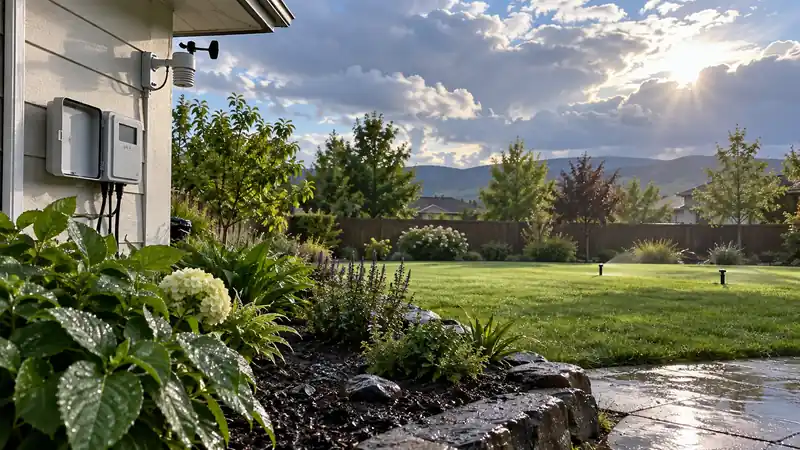
The best weather-based irrigation controllers can shorten or skip a scheduled run after rain, adjust watering as conditions change, or build a routine from information about plants and soil. Those approaches are related, but they are not interchangeable. One controller may mainly use a local forecast, another may estimate water loss over time, and a third may accept a physical rain sensor. Knowing which kind of adjustment the product makes is more helpful than relying on a broad “smart watering” label.
This comparison covers nine controllers with different station counts, installation requirements, and weather tools. Several are eight-zone models, while others are available with twelve or sixteen stations. One is included for its wired network option and local operation, and two Netro models show how an app-led weather schedule can differ from a controller with touch controls at the unit. The right fit depends on what is installed today, what the landscape needs, and how the system will be maintained after setup.
Quick Answer
For the shortest route through the list, start with the controller that fits the mounting point and control habits. These four are useful reference points for app-led weather scheduling, practical local access, and a path for a wired connection.
- Rachio 3 8-Zone is a good fit for an eight-valve system managed mainly from an app.
- Orbit B-hyve XR 8-Zone combines forecast-aware scheduling with controls and status at the unit.
- Rain Bird ARC8 adds weather adjustment to a familiar controller with a local interface.
- Yardian Pro is the most flexible network choice here, with Ethernet as well as Wi-Fi and on-device controls.
Comparison at a Glance
Station count is only one filter. The second and third columns capture how the weather feature works and what a homeowner should confirm before fitting the unit.
| Controller | Stations | Weather approach | Control options | Installation check |
|---|---|---|---|---|
| Rachio 3 8-Zone | 8 | Local weather intelligence and rain, freeze, or wind skips | Quick Run through the app | Indoor location or separate outdoor enclosure |
| Orbit B-hyve XR 8-Zone | 8 | Forecast-based schedule adjustment and delay | Display and controls at the unit | Wall clearance, signal, and pump or sensor wiring |
| Orbit B-hyve Smart 12-Zone | 12 | App schedule tools and weather delays | Local controls | Confirm the exact model and included power arrangement |
| Hunter PRO-HC 12-Zone | 12 | Hydrawise predictive weather adjustments | Full-color touchscreen | Check sensor, pump, and flow-meter terminals |
| Rain Bird ARC8 | 8 | Self-adjusting schedule based on local forecast and weather history | Simple local commands | Outdoor outlet and weather-protected connection |
| Netro Sprite 12-Zone | 12 | Plant, soil, and weather-based smart schedules | Manual zone run in app | Indoor-only unit with 2.4 GHz Wi-Fi |
| Yardian Pro 8-Zone | 8 | Smart program, weather-aware skip rules, optional sensors | On-device buttons and local network access | Indoor controller; enclosure needed outdoors |
| Netro Spark 8-Zone | 8 | Weather and plant or soil inputs for smart schedules | Touch buttons and LED status display | Indoor installation and 2.4 GHz Wi-Fi |
| Rachio 3 16-Zone | 16 | Same Rachio weather tools with larger station capacity | Quick Run through the app | Indoor location or separate outdoor enclosure |
What “Weather-Based” Actually Means
Weather adjustments can enter a watering plan in a few ways. A controller may use a forecast to postpone a cycle when rain is expected, use recent rainfall to skip a scheduled run, or adjust duration based on temperature, wind, and estimated evaporation. Another system may build watering dates from the plants and soil assigned to each zone. Some controllers also accept a wired rain sensor or flow meter, but those accessories measure something different from an internet forecast.
Forecast skips are useful, with limits
A forecast skip is a practical guard against watering shortly before a likely rain event. It cannot promise that rain will fall at every valve location or in the amount predicted. A local shower can miss one side of a property, and a shaded bed can stay moist after the sunny lawn has dried. Treat the feature as an adjustment to a sensible base schedule, then watch the actual landscape.
Weather data sources also vary in how localized they are and how they combine past observations with a forecast. A controller that lets the owner select a station or adjust skip thresholds provides more room to tune behavior. For an area with frequent passing showers, those settings can matter more than the number of programs shown in an app.
Smart schedules need accurate zone details
Some controllers ask about plant type, soil, slope, sprinkler type, sun exposure, or watering restrictions. Those inputs can produce a schedule that differs from a familiar fixed timer. This is expected: a slow-absorbing soil may need shorter cycles with pauses, while deep-rooted shrubs can follow a different rhythm from turf.
The result depends on the profile entered. If the zone combines lawn spray heads and drip emitters, one set of assumptions may not fit both. Correcting a mixed zone at the valve layout is often more effective than searching through app settings for a compromise runtime.
Rain sensors and weather services are different tools
A rain sensor responds to moisture at the installed sensor, while a network service estimates conditions from weather data. A physical sensor can be helpful where local rainfall differs from a nearby station. It also needs a compatible input and a mounting point that exposes it to representative weather. Some smart controllers rely on forecasts rather than accepting a traditional rain sensor, so check compatibility before transferring sensor wires.
Flow monitoring is separate again. It can help flag an unexpected change in water use when the compatible meter is installed, but it does not measure rainfall or guarantee that a dry zone will be corrected. Match every sensor to a specific maintenance need and budget for any required accessory.
How to Pick the Right Weather Controller
First map the valves. Record the station count and the areas served, then note the current schedule and any master-valve, pump, rain-sensor, or flow-meter wiring. Next decide whether the controller should manage an existing routine with occasional weather skips or create most of the schedule automatically. That choice narrows the list more than a general preference for a “smart” product.
Think about how you want to override automation
Weather software should be easy to pause when a landscaper is working, when a water restriction takes effect, or when a newly seeded area needs temporary attention. Look for a manual run, an instant skip, or clearly named zone controls. If several people will maintain the property, decide who owns the app account and how access will be shared.
Local controls also provide a useful path during a service visit. A display or button at the cabinet can make it easier to test a valve without handing over a household phone. Rachio favors app management, while the Orbit XR, Rain Bird ARC8, Hunter PRO-HC, Yardian Pro, and Netro Spark give the user more direct interaction at the unit.
Check what continues during a network outage
Ask whether a saved schedule keeps running without internet and which features stop updating. A forecast adjustment may pause when data access is lost, while a schedule already stored on the controller can continue. Some products provide a local web connection or Ethernet option; others are most convenient when the app remains online.
A controller should not be selected on the assumption that “smart” always means cloud-independent. If the site has unreliable broadband, local controls and a clear offline routine should move up the priority list. If the connection is stable, remote access may be worth the added setup and account management.
Match the enclosure to the exact mounting site
Indoor, outdoor, and protected installations are not interchangeable descriptions. Rachio 3 and the Netro controllers need an indoor location or the appropriate weather-protection solution. Yardian Pro is also an indoor unit by default, with an optional outdoor enclosure. Rain Bird ARC8 and the Orbit XR family are presented for indoor or outdoor mounting, but power outlet and wiring protection still need to follow their manuals.
Measure the wall, allow room to open the cover, and check the network at the exact mounting location. A metal enclosure, concrete wall, or detached utility space can change reception. If the product needs a module, enclosure, or sensor to deliver the feature you want, count that hardware before comparing the options.
Installation and First-Season Setup
Photograph the existing terminal strip before removing wires. Label the common, each station, rain sensor, master valve, and pump leads. Confirm that the replacement supports the valve voltage and accessories in the system; similar-looking terminals do not guarantee identical functions. If the old timer has a transformer or outdoor outlet, make sure the new unit uses a compatible power arrangement.
After wiring, manually run every station and look at the valves and heads. A weather algorithm cannot resolve a stuck valve, clogged nozzle, misdirected spray, or pressure problem. Test the controller first with a short run, then record which zones need attention before building a longer program.
Set a conservative baseline and allow the weather features to operate for a few cycles. Review skipped runs against the soil and the forecast that triggered the adjustment. If one area gets wet while another remains dry, adjust its zone profile or watering schedule rather than disabling every weather rule at once.
Keep a simple log during the first month: date, skipped or adjusted run, visible rainfall, and any change to the schedule. That record helps distinguish an inaccurate local data source from an incorrect zone profile. It also makes a seasonal change easier to explain to another household member or service provider.
Which Kind of Setup Benefits Most?
- A smaller, app-managed home system: An eight-zone Rachio, Orbit XR, or Rain Bird ARC8 can suit a compact valve map when remote adjustments are the main convenience.
- A larger property with separate water needs: The twelve- or sixteen-station versions give turf, shrubs, and drip circuits room for separate schedules, provided the valves and flow support them.
- A site with a service person at the cabinet: Local display or touch controls can make testing easier without depending on the owner’s phone account.
- A house with weak Wi-Fi at the controller wall: Consider an Ethernet-capable model or improve the network path before relying on remote weather updates.
- A buyer who wants automatic schedules: Enter plant, soil, slope, and exposure information carefully, then observe the first cycles before trusting the system to run without review.
Rachio 3 8-Zone
For an eight-valve yard, the Rachio 3 keeps station count close to the hardware and puts weather scheduling in the app. Its local-weather intelligence can skip or adjust runs for rain, wind, and freezing conditions, which is useful when the person managing the system is away from the cabinet.
The installation is the real constraint: this model is intended for indoor mounting. If the old timer is outside, include the compatible weatherproof enclosure in the replacement plan. Check wall space, power, cable entry, and Wi-Fi at the final location before removing anything.
A weather service can only improve a schedule that starts with a sensible zone map. Give the front lawn, shaded bed, and drip line separate profiles if they need different runtimes. Once that baseline is in place, compare skipped runs with the soil and planting conditions instead of treating every forecast as a perfect description of the yard.
Rachio is also app-centered, including its Quick Run workflow. That suits an owner comfortable using a phone, but households that share yard duties should sort out account access before the installer leaves. A prominent control surface at the cabinet may be easier when more than one person needs to check a station.

Pros
- The weather-aware app can adjust an eight-zone schedule without requiring the owner to visit the controller after every forecast change.
- Eight stations keep this model aligned with a common smaller home valve map rather than adding unused capacity.
- Quick Run gives a phone user a direct way to test or temporarily water one zone.
- Named valves and individual runtimes make it easier to adjust one planting area without blurring its schedule with the lawn.
Cons
- An outdoor mounting spot needs Rachio’s compatible enclosure, adding another piece to an otherwise simple replacement.
- The app-first control path is less convenient for a maintainer who expects to program everything from the wall.
A protected indoor location and an eight-valve map give this Rachio a clear fit. If the unit must stay outdoors, the enclosure changes the scope of the project; if physical controls are a priority, the XR or ARC8 offers a different day-to-day interface.
To buy this product, click here.
Rachio 3 16-Zone
Sixteen stations are useful when an eight-zone panel would combine valves that need different schedules. Rachio 3 carries the same app-centered weather workflow into a larger layout, with room to separate turf, beds, trees, and drip areas. That separation improves control only if the plumbing and valve map already support it.
Weather tools can shorten or skip runs as conditions change, but they depend on a reasonable baseline. A shaded border and sun-baked turf should not share one valve if their watering needs diverge. The app can organize distinct schedules; it cannot change the hydraulic arrangement.
This model follows the same indoor-first installation path as the smaller Rachio. An exposed controller needs the compatible enclosure, and the replacement plan should account for its footprint, outlet, cable route, and Wi-Fi. Extra terminals will not compensate for limited water flow, incompatible valves, or poor head coverage.

Pros
- Sixteen stations help keep a larger property’s lawn, trees, and garden circuits on schedules that reflect their different needs.
- Weather intelligence gives the owner a way to adjust a saved routine when local conditions change.
- Quick Run makes it practical to test an individual zone from the same app used for daily management.
- Zone labels help a sixteen-station map remain traceable when a single bed or tree circuit needs a runtime change.
Cons
- The indoor installation requirement means an outdoor replacement needs the compatible enclosure and additional mounting planning.
- A sixteen-station controller adds little value if the property has a stable valve map far below that capacity.
Shortlist the 16-zone Rachio when the live valve map or a documented expansion plan justifies the added outputs. A fixed eight-valve yard may be better served by its smaller sibling, while an outdoor mounting point makes the enclosure decision the first one to settle.
To buy this product, click here.
Orbit B-hyve XR 8-Zone
The B-hyve XR keeps a full-color display and controls on the cabinet, alongside the connected schedule in its app. Orbit specifies dual-band Wi-Fi and Bluetooth, so initial setup and later changes do not have to rely on a single interaction path. That matters when someone needs to inspect a station without opening another person’s phone account.
Forecast-based adjustments and custom programs handle different parts of the routine. Cycle-and-soak windows can break a longer run into intervals for a slow-absorbing area; they will not fix a head aimed at pavement or a valve grouping that mixes unlike emitters.
The linked XR is the eight-zone model. Its indoor/outdoor format gives more placement flexibility than the indoor-only controllers here, but the cabinet still needs wall clearance and the correct power arrangement. Check old sensor or pump-start connections against Orbit’s instructions before wiring.
An eight-station XR is more proportionate than its 16-zone sibling when the valve map is stable. If the property has more circuits or a near-term expansion, count those valves before committing. Also verify the exact model number on the seller page; the B-hyve family includes several station sizes and hose timers.

Pros
- The color display gives a service person useful status information at the controller without logging into the household account.
- Dual-band Wi-Fi and Bluetooth provide a flexible pairing path for a garage or utility-room installation.
- Cycle-and-soak scheduling can help a runoff-prone zone receive water in shorter intervals.
- Custom programs can keep lawn, beds, and drip on distinct calendars rather than forcing one watering pattern across all eight stations.
Cons
- The controller’s larger interface and setup options take more wall space and learning time than a basic timer.
- Weather adjustments depend on a suitable network connection and correctly entered zone information.
The XR’s distinction is a visible local interface paired with app scheduling. It suits an organized eight-valve system where both will be used, rather than someone looking for the smallest controller or a basic rain delay.
To buy this product, click here.
Orbit B-hyve Smart 12-Zone
When an eight-station timer is full, the B-hyve Smart 12-zone model adds room without leaving Orbit’s connected-controller family. App scheduling handles remote changes, while the unit’s local controls keep basic operation visible at the cabinet.
Twelve outputs can separate front and back turf, beds, side paths, and drip circuits when those areas need different watering decisions. Forecast adjustments become more useful with that separation; one weather response does not necessarily suit a shaded bed and exposed lawn alike.
Check the exact model and package before planning an outdoor installation. Product-family names can cover different station sizes and generations, so match the listing to the valve count and inspect the specified power arrangement, mounting cover, and any sensor or pump terminals.

Pros
- Twelve stations give a growing home system room to separate areas with different watering frequencies.
- Remote app access lets an owner check or adjust programs without opening the controller cabinet.
- Local controls make simple testing possible for someone standing at the unit during installation.
- Forecast adjustments can spare an owner from manually revising every program after rain or freezing conditions.
Cons
- The classic Smart model has fewer status details at the unit than the color-display XR family.
- Buyers should verify the exact twelve-zone model and its included outdoor protection before replacing an exposed timer.
For a twelve-valve property, the Smart model gives app scheduling and a familiar local control point without the XR’s larger display focus. On an eight-valve yard with no expansion plan, those extra outputs may simply remain unused.
To buy this product, click here.
Hunter PRO-HC 12-Zone
The PRO-HC is the monitoring-heavy option in this weather-based group. Its twelve-station model connects to Hydrawise and pairs forecast adjustments with a touchscreen, two sensor inputs, a master-valve or pump-start terminal, and built-in current sensing. That setup is valuable when someone will actively review alerts and system data, not merely set a calendar once a year.
Hydrawise provides app or web access and predictive weather scheduling; the screen keeps configuration and station tests available at the controller. Current sensing can flag certain wiring faults. A compatible flow meter adds water-use information, but it is a separate component unless the exact package says otherwise.
The twelve-zone version is a middle size in the PRO-HC family, which is sold in multiple fixed station counts. Verify the model code, enclosure type, transformer arrangement, and terminal layout against the system before ordering. A suffix mismatch can leave a buyer with either too much capacity or too few outputs.
Forecast automation is only as useful as the zone information behind it. Soil, sun exposure, plant selection, and sprinkler output all affect the starting program. On a property with an attentive caretaker or contractor, the alerts and sensor inputs can support a regular maintenance routine; a simple yard that needs only rain delays may not use them.

Pros
- The touchscreen lets an installer review schedules and run zones locally without relying on a phone.
- Built-in electrical sensing can help identify a wiring fault before a dead zone leaves plants dry.
- Hydrawise’s weather adjustments and alert tools suit an owner or contractor who actively monitors a larger system.
- The two sensor inputs and pump/master-valve terminal can keep compatible rain sensing and pump control within the same installation plan.
Cons
- A compatible flow meter is separate hardware, so flow monitoring adds an installation and cost decision.
- The Hydrawise setup and monitoring features may be more complex than a simple residential schedule requires.
Hydrawise, the touchscreen, and multiple monitoring inputs give the PRO-HC a role on a documented twelve-station system. Decide which alert or sensor will be used before paying for the more involved setup; a seasonal rain skip does not need a diagnostic stack.
To buy this product, click here.
Rain Bird ARC8
ARC8 is a connected controller that still behaves like an irrigation timer at the wall. It provides eight stations, local commands, and Rain Bird app scheduling, with support for a master-valve or pump-start relay and a rain or rain/freeze sensor.
The self-adjusting feature uses local weather information to skip watering or change duration. Three programs and four start times per program leave room to separate dissimilar areas rather than forcing every valve into one calendar. The schedule still needs a sound starting point; connected adjustment cannot make mismatched zones behave alike.
A physical sensor and forecast information should be treated as separate inputs. If the house already has a wired rain sensor, check its connection and configuration instead of assuming it behaves like the weather service. Local buttons remain useful while testing valves, and the app provides another route for later edits.
Eight stations set the capacity limit. Outdoor use still depends on the correct outlet, weather-protected connection, and careful wiring; an indoor/outdoor label does not remove those requirements. Confirm the mounting point and the existing sensor and pump connections before treating it as a direct swap.

Pros
- Local commands make a manual test possible without first opening the app.
- Three programs and multiple start times give an eight-zone yard room to separate watering groups.
- Support for a rain sensor and master-valve or pump-start relay helps it fit common residential wiring plans.
- Self-adjusting weather features can skip or change a run when local conditions do not support the usual schedule.
Cons
- Eight stations limit its use in a larger layout unless the valve map is redesigned or another controller is selected.
- The forecast-based adjustment depends on correct location and network setup, so it still needs an initial review.
Rain Bird ARC8 fits an eight-valve property that wants weather adjustment without hiding basic operation inside an app. It is not the best match for a larger valve map or someone expecting flow diagnostics, and outdoor power details should be checked first.
To buy this product, click here.
Netro Sprite 12-Zone
Netro Sprite builds its weather schedule around a profile of the yard. In the twelve-zone version, the app associates each area with plant and soil information, then uses weather data and watering restrictions to generate a program. Netro also offers basic schedules with weather skips, so the owner can decide how much automation to use.
The system can divide watering into shorter cycles for slower-absorbing soils when the inputs support that choice. Accurate zone details matter: a vegetable bed, established shrubs, and turf should not be described as the same irrigation type just because they share one property.
Sprite is an indoor controller using 2.4 GHz Wi-Fi, and Netro says it is not designed for traditional rain-sensor wiring. An existing wired sensor will not become a network input automatically. Check the power arrangement and the sensor plan before committing to app setup.

Pros
- Plant and soil profiles let the owner tailor smart schedules to the differences between turf, beds, and shrubs.
- The twelve-zone version can keep a larger residential layout from combining unlike watering needs.
- Basic programs offer a less automated path for owners who want to retain more schedule control.
- Entering local watering restrictions gives the automatic schedule a way to respect allowed days while keeping plant groups separate.
Cons
- Sprite is designed for indoor use, so an exposed mounting point needs another solution or a different controller.
- Traditional rain-sensor wires are not the Sprite’s weather input path, which can complicate a direct replacement.
Sprite is for a twelve-zone indoor installation where plant profiles and weather-informed schedules will be maintained over time. If a wired rain sensor or outdoor cabinet is essential, choose around that requirement before weighing the smart schedule.
To buy this product, click here.
Yardian Pro
Ethernet is the reason Yardian Pro stands apart from ordinary Wi-Fi controllers. The linked listing is the eight-zone version, and the port can be useful in a garage or utility room where wireless coverage drops at the place the irrigation wires enter the building.
Weather scheduling is only one operating mode. Yardian also has on-device select and run/stop buttons, local network mode, and a saved schedule that can continue through an internet interruption. Its support material describes weather skips for rain, freeze conditions, and sensors, subject to correct setup.
Two sensor ports can accept compatible wired rain sensors or pulse-output flow sensors. These devices need to match the input specification; a meter that merely measures flow is not automatically suitable. The selected version is eight zones, while the product family also includes a twelve-zone model, so count the actual valves.
Yardian is supplied for indoor use. Outdoor placement requires the manufacturer’s optional weatherproof enclosure, plus a sensible outlet and cable route. Decide whether Ethernet, local mode, and the sensor ports have a concrete job at the site; without them, the additional setup may not be worth it.

Pros
- Ethernet provides a wired connection option for a controller wall with unreliable Wi-Fi.
- On-device buttons and local access give the owner a practical way to run or test zones without internet access.
- Two sensor ports support a rain sensor and compatible pulse-output flow sensor when those inputs are needed.
- Weather skips for rain and freeze conditions can help avoid unnecessary cycles without requiring the owner to rewrite a stored program.
Cons
- The default controller is for indoor use, so outdoor installation requires the separate weatherproof enclosure.
- The linked eight-zone version will not serve a twelve-valve map despite the family’s higher-capacity model.
A wired-network option and an offline operating path make Yardian Pro relevant where Wi-Fi alone is unreliable. The eight-zone capacity, indoor cabinet, and compatible sensor requirements are the checks that determine whether those features help this property.
To buy this product, click here.
Netro Spark
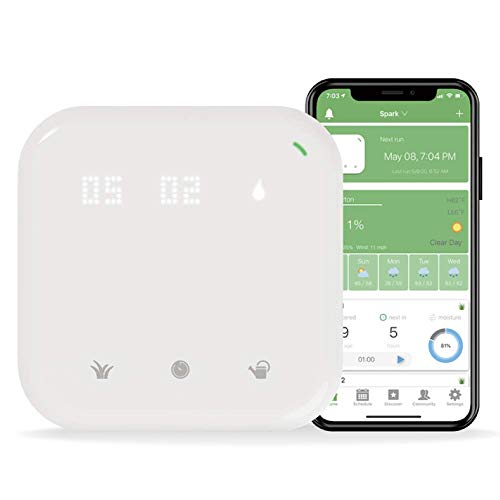
Spark puts its manual controls on the face of the controller: touch buttons select a zone, set a run duration, and start or stop watering, while an LED matrix shows zone and network status. That gives it a different service routine from the app-led Sprite.
The weather schedule uses Netro’s cloud service and the plant and soil details entered in the app. The linked listing is the eight-zone model; Spark is also sold in a sixteen-zone version. Confirm the suffix and valve count before ordering, particularly if the yard is likely to add independent circuits.
Netro lists a backup program and a valve-diagnosis feature marked as beta. Treat the diagnosis as a prompt to investigate, not a guaranteed repair or full flow-monitoring system. Spark also requires indoor placement and 2.4 GHz Wi-Fi, so decide whether the protected wall and network are available before the old controller comes down.
Pros
- Touch controls let an owner select and run a zone at the cabinet without reaching for a phone.
- The LED matrix makes active zone and network status easier to see during a quick inspection.
- A backup program gives the owner another schedule path alongside Netro’s smart watering option.
- Setting a run duration at the touch panel allows a one-time adjustment to a single zone without changing its recurring schedule.
Cons
- The selected eight-zone unit is an indoor model, so exposed installation needs a separately verified protection plan.
- Valve diagnosis is identified as a beta feature and should be treated as an aid rather than a definitive fault report.
Spark earns a place for owners who want weather-informed scheduling and hands-on zone control at the unit. Its eight-zone size, indoor-only installation, and beta diagnostic feature should be weighed separately rather than assuming the touch panel solves every service need.
To buy this product, click here.
Frequently Asked Questions
Can a weather-based controller water accurately without a rain sensor?
Yes. Many controllers use local forecast or historical weather information and can adjust a schedule without a physical rain sensor. A sensor instead measures conditions at its own location. The right choice depends on whether network data represents the yard well and whether the current system already uses a wired input that should be preserved.
Will weather scheduling work if the internet goes out?
It depends on the model. Some controllers continue a schedule already saved locally but stop receiving fresh forecast adjustments or remote commands. Yardian documents local operation and saved schedules, while app-centered models should be checked against their manuals for exact offline behavior. Test the expected fallback during installation rather than discovering it mid-season.
Does an eight-zone controller work for eight valves?
Station count generally refers to the number of valve circuits the controller can address. Confirm any master-valve or pump-start connection separately, since those terminals do not always count as ordinary stations. Also check whether the layout has a spare or future valve that would make a twelve- or sixteen-zone model more practical.
Can the Orbit XR or Rain Bird ARC8 be mounted outdoors?
The Orbit XR family and Rain Bird ARC8 are offered for indoor or outdoor installation. Outdoor placement still requires following the model’s power, outlet, and wiring instructions. A controller rated for outdoor use should not be paired with an exposed connection or an unsuitable power source.
How is Netro Sprite different from Netro Spark?
Both use Netro’s app and weather-informed scheduling, but Spark adds touch controls and an LED status display at the unit. Sprite focuses on the app and smart schedule approach. The station options also differ by exact version, so compare the linked model’s zone count and indoor installation requirements before choosing between them.
Do weather-based schedules remove the need to inspect sprinkler coverage?
No. A controller can adjust timing, but it cannot see every clogged nozzle, shifted head, leak, or dry corner. Walk the zones during a manual run and correct physical problems before asking the software to manage the season. Review plant and soil response after weather changes as well.
What should I do before replacing a connected timer?
Record the active stations, photograph the wiring, identify common and sensor leads, and check the power and network at the planned mounting point. Verify the exact station version and enclosure requirements, then manually test every valve after the new controller is connected. Keep a written copy of the initial schedule for service and recovery.
Final Take
Weather-based control is most useful when the controller has accurate information about the site and a sensible schedule to adjust. Rachio offers an app-first approach, Orbit balances connected tools with a local interface, Hunter adds professional diagnostics, Rain Bird keeps the basic controls familiar, and Netro builds schedules around zone profiles. Yardian adds Ethernet and local operation for a different network need.
Before choosing, confirm the number of live valves, the exact product variant, the mounting enclosure, and the fallback when internet access is unavailable. After installation, watch several runs and compare the system’s adjustments with the conditions at the yard. That is how weather automation becomes a useful part of irrigation management rather than a substitute for it.

- Ryan
Ryan Mitchell covers sprinkler controllers, smart irrigation, and watering technology at Best Sprinkler Controllers, with a focus on clear comparisons, practical features, and helping homeowners choose the right setup for their yard.
- Best Irrigation Controllers With Rain Sensor Support November 4, 2026
- Best Sprinkler Controllers for Large Yards: 9 High-Capacity Picks November 2, 2026
- Best WaterSense Irrigation Controllers: 7 Certified Picks October 29, 2026
- Can I Replace an Old Sprinkler Controller With a Smart Controller? October 27, 2026
- Best Weather-Based Irrigation Controllers: 9 Smart Picks October 25, 2026