
Best 16-Zone Sprinkler Controllers: 9 Picks in 2026
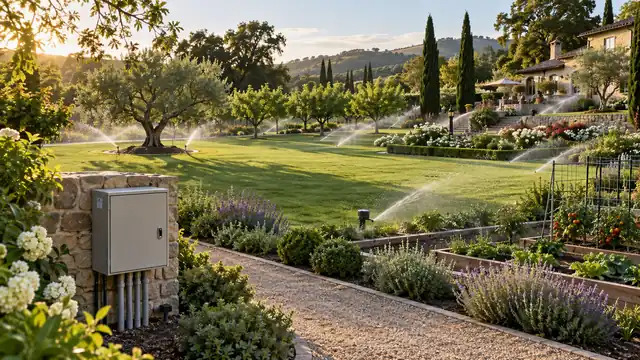
The best 16-zone sprinkler controllers fit a property with enough separate watering circuits to use that capacity. The number alone does not tell you whether a unit will work, though. A replacement has to match the valve map, the mounting location, the available power, and the way the owner wants to make changes after installation. A controller can have ample capacity and still be a poor fit if its outdoor protection, network setup, or local controls do not suit the site.
This roundup includes seven controllers with sixteen-station versions, plus two close alternatives: a fourteen-station Hunter X2 and a twenty-four-station Hunter PRO-HC. Those two are included because some large landscapes are better served by a slightly smaller, simpler unit or by a model with capacity to spare. Their station counts are called out directly so a buyer with exactly sixteen wired valves can rule them in or out without digging through the fine print.
Quick Answer
For a connected sixteen-zone system, start with the controller that matches the installation rather than the longest feature list. These four options cover the clearest paths: app-centered control, an indoor/outdoor unit with hands-on controls, and a system built for professional monitoring.
- Rachio 3 16-Zone is the app-first pick for a protected indoor mounting location.
- Orbit B-hyve XR 16-Zone gives connected control while retaining a physical interface at the unit.
- Hydro-Rain HRC 400, 16-station is a strong option when local programming and Bluetooth setup matter alongside Wi-Fi.
- Hunter PRO-HC 24-Zone is the capacity step-up for an installation that needs more than sixteen stations or values its monitoring tools.
Comparison at a Glance
The controller types here are not interchangeable. Use the station column to check fit first, then look at where the unit can be mounted and what remains usable if the home network is unavailable.
| Controller | Station count | Control path | Placement note | Best reason to compare |
|---|---|---|---|---|
| Rachio 3 | 16 | App, Quick Run | Indoor; outdoor enclosure is an accessory | App-led schedule and weather adjustments |
| Orbit B-hyve XR | 16 | App plus local controls | Indoor/outdoor model | Connected features with an on-unit interface |
| ImoLaza Wi-Fi | 16 | App-based setup and management | Check the selected model’s installation instructions | Connected programming for a larger valve map |
| Hydro-Rain HRC 400 WF-16 | 16 | Dial/display, Bluetooth, Wi-Fi | Indoor/outdoor housing | Local setup even when Wi-Fi is not available |
| Moen Smart Controller | 16 | Moen app and optional soil sensors | Outdoor enclosure sold separately | Independent zone schedules and sensor pairing |
| GreenVation Smart Controller | 16 | Smart Life/Tuya app | Verify enclosure and valve requirements before installation | Lower-cost connected feature set |
| HiOazo Outdoor Controller | 16 | App over 2.4 GHz Wi-Fi | Listed for outdoor use | Multiple plans and soak-style scheduling |
| Hunter X2 | 14 | Local dial; optional WAND module for Hydrawise | Indoor/outdoor family | Familiar local programming without built-in smart controls |
| Hunter PRO-HC | 24 | Touchscreen and Hydrawise Wi-Fi | Indoor or outdoor versions | Flow, sensor, and electrical monitoring options |
What Matters in a Sixteen-Station Controller
Station capacity is the easiest specification to compare and the easiest one to overvalue. A sixteen-station unit can operate up to sixteen wired irrigation zones in the supported configuration. It does not increase the water available to the property, make undersized pipe adequate, or guarantee that multiple valves can run together. Those questions belong to the plumbing, pump, and controller instructions.
Match stations to real valves, not a rough yard-size estimate
Count the valve wires at the existing controller and label the field valves if possible. One station might serve front turf, another a side strip, and others a vegetable bed, shrubs, or drip lines. Separate circuits are valuable when they need different run times or frequencies. A sixteen-zone model is excessive for a six-valve layout unless a documented expansion plan is likely; for a full sixteen-valve system, it prevents the new controller from forcing a redesign.
Two entries in this guide need particular care: the Hunter X2 is a fourteen-station alternative, and the Hunter PRO-HC listing is a twenty-four-station model. The X2 cannot control sixteen independent valves in the listed configuration. The PRO-HC provides extra capacity, but the unused stations do not improve water pressure or distribution. Compare those products only if their actual count fits the wiring plan.
Separate scheduling features from water-system capability
Weather skips, cycle-and-soak, soil sensors, flow alerts, and remote access solve different problems. Weather adjustments can reduce watering after a qualifying forecast event, but the adjustment depends on the selected data source and settings. A soil sensor reports conditions at its installation point; one sensor cannot represent every soil type or exposure across a large property. Flow monitoring can help spot abnormal use, but it requires a compatible meter and correct installation.
There is no automatic setting that makes a poorly divided system efficient. If lawn sprinklers and low-flow drip emitters share one valve, their schedules may conflict regardless of the controller. Put mismatched watering needs on separate circuits before expecting an app or forecast feature to fix the result.
Check how much control remains at the wall
Some owners are happy to use a phone for nearly every change. Others prefer a dial, display, or buttons when they are standing next to the wiring cabinet. Local access also matters during a router replacement, app sign-in problem, or service visit by someone who does not manage the household account. The HRC 400 and Hunter X2 make local programming central; the Rachio leans much more heavily on its app.
For connected models, test Wi-Fi at the mounting spot. A signal that reaches the garage door may not remain reliable behind a metal cabinet or concrete wall. If a unit needs an optional module, enclosure, sensor, or flow meter to deliver the feature being compared, include that hardware in the purchase plan.
How to Choose Without Creating a Harder Installation
Before comparing app screenshots, write down the information that determines whether a controller can replace the current one: station count, wire labels, sensor connections, pump or master-valve wiring, power source, mounting conditions, and the person who will adjust schedules. A short pre-install list is more useful than guessing from a product title.
Start with the controller you have, not the one you want
Photograph the terminal strip with the existing power safely isolated, then record which wire belongs to each station. Identify the common wire and any rain sensor, master valve, or pump relay. If the current unit has unused wires or expansion boards, find out whether those lead to active valves. The count written on an old faceplate can be misleading when the property has changed since the original installation.
Never assume wire colors are universal. A colored wire may have been repurposed, and an unlabeled bundle can be difficult to trace after removal. A clear map preserves the starting point for programming and makes later troubleshooting less dependent on memory.
Decide whether sixteen is the ceiling or a transition point
For a stable system with sixteen or fewer valves, a fixed sixteen-station controller keeps the choice straightforward. A landscape expansion can change that calculation: new beds, a detached structure, or a future irrigation zone may justify extra capacity, but only if the planned valves and cable route are real. The PRO-HC’s twenty-four stations are relevant to that kind of growth; the fourteen-station X2 is not a match for a full sixteen-valve map.
Do not purchase spare capacity as a substitute for a layout. A zone still needs a valve, suitable wire, enough flow, and a reason to run on its own schedule. If those pieces are missing, a higher station number remains unused hardware.
Make placement a first-order decision
Indoor controllers need a dry, reachable mounting point and enough clearance to open the cabinet. Outdoor installations need the exact controller model or a compatible weatherproof enclosure, not a general assumption that a plastic case can face rain. Confirm whether the transformer, power cord, wire entry, and accessories are part of the selected package. This is especially relevant to the Rachio 3 and Moen, which need a separate enclosure for an exposed installation.
Measure the wall and check where the existing conductors enter. A unit with a wide door or larger terminal compartment can be easier to service, but only if the surrounding pipe, shelf, or conduit does not block access. In a tight utility corner, the best controller may be the one that leaves room to read labels and replace a fuse or wire.
Choose remote features for a specific task
Remote starts are useful when a technician needs to test a station from the valve area or when an owner checks a property while away. Weather scheduling is most valuable when someone will review the schedule and local data source. If the irrigation plan rarely changes and a person is usually near the controller, a readable on-unit interface can matter more than another app function.
Think through account access before setup. Decide who owns the login, how a landscape contractor will get temporary access, and whether the controller can still run a saved schedule after a network interruption. These details keep the system maintainable when household roles or service providers change.
Installation and First-Season Setup
Turn off power according to the manufacturer’s instructions before moving wires. Transfer one conductor at a time from the labeled map, confirm each terminal against the new controller manual, and keep sensor and master-valve leads separate from station wires. Conventional irrigation systems often use low-voltage AC valves, but compatibility should be verified for the exact model and existing equipment rather than inferred from the plug shape.
Test each zone manually before building a long schedule. A valve that hums without opening, a station that continues after being stopped, or a head that sprays poorly points to a wiring, valve, pressure, or coverage issue. Sorting those faults first makes later programming easier to evaluate.
For a large property, start with a temporary schedule that uses conservative runtimes. Walk the zones while they run. Look for water reaching pavement, dry edges between spray patterns, runoff down slopes, and emitters that deliver at a different rate than sprinklers. Those observations determine whether the next adjustment should change a station’s minutes, split a circuit, or involve a physical repair.
After the basic schedule works, add weather rules or sensor inputs one at a time. That makes it easier to understand why a cycle was shortened or skipped. Keep a written backup of program names and runtimes, especially if an app migration, phone change, or controller replacement is likely during the season.
Which Kind of Buyer Is Each Controller For?
A sixteen-station installation can be an ordinary home system with several distinct planting areas, or a property where the controller is part of a wider maintenance operation. The right interface depends on who will manage the schedule and how the system will be serviced.
- Choose app-centered control if schedule changes, remote checks, and weather adjustment are tasks you expect to use. Confirm the signal and mounting plan before choosing the product.
- Choose a strong local interface if a homeowner or contractor routinely works at the controller and wants settings visible at the cabinet.
- Choose expanded monitoring if flow or electrical alerts answer a real maintenance need and compatible sensors can be installed correctly.
- Choose a low-cost connected model cautiously if the main draw is broad capacity at a lower entry price. Verify the app, outdoor protection, warranty path, and installation documentation before moving old wires.
Rachio 3 16-Zone
The installation decision comes before the app features with this unit. Rachio 3 is intended for a protected indoor location; an exposed mounting point calls for its compatible weatherproof enclosure. If the old timer sits outside, count that enclosure, its power route, and the wall clearance as part of the replacement plan.
Once the location works, sixteen stations leave room to keep lawn, planting beds, and other circuits on separate schedules. Quick Run is handy for checking a valve, while weather adjustments and app controls suit an owner who expects to revisit the program as conditions change.
This is a phone-led controller, so its value depends on dependable access at the mounting point and someone willing to maintain the app schedule. Weather automation cannot repair a poorly mapped zone or a misdirected head; start with accurate zone details and a manual walk-through, then adjust the program against what the yard actually needs.

Pros
- The app and Quick Run functions make it easier to check an individual station without standing at the cabinet.
- Sixteen stations give a large residential valve map room to separate lawn, beds, and drip circuits.
- Weather-aware scheduling gives app-oriented owners a practical way to review watering against local conditions.
Cons
- An exposed mounting location needs the compatible outdoor enclosure, which adds a separate hardware step.
- Owners who want full programming from physical controls may find the app-centered workflow less comfortable.
Only shortlist Rachio if an indoor mounting point is available or the compatible enclosure is already in the plan. With that settled, its phone-first controls suit an owner who will maintain a full sixteen-zone schedule; anyone wanting routine programming at a physical dial should compare the Orbit or HRC instead.
To buy this product, click here.
Orbit B-hyve XR 16-Zone
The B-hyve XR keeps useful information on the controller itself. Its displays and local controls help a homeowner or service person check status at the cabinet, while the app handles remote changes. That arrangement is a practical middle ground for a property where more than one person may need to understand the schedule.
The sixteen-station version supports 24-volt AC valves, multiple programs, cycle-and-soak windows, and rain or freeze delays. Bluetooth and dual-band Wi-Fi provide connection options, though the signal still has to reach the final mounting point. A weak connection behind a metal cabinet can undermine the convenience of remote access.
A pump-start relay is part of the feature set, which makes this model worth comparing for a system wired around a pump. Check the manual against the pump and valve loads before connecting anything. The interface can manage a capable setup, but a simple lawn with one uncomplicated program may not need all of its options.
Allow room for the larger cabinet and for its door to open fully. During commissioning, name stations by the areas they serve and build only the programs the yard needs. That keeps the local display useful instead of turning the controller into a list of cryptic zone numbers.

Pros
- The on-unit displays let a homeowner or service person check status without opening a phone app.
- Dual-band Wi-Fi and Bluetooth give the installer more than one path for pairing and routine access.
- Cycle-and-soak scheduling can separate watering pulses for zones where a single long run would lead to runoff.
Cons
- The multi-program setup rewards careful naming, so a buyer expecting a single simple timer may need more time to learn the interface.
- Its larger cabinet needs a mounting area with enough clearance for the door and wiring access.
At a property where both the owner and a service person may use the controller, the XR’s display can earn the extra cabinet space. The case is weaker if local status is unimportant and the additional program options would remain untouched.
To buy this product, click here.
ImoLaza 16-Zone Wi-Fi Controller
Check the network before weighing the app features. The ImoLaza sixteen-zone model uses a 2.4 GHz Wi-Fi connection, so confirm that the home router exposes a compatible band where the controller will be mounted. A network that works in the kitchen may not reach a cabinet across a garage or behind masonry.
The app provides schedule changes, quick runs, weather-related skips, and watering history. On a large valve map, those tools can make it easier to test a far-side zone or review why a cycle changed. They still rely on accurate zone labels and a schedule that reflects the actual heads, soil, and planting areas.
Before transferring wires, match the exact controller version to the supplied manual and identify any sensor or master-valve connections. Setup also involves an app account, pairing, and zone configuration. This suits an owner comfortable managing a connected system; it is a less natural replacement for someone who expects a dial and screen at the wall.

Pros
- App-based quick runs let an owner test a valve from the property rather than relying on a second person at the cabinet.
- Weather skips and watering history give schedule changes a more visible context than a basic timer provides.
- The sixteen-station version can preserve separate programs for a full-size residential valve map.
Cons
- The 2.4 GHz network requirement can complicate setup in homes where the router hides or disables that band.
- Owners who prefer local programming may find the app account and pairing sequence an unnecessary dependency.
A reliable 2.4 GHz signal and someone willing to manage the app account are prerequisites here. With those in place, ImoLaza offers remote schedule tools for a sixteen-station system; without them, its main advantage becomes difficult to use.
To buy this product, click here.
HRC 400 16-Station Controller
A person standing at the controller can program the HRC 400 with its display and turn-and-select dial. That local interface is the reason to look closely at this model: Bluetooth and Wi-Fi are available too, but day-to-day access does not begin and end with a phone.
The WF-16 version is built for sixteen stations and has a removable hinged panel that exposes the wiring area. Bluetooth setup can help during commissioning before a Wi-Fi connection is ready. For a homeowner who wants the contractor to test zones at the cabinet, that extra physical access is more than a cosmetic detail.
Hydro-Rain materials describe weather adjustment and a catch-cup feature for using measured sprinkler output to tune the schedule. Those tools are most useful after the basic valve map is correct. They can help refine runtimes, but they do not replace checking coverage, runoff, or pressure in the field.
Confirm the WF-16 model number rather than relying on a family-level listing, since eight- and sixteen-station variants are sold separately. Measure the mounting area as well. The removable panel and generous wiring access are convenient only when the wall leaves enough room to open and service the unit.

Pros
- The large display and dial let a homeowner program or check stations at the cabinet without opening an app.
- Bluetooth offers a practical setup route before the controller is connected to the property’s Wi-Fi.
- The removable hinged panel leaves the wiring area easier to reach during installation and later service.
Cons
- The sixteen-station configuration is sold separately from the eight-station version, so verify the model number before checkout.
- The larger cabinet needs more wall clearance than a compact replacement timer.
Among the exact-capacity choices, the HRC 400 is a natural fit for someone who wants a dial, a readable display, and connected access in one cabinet. Measure first: its service-friendly layout only helps when the wall leaves room to open and work on the unit.
To buy this product, click here.
Moen 16-Zone Smart Controller
Moen’s strongest distinction is the way its app treats zones as separate schedules rather than forcing one routine across the yard. That can help when turf, shrubs, and drip circuits need different timing, and it gives an owner a clearer place to make adjustments after watching the system run.
The controller can pair with optional Smart Wireless Soil Sensors and provides weather skips, valve diagnostics, and water-use information. Sensor readings are local to their placement, so one unit should not be treated as a measurement for every bed and exposure. The Flo integration may be relevant to an existing Moen water setup, but verify device and app compatibility for the exact combination.
Outdoor installation needs Moen’s separate controller enclosure. That changes the cost and the shape of the project for anyone replacing an exposed timer. The app and sensor ecosystem also asks for setup time, so this model is most compelling when the household plans to use those connected tools rather than leaving them idle.

Pros
- Independent schedules let the owner adapt a lawn, shrub border, and drip circuit without forcing one routine across all zones.
- Optional wireless soil sensors give a buyer a path to add localized moisture information where it will improve a schedule.
- Valve diagnostics and water-use displays help make maintenance decisions more visible in the app.
Cons
- An outdoor installation needs Moen’s separate enclosure, so the controller is not a simple exposed-wall replacement on its own.
- The strongest automation depends on app setup and optional sensors, which may be more system than a basic yard needs.
Moen suits a household that expects to use zone-level schedules, sensor input, or water-use information. If those tools have no clear role, the separate outdoor enclosure and app setup add work without much return.
To buy this product, click here.
Smart 16-Zone Irrigation Controller
GreenVation’s appeal is a broad connected feature list at a lower-cost end of the market: a sixteen-zone option, Smart Life or Tuya app control, and weather-related scheduling. The practical question is how well the instructions, firmware path, and support match the demands of a full irrigation system. Check those details before station count becomes the deciding factor.
The listing says the controller runs one watering zone at a time. That sequential approach may suit a residential supply, but it can lengthen the full cycle on a landscape with many stations. Compare it with the existing pump and schedule, especially if the current system overlaps valves or has a narrow watering window.
The supplied guidance calls for pairing the unit and updating firmware through the app. Treat that as a commissioning task: complete it, run every valve manually, and confirm that schedules and history appear as expected before relying on unattended watering. Smart Life or Tuya may be convenient in a home already using either app, though more household members may need access to the same setup.
The product information does not establish the same depth of installation documentation as the better-known irrigation brands in this guide. Verify the exact sixteen-zone variant, enclosure rating, valve compatibility, warranty route, and seller support in writing. A patient owner with a fallback controller may accept that uncertainty; a time-sensitive replacement has stronger-documented choices.

Pros
- The app’s schedule and history views give a hands-on owner a way to inspect routines after the installation is running.
- The sixteen-zone option offers enough terminals for a large home valve map if the selected version and wiring are confirmed.
- Smart Life or Tuya pairing may suit a household that already uses one of those apps for compatible devices.
Cons
- The instructions call for a firmware update after pairing, adding a commissioning step before the schedule should be trusted.
- Limited product feedback and less established documentation make it prudent to verify support and enclosure requirements first.
Price and app connectivity make GreenVation worth examining, while the available product information leaves more setup and support questions than the established alternatives. Consider it only after confirming firmware steps, enclosure rating, warranty support, and a workable fallback during commissioning.
To buy this product, click here.
Outdoor Smart 16-Zone Controller
HiOazo sells this controller in a sixteen-zone option and describes support for sixteen watering plans. The selected variant matters: the listing also offers a twelve-zone size, so check the option in the cart against the live valve count. Its connection is listed for 2.4 GHz Wi-Fi, which should be tested at the intended wall location.
The app includes standard and soak-style scheduling along with rain, frost, and wind skips. Soak intervals can be useful on a slope or slower-absorbing soil, where a long run may send water toward a path. They do not measure moisture or correct a poorly aimed head, so set runtimes after observing the zone rather than relying on the mode name.
The product is marketed for outdoor use, but verify the precise enclosure and wire-entry instructions for the model being purchased. Pair it at the final location and keep the old wiring map until every valve has passed a manual test. Buyers who value a long support history may find a familiar irrigation brand easier to assess.

Pros
- Sixteen plans let the owner distinguish watering routines across different zones instead of relying on one property-wide schedule.
- The soak-style option gives sloped or slower-absorbing areas a way to pause between watering intervals.
- The outdoor-focused design may simplify placement where an indoor utility area is unavailable, subject to its exact mounting instructions.
Cons
- The 2.4 GHz network requirement can be a hurdle if the router does not expose that band clearly.
- A small review history makes it harder to judge long-term app and support performance than with established controller families.
For a site that needs outdoor placement and soak scheduling, HiOazo’s sixteen-zone version offers a specific combination. Confirm weather protection and Wi-Fi at the mounting point, then weigh its support history against a controller from a longer-established irrigation brand.
To buy this product, click here.
Hunter X2 14-Zone
Capacity is the first decision with this Hunter X2: the linked version controls fourteen stations, not sixteen. It is a legitimate alternative for a large property with fourteen or fewer active valves. With fifteen or sixteen live wires, it is short by design and should not be treated as an exact-capacity replacement.
At the cabinet, the X2 uses a dial and display for entering programs and running zones. The base controller operates locally; adding the separate WAND module brings Wi-Fi and Bluetooth access through Hydrawise. Keeping that module optional gives a buyer room to start with a straightforward timer, provided remote features are not assumed to be included.
Hunter sells the X2 family in multiple station counts and configurations. Match the exact part number, power arrangement, indoor or outdoor housing, and sensor terminals to the existing installation. A familiar-looking front panel does not guarantee that the selected package has the count or connection the valve map needs.
For a replacement that will be programmed in person, the local dial remains easy to understand during service visits. A WAND-enabled setup adds app pairing and network upkeep. Decide which control path will actually be used, then keep the schedule simple enough that the next person can make sense of it.

Pros
- The local dial and display let an owner review or change a schedule without an app account.
- The optional WAND module provides a defined route to Hydrawise if remote scheduling becomes useful later.
- A fourteen-station version can be a measured fit for a large property whose actual valve map stays below sixteen.
Cons
- This version cannot serve sixteen active zones, so a full sixteen-valve replacement requires a different capacity plan.
- Wi-Fi and Hydrawise functions require the separate WAND module rather than coming from the base dial controller alone.
Fourteen stations make the X2 a sensible local-control choice only when the valve map stays within that limit. If fifteen or sixteen valves are active, treat the count as decisive and choose a controller with enough outputs from the start.
To buy this product, click here.
Hunter PRO-HC 24-Zone
The linked PRO-HC is a fixed twenty-four-station model, so it belongs here as a step-up rather than a sixteen-zone match. Extra stations can be useful when a documented expansion is planned or the grounds already have a complex valve map. For a stable sixteen-circuit yard, the unused outputs add cabinet size without improving pressure or coverage.
Hunter pairs Hydrawise Wi-Fi with a touchscreen that supports programming at the controller. The unit also provides a master-valve or pump-start output, sensor inputs, and current sensing for electrical faults. A compatible flow meter is optional; add one only if water-use or leak monitoring is a real need and the meter can be installed correctly.
Weather-based scheduling and remote checks can help oversee multiple zones, but the system still needs sound runtimes and a person to review alerts. Verify the exact twenty-four-station part number, indoor or outdoor housing, supply arrangement, and mounting footprint. Similar PRO-HC listings can have different counts, and the family name alone is not enough to confirm fit.

Pros
- The local touchscreen lets an installer set up and test the controller without making every task depend on a phone.
- Built-in electrical sensing can help narrow a wiring fault to a station before landscape damage spreads.
- The master-valve output and optional flow-meter support give larger sites useful monitoring paths when the associated equipment is installed.
Cons
- Twenty-four fixed stations are more than a sixteen-valve system needs unless expansion is already planned.
- A flow meter and Hydrawise account add setup work, so the professional monitoring features are not a no-effort upgrade.
The PRO-HC earns its larger cabinet when twenty-four stations or its monitoring options solve a real site need. A property staying at sixteen zones can avoid extra capacity and setup; planned expansion makes the higher station count easier to justify.
To buy this product, click here.
Frequently Asked Questions
Can a sixteen-zone controller run sixteen valves at once?
Station count means the controller can address up to that many zones, not that all valves should operate simultaneously. The water supply, pump, pipe sizing, and controller design determine what can run together. Many residential schedules run stations in sequence to keep demand within the system’s capacity.
Is the Hunter X2 a true sixteen-zone controller?
The linked X2 is a fourteen-station version, so it cannot serve sixteen separate active valves as configured. It is included as a close local-control alternative for a property with fourteen or fewer stations. A full sixteen-valve map needs a controller with at least sixteen outputs or a different system design.
Does the Rachio 3 need an outdoor enclosure?
Rachio 3 is intended for an indoor location. For outdoor mounting, use the compatible weatherproof enclosure and follow its installation instructions. Confirm enclosure fit, power access, and wire entry before replacing a controller that currently sits outside.
Which option has useful controls at the controller itself?
The HRC 400 has a display and dial, the Orbit B-hyve XR includes on-unit displays and controls, and the Hunter X2 uses local dial programming. Hunter PRO-HC adds a touchscreen. These physical interfaces are helpful during installation and service, even when an app is also available.
What does the WAND module add to Hunter X2?
WAND adds a Wi-Fi and Bluetooth connection to the X2 for Hydrawise app and web management, including remote scheduling and weather-related adjustments. The base X2 remains a local controller without that module. Check the package contents so the purchase includes the connection hardware if remote access is required.
Are wireless soil sensors required for the Moen controller?
No. The Moen controller can run zone schedules without those optional sensors. Pairing compatible soil sensors adds localized moisture readings for more specific watering decisions, but their placement should represent the areas they are meant to guide.
What should I verify before replacing a sixteen-station timer?
Count the live valves, photograph and label the wiring, identify common, sensor, master-valve, and pump leads, and confirm mounting, power, and network needs. Compare every connection with the new model’s manual before moving wires. Test each zone manually before creating the full schedule.
Final Take
For a true sixteen-valve replacement, Rachio, Orbit, ImoLaza, Hydro-Rain, Moen, GreenVation, and HiOazo offer different balances of app access, local controls, placement, and documentation. The Rachio is app-centered and needs an enclosure outdoors; the HRC 400 and Orbit keep more information visible at the cabinet; Moen stands out for its optional soil sensors; and the newer lower-cost choices call for extra attention to setup and support.
The Hunter X2 is a fourteen-station alternative, while the linked PRO-HC offers twenty-four fixed stations and a deeper monitoring path. Those capacity differences should decide whether either belongs in the final comparison. Count the valves, verify the mounting plan and wiring, then choose the control style that the person responsible for the yard will actually maintain.

- Ryan
Ryan Mitchell covers sprinkler controllers, smart irrigation, and watering technology at Best Sprinkler Controllers, with a focus on clear comparisons, practical features, and helping homeowners choose the right setup for their yard.
- Best Irrigation Controllers With Rain Sensor Support November 4, 2026
- Best Sprinkler Controllers for Large Yards: 9 High-Capacity Picks November 2, 2026
- Best WaterSense Irrigation Controllers: 7 Certified Picks October 29, 2026
- Can I Replace an Old Sprinkler Controller With a Smart Controller? October 27, 2026
- Best Weather-Based Irrigation Controllers: 9 Smart Picks October 25, 2026