
Best Local-Control Sprinkler Controllers: 9 Cloud-Light Picks
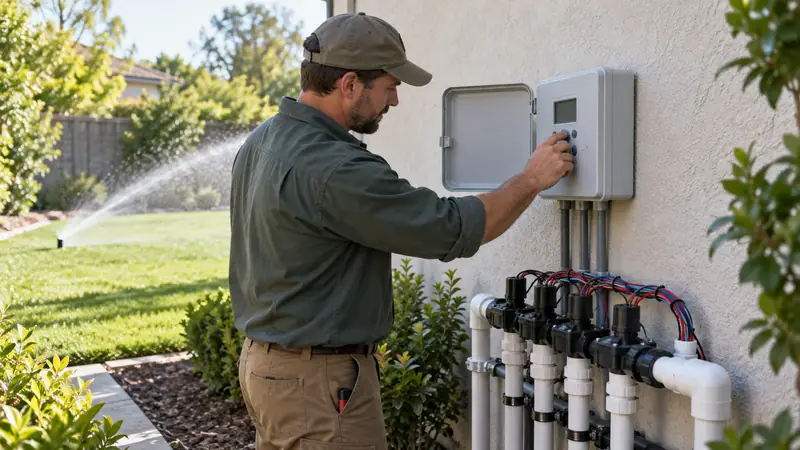
Best local-control sprinkler controllers are a practical choice for a property where watering should stay understandable at the wall, whether or not an app is part of the routine. The difference is visible on a service day. Someone can read the schedule, run one valve, pause watering, or explain the station map without first finding the right phone, account, and connection.
“Cloud-light” does not describe one standard feature set. Some controllers are fully local. Others store a dial-based schedule but can accept an optional Wi-Fi module. A few combine an on-unit interface with remote management from the start. This guide separates those models and explains what continues to work at the panel, what depends on an accessory or network, and how to match the station count to the actual valves.
These are irrigation controllers, not substitutes for sound system design. The controller can operate the valves and apply a schedule, but it cannot correct a blocked sprinkler head, a leaking valve, poor pressure, or a zone that combines plants with different water needs. A good purchase begins with the current wiring and landscape, then adds only the controls that solve a real maintenance problem.
Quick Answer
For a combination of local programming and connected access, start with Rain Bird TRU8IW or TRU6I, depending on whether the property needs eight or six stations. The Hunter X2 14-Zone keeps a familiar panel on a larger system and leaves Wi-Fi to an optional WAND module. If a local-only schedule is the goal, Rain Bird SST600IN is a more honest fit than paying for connected features that will go unused.
- Rain Bird TRU8IW pairs an eight-station dial interface with Wi-Fi hardware included in the linked model.
- Hunter X2 14-Zone offers a larger fixed station count with local programming and optional connected access.
- Rain Bird ESP-TM2 8-Station keeps a local schedule and makes Wi-Fi an accessory decision.
- Rain Bird SST600IN is a six-station local timer for a protected indoor location.
Use those links to form a shortlist. Then verify the exact model, enclosure, station capacity, accessory bundle, and service tasks that remain available without a phone connection.
Comparison at a Glance
| Controller | Station count | Local controls | Connected path | Primary buying check |
|---|---|---|---|---|
| Rain Bird TRU8IW | 8 | Dial, display, manual watering | Wi-Fi module included | Indoor-only mounting |
| Rain Bird ESP-TM2 with LNK, 6-Station | 6 | Dial and display | Verify LNK bundle contents | Six-valve map and exact package |
| Rain Bird ESP-TM2 8-Station | 8 | Dial and display | Compatible LNK2 module optional | Do not assume Wi-Fi hardware is included |
| Hunter X2 14-Zone | 14 | Dial and display | Optional WAND module | Large fixed valve map and exact variant |
| Hunter X2 6-Zone | 6 | Dial and display | Optional WAND module | Six-station ceiling |
| Orbit 57900 | 12 | Dial and swing panel | None | Confirm model 57900 and power arrangement |
| Rain Bird SST600IN | 6 | Dial and display | None | Indoor-only location |
| Hunter X-Core 4-Station | 4 | Dial and display | Conventional local timer | Four circuits or fewer |
| Rain Bird TRU6I | 6 | Dial and display | LNK2 module compatible | Indoor-only location and accessory need |
Fixed station counts refer to independently controlled valve outputs. A model with more outputs does not improve coverage by itself, and two areas that need different schedules should not be joined solely to fit a smaller timer.
What “Local Control” Means in Practice
A dial can edit schedules, while a button may only start a run
On a dial-based model, the panel can expose start times, watering days, runtimes, seasonal adjustment, and manual watering. That is useful during a valve replacement or when the person maintaining the yard does not use the connected app. By comparison, a small set of buttons may allow a manual start, stop, or station advance while full schedule creation remains in the app. Both are physical controls, but they provide different levels of independence.
Before buying, read the manual for the exact model and answer a short list: Can the controller start a single station? Can the panel stop a running schedule? Can it change the day or duration? Does it show which zone is active? What happens after a power loss? The answers describe the service routine more accurately than a product title that says “smart” or “manual.”
Stored schedules and network services are separate things
A controller may continue a stored watering program if a router loses service, while its remote controls, forecast adjustments, alerts, or app access become unavailable. Another controller may need an account or a module for some features while its dial remains usable. Do not assume that a local panel guarantees every feature is available offline. Check the product manual for how the controller behaves during a network interruption, an account change, and a power interruption.
For a second household member or landscape technician, a clear local route can be more useful than a long feature list. Keep a printed valve map near the controller and label each station in plain language. A person who can identify “front lawn” or “south bed” at the cabinet is less likely to run the wrong zone than someone working from a list of unnamed station numbers.
Local-first and local-only are different purchase categories
The ESP-TM2, TRU6I, and Hunter X2 families offer local programming alongside optional or included connected paths. The Orbit 57900, SST600IN, and X-Core options are conventional timers in the product configurations considered here. Calling every one of them “smart” would confuse a reader who wants forecast-based adjustments. This list includes the conventional products as alternatives for people whose priority is direct operation rather than network management.
Accessories deserve their own line in the budget. An optional module can change the purchase price, installation work, app requirements, and placement decision. When a listing advertises a bundle, check the box contents and model number rather than assuming the accessory is standard in every offer.
How We Evaluated These Controllers
This roundup prioritizes the work that happens before and after a watering schedule is entered. We looked at how much programming is available at the unit, whether a connected accessory is required, the number of fixed outputs, the cabinet location, and the practical limits created by those decisions. The comparison also distinguishes a truly conventional timer from a smart-capable controller whose connected features are optional.
Useful operation at the controller
Local programming, a readable display, and manual station testing help with setup and service. The quality of that experience depends on what the interface can actually do, not how many buttons or lights it has. We gave greater weight to products whose schedule and zone controls remain accessible beside the wiring, while noting models where detailed changes are routed through an app.
Honest treatment of optional connectivity
We separate built-in Wi-Fi, a module sold separately, and no connected route. That distinction affects cost and everyday use. It also protects readers from a common mismatch: a product page may show an app-connected family, while the exact model package being considered contains only the timer.
Capacity and installation fit
Station count, enclosure, power arrangement, and accessory terminals must work together. A twelve-station controller has little advantage if the property has four valves and a small indoor location. A compact timer is a poor match for a system with more independent circuits than outputs. Each profile explains the point at which the model’s strength matters and the limitation that may change the recommendation.
Choosing a Controller for a Cloud-Light Setup
Write down the service actions you need
List the tasks that must work without the app. For many households, that is starting one zone, stopping irrigation, and reading which station is active. If the owner wants to edit weekdays, run times, or seasonal settings at the panel, choose a controller whose manual confirms those specific functions. A local run button does not replace schedule editing.
Count every valve circuit before looking at models
Walk the property and identify the independent valves. A large lawn may use more than one circuit, while a garden bed may share a valve with other planting only if their water requirements are compatible. Make a table of station number, location, emitter type, and any sensor or pump relationship. It will help avoid buying a four- or six-station timer for an eight-valve system.
Choose the correct cabinet and power path
Indoor-only means the timer needs a protected location. Indoor/outdoor models still have defined installation and power instructions. Check whether the unit plugs into a receptacle, uses a transformer, or needs conduit, and leave space to open the cabinet. If the old timer is mounted in an exposed box, a similar-looking replacement may not have the same environmental rating.
Decide whether an add-on is worth owning
Optional Wi-Fi can be a sensible upgrade when someone changes schedules away from home or needs network-based weather tools. It adds setup and another component. For a stable system with an on-site owner, a dial may be enough. Compare the price of the exact module and any account requirements before deciding that future compatibility makes a model the best value.
Keep sensor names precise
A rain-sensor terminal accepts a physical device wired to the controller. Weather-based scheduling uses online data and often an app or service. Soil-moisture sensors and flow-monitoring hardware are different again. Confirm compatibility and accessory requirements by model number; a controller having a sensor terminal does not mean a sensor is in the box.
Product Reviews
Rain Bird TRU8IW: Best Eight-Station Indoor Controller with Included Wi-Fi
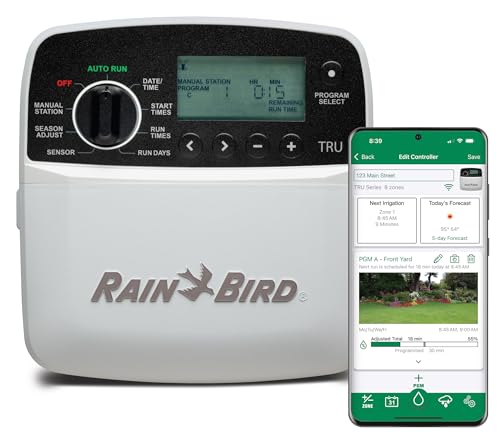
A useful dial and included Wi-Fi seldom arrive together in a local-first controller. Rain Bird pairs both in the TRU8IW, an indoor eight-station unit. The display and dial handle programming at the wall, while the bundled Wi-Fi module adds remote schedule access. In a household where one person manages the timer and another occasionally changes watering away from home, each route has a clear job.
Three programs with four start times each give the controller room to separate areas that follow different routines. A turf zone and a drip bed, for example, can sit in different programs, while each physical valve remains its own station. Manual watering can start one station, all stations, or a selected program, which is handy for observing a zone during a wiring check.
Rain Bird lists a built-in battery to keep time through short power interruptions and nonvolatile memory for saved schedules. That local storage is useful when a network connection is unavailable, though app-based remote access still depends on the network. The controller’s memory and its connected features are separate parts of the ownership picture.
Sensor and master-valve connections broaden the installation options. Rain Bird allows a rain sensor to be bypassed by station and a master valve to be assigned by station, details that can help when different areas need different sensor behavior. Check the wiring diagram before transferring those connections. Sensor support does not tell the controller whether a sprinkler head is clogged or a bed is receiving uneven coverage.
Placement is the firm constraint: TRU8IW is indoor-only. Mount it in a protected garage or shed with a suitable outlet, room to open the wiring compartment, and a reliable Wi-Fi signal at the final location. An exposed wall or valve-box installation calls for a controller rated for that environment.
Pros
- The included Wi-Fi hardware and usable front panel give a homeowner a connected route without sacrificing on-site schedule adjustments.
- Eight stations can keep lawn, beds, and drip circuits on separate runtimes when the existing valve map fits the limit.
Cons
- Indoor-only mounting calls for a protected wall and rules out exposed controller locations.
- Remote features depend on network setup, so a weak signal at the garage can reduce the value of the bundled connection.
The TRU8IW offers a balanced setup for an indoor eight-valve system where the panel should remain usable and phone access is genuinely helpful. Its bundled connection is a plus, but the indoor-only cabinet rules out exposed mounting. Confirm the exact model and terminal needs before deciding it belongs on your wall.
To buy this product, click here.
Rain Bird ESP-TM2 with LNK, 6-Station: Best Six-Zone Connected Bundle
The linked six-station bundle is defined by its box contents: Rain Bird pairs the ESP-TM2 controller with an LNK Wi-Fi module. A plain ESP-TM2 listing may omit that accessory, so compare the model number and included parts instead of assuming every six-station unit has remote access.
At the panel, the TM2 keeps routine programming visible through its dial and display. Three programs with up to four start times each can separate a stable lawn schedule from beds or drip areas. Six outputs suit a settled valve map. If a seventh circuit is already planned, choose a controller with more capacity before installation.
The LNK module adds a phone route for schedule changes and connected alerts. It needs a compatible controller and a 2.4 GHz Wi-Fi network, so test signal where the timer will stay rather than where setup begins. Also verify that the package has the appropriate 120-volt version and enclosure for the intended mounting location.

Pros
- Six independently scheduled outputs match a settled six-valve property without requiring a larger cabinet or unused stations.
- The dial, display, and documented manual controls keep commissioning tasks visible at the controller.
Cons
- The Wi-Fi expectation depends on the exact bundle including the compatible LNK module.
- Six fixed stations leave little room for a later valve addition unless the controller is replaced.
A known six-valve layout and a real need for remote adjustments are the two reasons to favor this bundle. If the app is unlikely to be used, the standalone ESP-TM2 keeps the local controls without the added module. A full six-station map with new zones planned points toward a larger controller.
To buy this product, click here.
Rain Bird ESP-TM2 8-Station: Best Local Schedule Panel with an Upgrade Path
The eight-station ESP-TM2 is a conventional panel controller first. Its dial and display can run the schedule without a network, and the compatible LNK2 module remains an optional route to app access. That separation suits an owner who wants local programming today and a clear choice about connectivity later.
Rain Bird provides three programs and up to four start times for each. Programs help group valves by watering routine, but they do not create extra physical stations. A valve map can keep lawn, foundation beds, and drip circuits distinct; a shared program should be reserved for areas whose timing can reasonably match.
If remote changes become useful, the LNK2 fits into the controller’s accessory slot and uses 2.4 GHz Wi-Fi. A weak signal near the garage or utility room can make that upgrade frustrating, so check coverage at the mounted location. The controller remains usable at the panel when app access is not part of the routine.
The U.S. ESP-TM2 family includes indoor and outdoor versions, and the model count and enclosure vary by SKU. The linked offer should be checked for its exact eight-station model, power arrangement, and whether an LNK2 is included. Photograph existing terminals before removal, especially if a rain sensor, pump relay, or master valve is wired.

Pros
- Local schedule entry works without a network while the compatible module preserves a future route to remote control.
- Eight outputs and multiple programs let a homeowner separate watering routines across a varied residential landscape.
Cons
- Remote access is not part of the basic controller unless the appropriate module is included or purchased.
- The fixed eight-station count can fall short when the existing system already has more independent valves.
Eight stations leave room to keep more areas on separate schedules while preserving a dial-driven setup. The LNK2 is an add-on, not a reason to assume the base controller is already connected. This model suits a homeowner who wants to decide that question after matching the station count and cabinet to the existing installation.
To buy this product, click here.
Hunter X2 14-Zone: Best High-Capacity Dial Controller
Fourteen independent valves are useful only when the property has fourteen distinct circuits to manage. On a larger landscape, the X2-1400 can keep turf, trees, beds, and drip areas from being compressed into a handful of shared schedules. Its fixed station count is the starting point; the real benefit is preserving separate run times where soils, sun, or plantings differ.
Hunter’s X2 provides three programs with four start times each, plus a backlit display and familiar dial-based entry in its conventional mode. Cycle and Soak can divide a station’s run into shorter cycles, which helps limit runoff on slopes or tight soils. Easy Retrieve stores a schedule for later restoration, while QuickCheck can help identify short-circuit wiring faults.
The optional WAND module changes the control arrangement. With Wi-Fi enabled, Hunter directs schedule programming through Hydrawise and disables the X2 dial and button functions used for programming. Manual station, program, and test runs remain available at the controller. That is a meaningful tradeoff for this roundup: the base unit supports local programming, while connected mode is app-managed.
An outdoor cabinet and a fourteen-station terminal map need a suitable service location. Confirm that the exact X2-1400 listing matches the U.S. 120-volt model, then compare the old common, pump or master-valve, and sensor wiring with Hunter’s diagram. Label the circuits before disconnecting them; that small step matters more as the number of valves grows.
The WAND is sold separately unless the item page explicitly identifies a bundle. If the controller will remain in local mode, the module may add cost without helping the person who maintains the system. If Hydrawise access is the goal, account for the changed programming workflow before purchase rather than expecting the dial and app to be interchangeable.

Pros
- Fourteen independent stations give a complex property room to schedule more landscape sections separately.
- The panel-based program entry and documented diagnostics support service work without requiring the optional app connection.
Cons
- The WAND module is a separate buying decision unless the exact package explicitly includes it.
- A fourteen-station cabinet and setup can be unnecessary for a compact yard with a short valve map.
A fourteen-station map gives the X2-1400 a clear purpose, but the way you intend to use WAND matters just as much as capacity. Local panel programming is available in conventional mode; active Wi-Fi shifts scheduling to Hydrawise. For a large property, that distinction should be settled before choosing the hardware.
To buy this product, click here.
Hunter X2 6-Zone: Best Smaller Local-First Hunter Controller
Scaled to six fixed outputs, the X2-600 is easier to justify on a compact valve map than its fourteen-station sibling. The familiar panel can hold separate programs for lawn and beds, with three programs and four start times available in the X2 family. This is a conventional controller first, so check the existing valve count before paying for connectivity.
Cycle and Soak gives the owner a way to break a long station runtime into shorter watering periods. On a slope or tight soil, that pause can let water absorb before the next cycle and reduce runoff. QuickCheck and Easy Retrieve add practical service functions, one for short-circuit diagnosis and one for saving a program that can be restored after unwanted changes.
A WAND module is optional and sold separately unless the package says otherwise. When Wi-Fi is active, Hunter’s instructions move programming into Hydrawise and disable normal schedule entry from the X2 dial; manual run and test controls remain at the panel. That switch in workflow is easy to miss if a buyer assumes the app simply mirrors every dial function.
The six-station count is fixed, so new valve circuits require another controller or a replacement. Verify the exact X2-600 model and cabinet, and check whether the irrigation system includes a sensor or pump-start connection. If the controller is expected to stay local, an accessory bundle may be unnecessary.
Pros
- A six-valve layout can stay on individually named circuits while the owner programs directly at the controller.
- The optional WAND path lets a buyer add connected management later instead of paying for it by default.
Cons
- Remote access needs the compatible accessory, so the controller alone will not meet an app-first requirement.
- The six-station ceiling may require a second controller or replacement if the landscape gains more valves.
Six stations are a sensible match for a settled property with no near-term plan to add drip or landscape zones. The X2-600 also keeps connected control optional, although fitting WAND changes how schedules are programmed. Its strongest case is a buyer who values local operation and understands that tradeoff before adding the module.
To buy this product, click here.
Orbit 12-Station Indoor/Outdoor Timer: Best Conventional Choice for a Large Valve Map
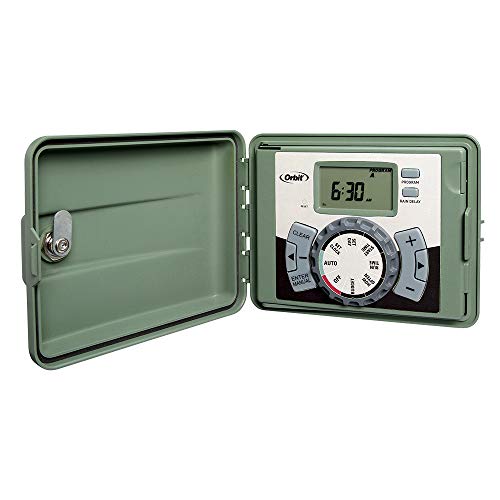
Orbit’s twelve-station Easy-Set Logic timer is built around the part of installation that often gets overlooked: access to the wires after the controller is mounted. The display swings open with the panel, leaving the terminal area reachable for service. That is useful on a larger conventional system where a mislabeled station can otherwise turn a quick repair into a wiring hunt.
Three programs with as many as four start times each let the homeowner separate watering routines. Orbit says overlapping run times are stacked, so one valve solenoid runs at a time rather than opening several zones together. Manual mode can run one zone, selected zones, or all zones, which keeps commissioning and seasonal checks at the cabinet.
The timer is designed for 24 VAC sprinkler systems and an indoor or outdoor installation, with a rain-delay control and support for a rain or freeze sensor. Orbit also lists pump-start relay support. Follow the manual for the power path and relay wiring; the controller is not a replacement for the relay’s separate power requirements.
There is no app, remote status, or connected weather service in this model. That absence removes network setup from daily operation, but it also means a schedule change requires access to the property. Confirm that the linked product is the twelve-station 57900, since the Easy-Set cabinet is sold in several station counts.
Pros
- Twelve fixed stations accommodate a larger valve map while keeping each schedule editable at the cabinet.
- The swing panel gives a service person direct access to wiring and controls without an app-dependent workflow.
Cons
- There is no connected app or remote status path for someone who wants to adjust watering away from the property.
- The exact station variant needs checking because the product family includes several similar cabinet models.
Where twelve valves need independent schedules and someone can reach the controller, Orbit’s swing panel and direct manual controls make a conventional timer easy to service. Remote-first households will miss app access. Check the 57900 model label and wiring diagram before replacing an existing unit.
To buy this product, click here.
Rain Bird SST600IN: Best Simple Indoor Timer for Six Zones
Some irrigation systems need six separate schedules and no cloud account. Rain Bird’s SST600IN fits that narrower job with zone-by-zone programming, a large display, and direct controls for watering one zone or all zones. Each valve can receive settings suited to its area instead of sharing a program simply because the controller offers too few outputs.
A one-touch seasonal adjustment, rain delay, and multiple watering times cover common schedule changes at the panel. The timer supports a rain sensor and a master valve or pump-start relay, and Rain Bird lists compatibility with standard 24 VAC valves. Those connections should still be matched to the manual and the existing wiring before installation.
The SST600IN is an indoor model. A garage or protected utility room works when the wiring can reach the terminal area and the controller stays away from weather exposure. Its interface is deliberately direct, which makes routine use easier to hand off in a household where not everyone wants to manage irrigation from a phone.

Pros
- The large dial-and-display interface lets a homeowner adjust six schedules at the wall without depending on a phone.
- Rain delay and seasonal adjustment give direct ways to pause or scale a routine as conditions change.
Cons
- Indoor-only installation requires a protected location and does not fit an exposed valve-box wall.
- The absence of app access rules out remote checks and connected schedule adjustments.
For a stable six-zone yard, this controller keeps the schedule legible at the wall and limits setup to functions that can be handled locally. Its indoor placement and lack of remote access are real constraints, not hidden costs. A covered service area and a settled valve map are the conditions that make the SST600IN feel right.
To buy this product, click here.
Hunter X-Core 4-Zone: Best Compact Local Timer with Cycle and Soak
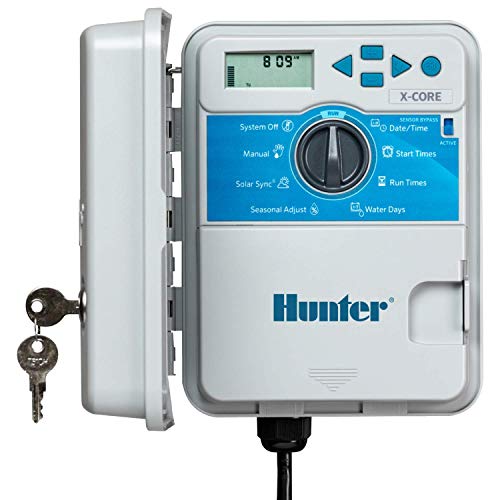
A four-station X-Core is a small-system controller, not a way to consolidate a larger valve map. Hunter’s family uses a dial and display, three programs, and four start times per program. That is enough to separate a few lawn and garden circuits while keeping the schedule visible at the cabinet.
Cycle and Soak is the feature that gives this compact unit a particular use case. It breaks one station’s runtime into shorter watering cycles with waits for absorption, which can help on slopes or tight soils where a long continuous run tends to move water downhill. Hunter says X-Core units with a July 2013 or later date code include Cycle and Soak; confirm the date code if buying older stock.
The controller remains a local timer. A compatible weather sensor can add a pause or seasonal adjustment, but the X-Core is not an app-connected Wi-Fi model. The feature set is useful when watering needs are understood and the owner wants to adjust a program directly at the panel.
Check the enclosure printed on the listing before ordering. Hunter identifies XC-400 as a four-station outdoor model and XC-400i as the indoor version. Product pages can group related variants, so verify the model code, power lead, and intended mounting location instead of relying on a generic product title.
Pros
- Four independent stations keep a small property’s distinct watering areas from sharing one unsuitable schedule.
- Cycle and Soak and wiring diagnostics provide practical tools for runoff-prone zones and service checks.
Cons
- Four fixed stations are restrictive for a yard with more than four independently valved areas.
- The conventional interface does not supply remote schedule changes through a phone app.
Only a property with four or fewer independent valves can use the X-Core’s full station map without combining areas. Cycle and Soak is a meaningful advantage on runoff-prone ground, provided the model date code supports it. If the valve count or enclosure is uncertain, resolve that before treating the low station count as a bargain.
To buy this product, click here.
Rain Bird TRU6I: Best Six-Station Indoor Controller with a Wi-Fi Upgrade Route
Rain Bird’s TRU6I and TRU8IW share a dial-and-display approach, but the six-station TRU6I is the smaller, indoor model with a different connectivity package. It can program at the controller and manage up to six valves, with three programs and four start times per program. The output count, not the app, should decide whether this version fits the yard.
Manual watering can run a station, a program, or all stations for testing. A built-in battery maintains the clock during short power interruptions, and nonvolatile memory stores the schedule. Those details support local operation, while a network outage affects the connected features rather than the physical schedule controls.
TRU6I is compatible with Rain Bird’s LNK2 Wi-Fi module, which is a separate accessory unless the listing clearly bundles it. LNK2 needs a compatible 2.4 GHz network, so measure signal at the indoor mounting spot. The same dial-and-display panel remains available for local setup when remote app access is not the priority.
Before replacing a timer, check whether the current system uses a pump-start relay, master valve, or rain sensor and compare the terminal diagram. The indoor enclosure needs a protected location with a suitable outlet. A product-family page may show indoor and outdoor TRU models together, so the exact TRU6I code is worth confirming.

Pros
- Six stations and local schedule controls fit a compact property where each valve needs a distinct routine.
- The compatible LNK2 module leaves a documented way to add remote access without replacing the timer.
Cons
- The LNK2 accessory is separate unless confirmed in the exact package.
- Indoor-only placement rules out exposed mounting and requires a protected service location.
The TRU6I is the smaller local-control route for a six-valve indoor installation, with Wi-Fi available through a separate LNK2 module. It is a better match than TRU8IW when the station map is genuinely shorter and remote access can wait. A protected mounting location and a verified module choice settle the main buying questions.
To buy this product, click here.
Installation and the First Month of Ownership
Document the old timer before disconnecting it
Take a clear photograph of the wiring and write each label on a paper map. Identify station wires, common, sensor terminals, master valve, and pump-start relay separately. Switch off power according to the current controller’s directions. If the transformer or valve wiring is unfamiliar, get qualified help rather than inferring connections from wire color alone.
Match each conductor to the new terminal diagram
Use the manual for the exact station count and enclosure. Similar product families may arrange terminals differently, and an included Wi-Fi module does not change the valve wiring plan. Connect one station at a time, keep conductors from pulling against terminals, and leave enough room to open the cabinet for later troubleshooting.
Test one valve at a time
Start with a short manual run and watch the zone. Confirm that the intended area receives water, the valve closes cleanly, and the controller identifies the correct station. A buzzing solenoid, a slow start, a patch of dry lawn, or pooling at a low point is a system issue to investigate before extending the schedule. A controller can show that it sent a signal; it cannot prove the heads are positioned well.
Build a restrained schedule and adjust from observation
Separate turf, shrubs, trees, and drip circuits where their needs differ. On sloped or compacted ground, shorter cycles with a soak interval can reduce runoff. Start with a conservative runtime and observe the soil after watering. Change one variable at a time so you can tell whether frequency, duration, coverage, or valve behavior caused the result.
Keep local access understandable
If the model also uses an app, pair it at the permanent location and test a start, a stop, and a normal scheduled event. Write down which tasks remain at the panel. Share the zone map with anyone responsible for the yard, and keep the model manual accessible for account changes, power interruptions, or seasonal shutoff.
Common Buying Mistakes
- Counting landscape areas instead of valve outputs. The controller needs one station per independent valve circuit that requires its own schedule.
- Treating every screen or button as full local programming. Check whether the panel can edit schedule details or only start and stop watering.
- Assuming a Wi-Fi module is included. Confirm the exact bundle contents for ESP-TM2, TRU, and X2 models.
- Mounting an indoor-only model in an exposed location. Match the enclosure and power instructions to the site.
- Combining zones with different needs to save a station. Lawn and drip areas often require distinct runtimes and watering frequency.
- Expecting weather automation to spot a mechanical failure. Forecasts do not detect a clogged filter, blocked head, damaged wire, or leaking valve.
Frequently Asked Questions
Will a local controller keep a schedule if the internet is down?
That depends on the specific model and how its schedule is stored. A dial-based timer may continue a saved program while app access and weather features pause. Read the manual for the controller and test normal operation after installation rather than assuming every smart-capable unit behaves the same way.
Does a physical control panel mean I can change every setting without an app?
No. Some units offer complete schedule entry at the cabinet; others keep the panel for manual watering, stopping, or zone advancement while detailed edits remain in an app. Confirm the task list in the model’s manual before buying.
Is the Hunter X2 14-station model expandable?
It is a fixed fourteen-station controller, not a modular platform that can add unlimited outputs. Count the valves and planned additions. If the system needs more than fourteen independent circuits, compare a controller built for that capacity.
Which Rain Bird ESP-TM2 model includes Wi-Fi?
The ESP-TM2 controller family can be upgraded with a compatible LNK2 module. Some retail offers bundle the module and some sell the controller alone. Check the precise contents and model number of the package you are considering.
Can I install an indoor/outdoor timer inside?
Often the product family supports both locations, but power and mounting instructions still apply. An indoor-only controller should not be mounted in an exposed location. Check the exact enclosure label, outlet or conduit requirements, and local electrical rules.
Is a rain sensor the same as app-based weather adjustment?
No. A rain sensor is physical hardware wired to a compatible terminal. Weather adjustments use network data and may change a program based on conditions associated with the controller’s location. Either function may require setup or a separate accessory.
How do I know whether six stations are enough?
Count the valves that need different schedules. A separate front lawn, backyard, shrub bed, and drip circuit may need separate stations, depending on the actual plumbing and watering needs. Leave room only for a realistic planned addition; a larger number does not improve coverage by itself.
Final Take
A cloud-light controller earns its place by leaving the owner with a clear way to operate the system at the property. Rain Bird TRU8IW combines a local panel with included Wi-Fi, ESP-TM2 and Hunter X2 models keep the schedule visible while making connectivity an accessory choice, and the Orbit, SST600IN, and X-Core options favor conventional local operation.
Before choosing, check the station map, cabinet location, accessory list, power connection, and the specific tasks that must remain available without an app. After installation, test every valve and adjust the schedule from what the landscape shows. That decision process keeps the controller’s interface in service of the irrigation system rather than the other way around.

- Ryan
Ryan Mitchell covers sprinkler controllers, smart irrigation, and watering technology at Best Sprinkler Controllers, with a focus on clear comparisons, practical features, and helping homeowners choose the right setup for their yard.
- Best Sprinkler Controllers Without Subscription Fees November 20, 2026
- Sprinkler Controller Has No Power: What to Check First November 18, 2026
- Best Local-Control Sprinkler Controllers: 9 Cloud-Light Picks November 16, 2026
- Best Smart Sprinkler Controllers With Physical Controls November 14, 2026
- Best Battery-Powered Sprinkler Controllers: 9 Picks in 2026 November 10, 2026