
Best WiFi Sprinkler Controllers: 9 Picks in 2026
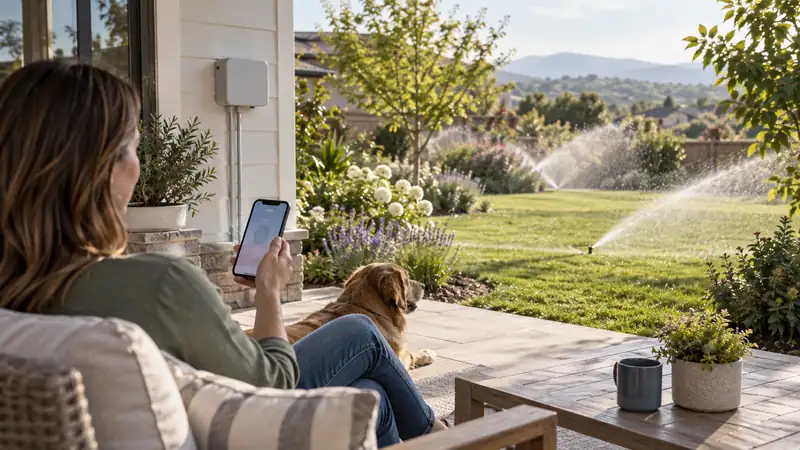
The best WiFi sprinkler controllers make schedule changes easier, but wireless access is only one part of a successful irrigation installation. The controller still has to operate every valve, fit the mounting location, work with the transformer and common wire, and provide a control path that the household can use during an outage or service visit.
A good connected controller can pause watering around weather, show the upcoming schedule, start a zone from a phone, and keep the owner informed when the system needs attention. The best choice depends on the way the property is wired and the way the system will be managed. An app-first model may be excellent for one homeowner and frustrating for a shared property that relies on local controls.
This guide compares nine Wi-Fi sprinkler controllers across station capacity, network type, mounting category, local access, weather features, sensors, and upgrade paths. The group includes built-in Wi-Fi models, a controller with Ethernet, a traditional unit paired with a wireless module, and compact six-zone choices.
Before choosing a model, count the valves, check the wireless signal at the controller location, identify the common and station wires, and record any pump, master valve, rain sensor, or flow meter. A controller with a strong app cannot compensate for an incomplete wiring plan or a location where the network cannot reach.
Quick Answer
These four choices cover the most useful Wi-Fi controller paths, from polished weather scheduling to Ethernet, local controls, and modular connectivity.
- Rachio 3 is the strongest general pick for weather-aware app scheduling.
- Orbit B-hyve XR fits indoor or outdoor placements with built-in Wi-Fi.
- Yardian Pro stands out when Ethernet and broad home automation matter.
- Rain Bird TRU8IW keeps a local dial and LCD alongside connected access.
Wi-Fi Sprinkler Controller Comparison
| Controller | Stations | Network path | Best fit |
|---|---|---|---|
| Rachio 3 | 8 | Dual-band Wi-Fi | Weather-aware app control |
| Orbit B-hyve XR | 8 | Built-in Wi-Fi | Indoor or outdoor placement |
| Hunter PRO-HC | 12 | Hydrawise Wi-Fi | Large systems and monitoring |
| Rain Bird ARC8 | 8 | Wi-Fi and app | Rain Bird households |
| Yardian Pro | 8 | Wi-Fi or Ethernet | Automation and weak wireless areas |
| Rain Bird TRU8IW | 8 | Preinstalled Wi-Fi | Local and remote control |
| Orbit B-hyve 57946 | 6 | Wi-Fi and app | Compact systems |
| RAINPOINT Smart 8 | 8 | 2.4 GHz Wi-Fi | Simple retrofit |
| ESP-TM2 with LNK | 8 | Separate LNK module | Traditional controls with app upgrade |
Use the detailed sections to decide how much connected control the irrigation system actually needs. Look at the network path, local controls, enclosure, station count, and wiring as one installation rather than treating the word Wi-Fi as the entire decision.
1. Rachio 3 Smart Sprinkler Controller, 8-Zone: Best Overall Wi-Fi Sprinkler Controller

Rachio 3 is built around connected schedule management, making it a strong fit for a homeowner who wants weather response and remote control from the start. The eight stations can separate the most common residential valve groups, and the app gives each zone a place in the schedule. A homeowner can name the circuits, set runtimes, run a zone manually, and make seasonal changes without standing at the controller.
The product information describes dual-band Wi-Fi, automatic skips for rain, wind, freeze, and saturation, seasonal adjustment, grow-in schedules, and support for Alexa, Google Home, and IFTTT. That feature set gives the controller more depth than a remote on and off switch. It can help a homeowner respond to weather while still keeping separate routines for lawn, beds, shrubs, and drip areas.
The Wi-Fi plan depends on the mounting location. Rachio 3 is intended for indoor use, so the controller may sit in a utility room or protected garage where wireless coverage is different from the yard. The unit also leans heavily on the app for schedule creation. A buyer who needs a complete screen or dial at the cabinet should compare the local interface with the models below.
Pros
- Weather skips can keep a rain-sensitive schedule from running unchanged after a storm or freeze.
- Dual-band Wi-Fi gives more households a practical route to remote schedule edits.
Cons
- The indoor-first design may require a protected location or suitable enclosure outside.
- Most schedule creation happens in the app, so buyers wanting a full local panel may prefer another style.
Rachio makes the most sense at an eight-valve home with a sheltered mounting point and an owner who will use weather-aware scheduling from a phone. If the controller must remain outdoors or a full local panel is important, the app-led approach loses some of its appeal.
To buy this product, click here.
2. Orbit B-hyve XR, 8-Zone: Best Indoor or Outdoor Wi-Fi Model

Orbit B-hyve XR addresses two common Wi-Fi controller concerns at once: it includes built-in wireless access and uses a case intended for indoor or outdoor installation. That makes it useful when the valve wires terminate in a garage, shed, or exterior service area. Eight stations can support separate lawn, bed, shrub, and drip circuits in a typical residential system.
The B-hyve app supports remote schedule changes, custom programs, and weather-aware watering. A homeowner can make an adjustment before a storm, check the schedule away from home, or run a zone while watching the landscape. Built-in Wi-Fi avoids the extra module decision found on some traditional controllers, which can keep a replacement project more direct.
The local control path deserves a close look. The available product information emphasizes app management more than a complete programming screen at the cabinet. That can work well for a phone-centered household, but a service person may want visible controls during testing. The eight-zone capacity also leaves no room for a ninth valve, so count the current and planned circuits first.
Pros
- Built-in Wi-Fi avoids buying and fitting a separate module before remote scheduling is available.
- The indoor/outdoor case gives more choice when the wiring ends at a garage or exterior service point.
Cons
- The 2.4 GHz requirement can make placement more dependent on router coverage.
- Eight stations leave limited capacity for a ninth valve or a future landscape addition.
There is a practical reason to favor the B-hyve XR: it combines Wi-Fi with an enclosure suited to more mounting locations. That advantage matters less when the signal is weak at the cabinet or the landscape is likely to need a ninth valve.
To buy this product, click here.
3. Hunter PRO-HC, 12-Zone: Best Wi-Fi Controller for Larger Systems

Hunter PRO-HC uses Hydrawise to connect a twelve-station controller with weather-based scheduling and remote access. The extra station count gives larger residential properties room for several lawn sections, planting beds, trees, slopes, and drip circuits. It also gives a system more room to split a circuit after a flow test without replacing the controller immediately.
The product information identifies a full-color touchscreen, sensor inputs, a pump or master-valve output, wire-fault detection, and compatibility with a flow meter. Those features make the PRO-HC relevant when Wi-Fi needs to support monitoring and irrigation hardware rather than schedule changes alone. The touchscreen creates a local path for setup and testing while Hydrawise handles connected tools.
The network and wiring plan need to be developed together. A flow meter or sensor may need separate equipment, and the pump or master-valve arrangement must match the output. The feature set can be more than a small yard needs, so a buyer should weigh the station count and monitoring value against a simpler eight-zone controller.
Pros
- Twelve stations let a larger yard keep lawns, beds, trees, and drip circuits on separate schedules.
- Hydrawise and the touchscreen provide both connected oversight and a visible local way to check a running zone.
Cons
- The broader feature set may feel like more setup than a small yard needs.
- Flow and sensor functions may require compatible accessories beyond the controller itself.
On a larger property, the PRO-HC’s extra stations and monitoring connections can earn their place by keeping distinct circuits separate. A small, stable system with no sensor or flow plan would leave much of that capability idle.
To buy this product, click here.
4. Rain Bird ARC8, 8-Zone: Best Rain Bird Wi-Fi Controller

Rain Bird ARC8 gives an eight-zone irrigation system Wi-Fi access, app scheduling, local operation, and weather adjustment. The indoor or outdoor format can suit a wide range of replacement locations, while the station count covers common residential valve layouts. The controller also keeps the purchase within a familiar irrigation brand for homeowners who want continuity with existing equipment.
The app can create schedules, start a zone, delay watering, show upcoming runs, and provide weather information. The product information also identifies WaterSense certification, Alexa support, and Google Assistant compatibility. These features make ARC8 useful for a household that wants remote access but still values a controller with local operating options.
A reliable network does not remove the need for a good wiring plan. Confirm the transformer, common wire, station count, sensor connection, master valve, and intended enclosure. Eight stations can fill quickly on a property with separate front and rear lawns, beds, trees, and drip, so review future landscaping before deciding that the count is enough.
Pros
- The app and on-controller access give an existing Rain Bird household two ways to review or change a program.
- Weather adjustment can reduce manual schedule edits when forecast conditions change.
Cons
- Eight stations can fill quickly on a property that is still adding beds or drip circuits.
- Remote management relies on a dependable network and the Rain Bird app.
For a Rain Bird household that wants app access but still values local operation, ARC8 keeps both routes in one eight-zone controller. Its station limit is the main question to settle before the yard gains another bed or drip circuit.
To buy this product, click here.
5. Yardian Pro, 8-Zone: Best Wi-Fi Controller with Ethernet

Yardian Pro gives a connected irrigation system two network routes. It supports Wi-Fi and an RJ45 Ethernet port, while physical buttons allow a local zone run. That makes the controller worth a close look for a garage, utility room, or exterior service point where wireless coverage is uncertain. A wired connection can keep a fixed controller online without relying on the router signal reaching through several walls.
The platform supports HomeKit, Alexa, Google Home, and Home Assistant. It also describes weather-based scheduling and wired or wireless flow-sensor compatibility. For a homeowner who wants irrigation status to join a wider automation system, those options can be more valuable than a simple forecast skip. Physical buttons also help with installation and service when a phone is not the quickest tool.
Yardian Pro has a larger setup footprint. The owner needs to choose the network path, decide whether flow monitoring is needed, plan the enclosure, and connect the controller to the chosen automation platform. The optional IP56 enclosure can support a demanding location, but accessory requirements should be checked before the cabinet is mounted outside.
Pros
- Ethernet offers a stable network route when the controller location is beyond dependable Wi-Fi coverage.
- Physical buttons let an owner test a valve without opening the app during installation or service.
Cons
- The network, automation, and sensor choices may take longer to configure than a basic timer.
- Outdoor placement may need the optional enclosure and compatible monitoring hardware.
An Ethernet run changes the calculation for Yardian Pro when Wi-Fi cannot reach a fixed controller reliably. Without a wired-network or automation need, its broader setup is harder to justify over a simpler app timer.
To buy this product, click here.
6. Rain Bird TRU8IW: Best Wi-Fi Controller with a Local Dial
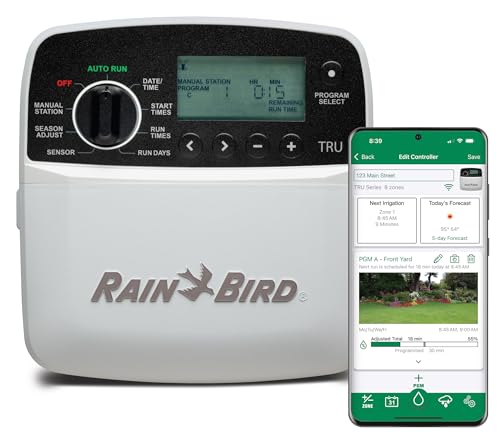
TRU8IW combines an eight-station timer, a preinstalled smart Wi-Fi module, a dial, and an LCD. The dual control path matters for households that want remote access but do not want a network connection to become the only way to manage the schedule. A person can use the app from the house or use the panel during installation, a service visit, or a short connection problem.
The product information describes three programs, four start times per program, manual station control, seasonal adjustment, and a one to fourteen-day rain delay. Those settings give the controller enough depth for separate lawn, bed, shrub, and drip schedules. The local display also makes it easier to see which program or start time is active without translating every option through an app screen.
The indoor installation category limits where the controller can be placed. The program-based structure also asks the owner to plan the schedule carefully before turning on automatic watering. A fully app-first controller may feel simpler for an owner who wants one place to edit every setting, while TRU8IW is stronger for shared local and remote use.
Pros
- The dial and LCD keep schedule checks available at the controller while Wi-Fi supports changes from elsewhere.
- Three programs and multiple start times help separate routines across an eight-valve layout.
Cons
- The station count leaves limited reserve for an expanding landscape.
- Remote features depend on the network setup and LNK functions being available at the installation.
Local service access is the TRU8IW’s clearest advantage: the dial and display remain useful even when no one wants to manage the schedule through a phone. Check the indoor-only placement before its hybrid control style wins the comparison.
To buy this product, click here.
7. Orbit B-hyve Smart 6-Zone 57946: Best Compact Wi-Fi Controller

Orbit 57946 brings B-hyve app control and weather-aware scheduling to a six-zone system. Its smaller station count suits a townhouse, compact lawn, or settled property with six or fewer independent valves. The indoor or outdoor format adds placement flexibility, which can matter when a small controller must sit near the valve box rather than inside the home.
The app can handle custom schedules and remote changes, while weather-based adjustments can pause or alter watering around local conditions. A six-zone controller can be easier to understand because every station has a clear job. It may cover a front lawn, rear lawn, foundation bed, side strip, garden, and drip circuit without leaving a large unused cabinet.
The limit is future growth. A new side bed, pool planting, or separate tree circuit can consume the last station quickly. The owner should also consider whether app-centered control is acceptable for service and outage situations. A larger controller or a model with more local controls may be a better long-term choice for a changing landscape.
Pros
- Six stations avoid paying for a larger controller when a compact property has a settled valve map.
- App scheduling makes a remote pause or runtime adjustment possible without visiting the controller.
Cons
- Six stations leave little room for a new bed, tree circuit, or later valve.
- Remote management depends on the B-hyve account and a stable network connection.
Six stations are a tidy match for a compact property when every existing valve has a defined job and expansion is unlikely. The 57946 becomes a short-term choice if a new garden or separate drip line is already on the plan.
To buy this product, click here.
8. RAINPOINT Smart 8-Zone Controller: Best Straightforward Wi-Fi Retrofit

RAINPOINT takes a direct approach to eight-zone Wi-Fi control. It uses 2.4 GHz wireless access, an app, physical buttons, and a standard 24VAC arrangement. That gives a homeowner a path for remote scheduling and a path for local testing at the cabinet. Eight independent zones can separate common residential areas without requiring a large automation platform.
The product information describes independent schedules, valve status, upcoming watering, history, rain and freeze skips, and rain-sensor compatibility. It also states that schedules can remain available through power or network interruptions. Those features make the controller suitable for an owner who wants the app to simplify routine management while keeping the schedule useful during a temporary connection problem.
The network band needs to be confirmed before installation. A 2.4 GHz signal often reaches farther than a 5 GHz signal, but walls, metal, and distance still matter. The controller also follows a more self-contained path than a platform-heavy model, so it may be less suitable for a home that needs Ethernet, flow alerts, or broad smart-home control.
Pros
- Physical buttons make a quick local valve test possible even when a phone is not the most convenient control.
- Saved schedules and rain-related skips give the app-oriented setup a useful routine beyond simple remote starts.
Cons
- The controller needs suitable 2.4 GHz coverage at its mounting location.
- Its smart-home integration path is more limited than broader platform ecosystems.
RAINPOINT comes into its own when standard valve wiring, reachable 2.4 GHz coverage, and simple app adjustments describe the installation. A property that depends on Ethernet, flow monitoring, or wider automation should look to another platform.
To buy this product, click here.
9. Rain Bird ESP-TM2 with LNK Wi-Fi Kit: Best Modular Wi-Fi Upgrade Path

The ESP-TM2 and LNK kit takes a two-part route to connected irrigation. The ESP-TM2 provides an eight-station controller with a backlit LCD, conventional programming, seasonal adjustment, delay watering, and a Contractor Default function. The LNK module adds wireless access and a connected path without removing the local dial and display from the system.
That arrangement can suit a homeowner who wants local programming first and app access second. The controller remains understandable at the cabinet, while the module can provide remote changes and internet weather features after the network setup is complete. The kit format also makes the connected components clear, which helps during a staged replacement project.
The module-based design creates another part to install and configure. The owner should verify that the selected bundle includes the module, that the controller has a suitable mounting location, and that the wireless signal reaches the cabinet. The eight-station count leaves no spare output, and the local programming path may feel slower than a fully app-first controller for frequent schedule changes.
Pros
- The local dial and display make commissioning understandable without relying on the app for every change.
- A compatible LNK module adds remote access while retaining the familiar panel for household or service use.
Cons
- Connected access depends on the compatible LNK add-on rather than the base unit alone.
- The eight-station limit offers less room for new valves than a larger controller.
The ESP-TM2 bundle suits an owner who wants to set up the watering plan at the dial and use phone access for remote changes afterward. Verify that the LNK module is included and that the cabinet has room for the two-part arrangement.
To buy this product, click here.
How to Choose a Wi-Fi Sprinkler Controller
Test the signal at the controller location
A phone can show a strong signal in the house while the controller location has a weak connection. Concrete walls, metal cabinets, detached garages, and distance can change the result. Test the network where the controller will be mounted, not where it is convenient to stand during the purchase decision.
Think about the network path after installation. A mesh node may solve a distant garage, while an Ethernet connection may be more stable for a fixed controller. If the signal is marginal, the smart features can become unreliable while the controller itself remains functional.
Confirm the wireless band
Many controllers use 2.4 GHz because it usually travels farther and passes through walls more easily. Some support both 2.4 and 5 GHz, while others require a 2.4 GHz network during setup. Router band steering, guest networks, and security settings can affect connection.
Check the exact requirement before installation. A separate network name for 2.4 GHz can simplify setup in some homes. The router should be close enough to the controller for a stable connection, yet protected from weather and unauthorized access.
Decide how the system should work offline
A connected controller should have a clear behavior when the network goes down. Many models can keep a saved schedule running, while remote changes, weather data, and notifications may pause. The owner should know whether the local schedule continues and how to resume normal connected operation.
Physical buttons, a dial, screen, or quick-run controls can provide useful backup access. An app-only workflow can still be appropriate for a private home with reliable coverage, but a service property or shared household may need a more visible local path.
Check account and household access
Connected irrigation usually involves an app account. Decide who will receive access, who can change schedules, and how a service person will run a test. A controller that works for one owner may create friction when several people need to view the status or pause the schedule.
Keep the zone map separate from private login details. Record the station names, runtimes, sensor connections, and installation notes in a location that can be updated without placing account information on the cabinet.
Match Wi-Fi with the enclosure
An outdoor controller may have a weather-resistant case, but the wireless signal still has to pass through the wall or cabinet. A metal enclosure can reduce signal strength. An indoor controller may have a better network path but require a long wire run to the valve box. The best choice balances water, wiring, access, and network location.
Protect the power connection and wire entry. A weather-resistant cabinet does not make an exposed outlet or an unsealed cable connection safe. Read the mounting instructions and leave space for the transformer, station wires, and any module.
Look at built-in Wi-Fi versus a module
Built-in Wi-Fi puts the connected hardware inside the controller. A module-based system keeps a familiar local controller and adds wireless access through an accessory. Neither approach is automatically better. Built-in access can reduce the number of parts, while a module can provide a staged upgrade for someone who prefers local programming.
Check whether the module is included, what functions it adds, and where it fits in the cabinet. A controller that is described as Wi-Fi-ready may still need a separate purchase before remote access works.
Review weather and sensor features
Weather skips, seasonal adjustment, rain sensors, and flow meters address different conditions. Forecast-based tools can pause watering around rain or freeze. A rain sensor responds to moisture at the property. A flow meter can reveal unusual water use. The controller needs the right connection and the schedule needs sensible runtimes for any of these features to help.
Do not choose a controller for a sensor port that the irrigation system will never use. Also, do not assume that a controller’s compatibility statement includes the accessory. Build the hardware list before starting the installation.
Plan for maintenance and updates
Connected controllers may receive app or firmware updates, and the network can change when a router is replaced. The system should have a recovery plan. Keep the model information, station map, and installation notes together so the controller can be reconnected without guessing.
Review the schedule after an update, a power interruption, or a major landscaping change. Smart features can make adjustments easier, but the owner still needs to watch the heads, soil, and plant response.
Wi-Fi Installation Checklist
- Count active valves and identify any spare or future station.
- Test the wireless signal at the exact controller location.
- Confirm the required band and router settings.
- Record the common, station, sensor, pump, and master-valve wires.
- Check whether the controller uses built-in Wi-Fi or a separate module.
- Match the enclosure and power arrangement to the mounting location.
- Connect the app account and decide who needs access.
- Run every zone manually after installation.
- Test the saved schedule with the network temporarily unavailable.
- Store the zone map and seasonal settings with the maintenance records.
Frequently Asked Questions
What is the best Wi-Fi sprinkler controller?
The best choice depends on station count, mounting location, local controls, and the kind of connected access you want. Rachio 3 suits weather-aware app scheduling, Orbit B-hyve XR offers flexible placement, and Hunter PRO-HC is a stronger fit for larger systems with monitoring connections.
Will a Wi-Fi controller work if my internet goes out?
Many models can continue a saved schedule locally, but app control, forecast adjustments, and alerts may pause. The exact behavior varies, so confirm the controller’s offline routine before relying on it for an unattended property.
Does a Wi-Fi sprinkler controller need 2.4 GHz?
Many controllers use 2.4 GHz because it reaches farther through walls and supports common smart-home setup paths. A dual-band model can be easier to install, while a single-band unit needs suitable coverage at the controller.
Can I install a Wi-Fi controller outside?
Only when the controller and its enclosure support the exposure at the mounting point. A protected garage or utility area may be the simplest location, while an outdoor cabinet also needs reliable signal strength and safe power access.
Is Ethernet better than Wi-Fi for irrigation?
Ethernet can provide a steadier connection when the controller is far from the router or surrounded by dense walls. Wi-Fi is simpler in many homes, so the better choice depends on the available cable route and the signal at the controller.
Do I need a separate Wi-Fi module?
Some controllers include wireless access, while traditional models use an add-on module. A separate module can make a staged upgrade practical, but it adds a compatibility check and another part to configure and maintain.
Final Verdict
Rachio 3 is the best overall Wi-Fi starting point for an eight-zone home that wants weather response and a strong app. Orbit B-hyve XR is a better match for flexible outdoor or indoor placement. Rain Bird ARC8 and TRU8IW serve homeowners who want connected access within a local Rain Bird control path.
Choose Hunter PRO-HC for a larger property with sensors, pump connections, or flow monitoring. Yardian Pro stands out when Ethernet and automation matter. RAINPOINT is a straightforward retrofit, while the ESP-TM2 with LNK provides a traditional panel with a modular connected upgrade. Confirm signal, enclosure, wiring, offline behavior, and station count before selecting the final controller.

- Ryan
Ryan Mitchell covers sprinkler controllers, smart irrigation, and watering technology at Best Sprinkler Controllers, with a focus on clear comparisons, practical features, and helping homeowners choose the right setup for their yard.
- Best Irrigation Controllers With Rain Sensor Support November 4, 2026
- Best Sprinkler Controllers for Large Yards: 9 High-Capacity Picks November 2, 2026
- Best WaterSense Irrigation Controllers: 7 Certified Picks October 29, 2026
- Can I Replace an Old Sprinkler Controller With a Smart Controller? October 27, 2026
- Best Weather-Based Irrigation Controllers: 9 Smart Picks October 25, 2026