
Best Irrigation Controllers With Rain Sensor Support
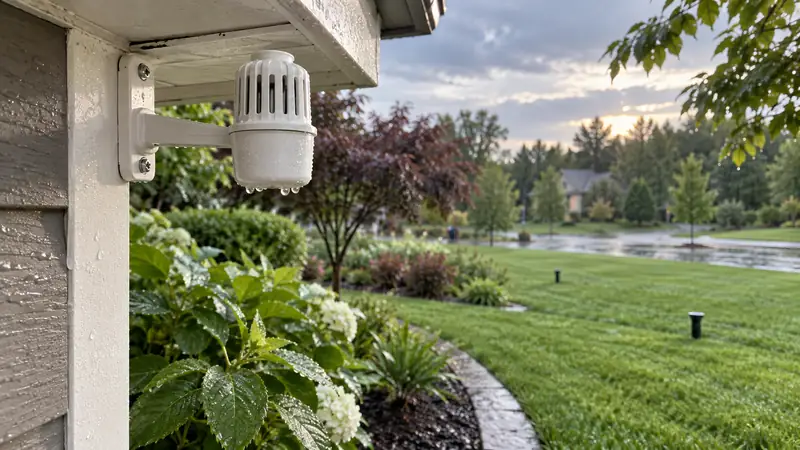
The best irrigation controllers with rain sensor support are the ones that read a compatible sensor and are configured to respond. That distinction sounds straightforward, yet it is easy to mistake a forecast-based rain skip for a physical sensor connection. Both can delay watering, but one reacts to a device measuring conditions at the property and the other works from weather information.
That distinction matters for a yard with sharp weather differences across a neighborhood, or where a local sensor is required by the irrigation plan. Sensor terminals, supported switch type, app setup, and mounting location all affect the result. Station count and Wi-Fi still matter, but they come after confirming the signal path.
The eight direct-input choices below cover app-led, local-control, and expandable systems. Netro Spark is listed separately as a weather-based alternative, not as a controller with a traditional add-on rain-sensor input. The comparison table makes that boundary visible before the product reviews.
Quick Answer
For a controller that will use an actual rain sensor, these four are the strongest starting points for different installations:
- Rachio 3 8-Zone pairs a wired or wireless normally closed sensor with app-based configuration.
- Hunter PRO-HC 12-Zone has two sensor inputs and suits a larger system with Hydrawise controls.
- Orbit B-hyve XR 8-Zone combines a physical sensor connection with separate forecast-based WeatherSense delays.
- Rain Bird ESP-TM2 with LNK, 6-Station keeps familiar dial controls and adds connected access in this bundle.
Best Irrigation Controllers With Rain Sensor Support: Comparison
“Sensor support” here means a documented physical input unless the row clearly says otherwise. The forecast-based alternative is labeled so it is not confused with a wired or wireless rain sensor.
| Controller | Physical rain-sensor path | Stations and control | Useful distinction |
|---|---|---|---|
| Rachio 3 8-Zone | Wired or wireless normally closed sensors; enable the selected S port in the app | 8; app and Quick Run | App-led scheduling with a local sensor input |
| Hunter PRO-HC 12-Zone | Two sensor inputs; supports Hunter Clik and standard rain/soil sensors | 12; touchscreen and Hydrawise app | More sensor and monitoring options for a larger layout |
| Orbit B-hyve XR 8-Zone | Supports most rain/freeze sensors through physical terminals | 8; app and local controls | Physical sensing and forecast delays are separate functions |
| Orbit B-hyve Smart 12-Zone | Rain-sensor terminals for a compatible physical sensor | 12; app and controller controls | More station capacity in the standard B-hyve line |
| Rain Bird ARC8 | Rain or rain/freeze sensor connection | 8; Wi-Fi app and local controls | Connected Rain Bird control with a physical sensor option |
| Rain Bird ESP-TM2 with LNK, 6-Station | Wired sensor input with station-level bypass settings | 6; dial, display, and LNK app access | Local programming remains central |
| Rain Bird ESP-ME3 Controller | Normally closed rain sensor on the SENSOR terminals | Expandable system, up to 22 stations; dial and LCD | Expansion path for a growing valve map |
| Netro Spark | No traditional add-on rain-sensor input; weather-data alternative | 8; touch controls and app | For buyers who want weather-based changes instead |
| RAINPOINT Smart 8-Zone | Listing identifies rain-sensor compatibility; confirm sensor type and wiring | 8; buttons and 2.4 GHz app connection | Connected retrofit with straightforward station count |
Physical Sensor or Weather-Based Rain Delay?
A physical rain sensor is mounted outside and changes an electrical contact after its sensing element gets wet. The controller then pauses automatic watering according to its sensor settings. Forecast features work differently: they use regional or local weather data to delay a program, with no sensor wire reporting what happened at the property. A manual rain delay is different again because a person starts it.
Those methods can coexist, but they are not interchangeable. If the purpose is to use a rain sensor required by a local plan, confirm a physical input and the supported sensor type. If the concern is avoiding watering before a forecast storm, connected weather scheduling may be enough. Netro Spark belongs only in the second conversation.
Rachio 3 8-Zone: Best Overall for App-Led Sensor Setup
Rachio 3 has a direct path for adding a rain sensor to an app-managed controller, but the connection must be configured after the wires are landed. Rachio lists wired and wireless normally closed sensors. The selected S1 or S2 port must then be enabled and identified as a rain sensor in the app; a connected wire alone does not tell the controller to pause watering.
The eight-zone version can keep lawn, beds, and drip circuits on separate schedules. Weather-based scheduling can supplement the local sensor, but these are distinct inputs: one reports rain at the property, the other uses connected weather information. That difference matters for a bed tucked beneath a roof overhang or in a sheltered courtyard.
Plan the mounting location before taking down the old timer. Rachio is an indoor controller, so an exposed installation needs the appropriate separate weatherproof enclosure. Check Wi-Fi where the panel will sit and make sure the sensor cable reaches its terminals without strain. Wired and wireless sensor kits also have different receiver and power arrangements, so match the exact instructions.

Pros
- Support for wired and wireless normally closed sensors gives buyers more flexibility in choosing a compatible sensor layout.
- App-based S-port setup makes the sensor assignment visible alongside everyday schedule controls.
- A local rain sensor gives the controller a property-level signal when a passing shower differs from the regional forecast.
- Keeping wired sensing separate from online weather data helps the owner understand which input paused a scheduled run.
Cons
- The eight-zone ceiling leaves no station reserve for a system that is already full.
- Outdoor mounting needs a separate weatherproof enclosure rather than an exposed wall location.
If the site needs both an actual rain signal and app-led schedule changes, Rachio 3 offers a clear route, as long as the eight stations and indoor location fit. Choose another model if the owner wants a physical dial-only workflow or the controller must stay exposed outdoors.
To buy this product, click here.
Hunter PRO-HC 12-Zone: Best for Multiple Sensor Inputs
Two sensor inputs are the PRO-HC’s differentiator. Hunter lists compatibility with its Clik sensors plus standard rain and soil sensors, with the selected input assigned in Hydrawise. For an installation with more than one monitoring device, that creates a more flexible path than a controller that accepts a single rain interruption signal.
Twelve fixed stations can separate turf, trees, shrubs, and drip areas when the valve layout has those circuits. The color touchscreen provides local access to setup, zone testing, and programming, while Hydrawise adds connected scheduling. These functions work together, but neither changes a valve map that groups unlike beds on the same station.
The setup is more involved than replacing one dial timer. Check the 2.4 GHz Wi-Fi connection at the controller, identify each sensor’s wiring type, and configure the inputs in the app. If the network is 5 GHz only, the specified 2.4 GHz connection is a mismatch. Confirm which sensors the exact controller revision supports before buying both the panel and monitoring hardware.
It is easy to overvalue the second input when there is only one rain sensor in the plan. Count the active valves and name the job for each sensor first. A second input becomes useful when it serves a real soil, rain, or other supported monitoring need; otherwise it is extra setup the irrigation system will not use.

Pros
- Two sensor inputs let a larger installation plan for rain sensing alongside another compatible sensor or flow device.
- The touchscreen supports zone checks and programming at the controller when phone access is inconvenient.
- Twelve outputs can keep lawn, tree, bed, and drip circuits on separate schedules around the sensor plan.
- The master-valve or pump-start connection can preserve compatible pump control in the same installation.
Cons
- Hydrawise setup and a 2.4 GHz network requirement add steps beyond programming a local-only timer.
- A fixed 12-station version can be an awkward match if the valve count is far below that capacity or likely to exceed it.
A twelve-zone controller with two sensor inputs suits a larger layout where both capacities solve real problems. For an eight-valve system with one rain switch and no expansion plans, the PRO-HC’s additional configuration may be more than the job requires.
To buy this product, click here.
Orbit B-hyve XR 8-Zone: Best for Physical and Forecast Rain Controls
B-hyve XR separates on-site sensing from forecast delays. A compatible rain or rain/freeze sensor connects to the physical terminals; WeatherSense can pause watering based on forecast thresholds for rain, wind, or freezing conditions. A weather service and a sensor mounted in the yard answer different questions, so one feature should not be used as proof of the other.
Eight stations cover many established residential valve maps, and the indoor/outdoor format gives the installer more placement choices than an indoor-only panel. Local controls remain available at the cabinet. Test Wi-Fi at the final mounting point, then locate the physical sensor where it receives representative rainfall rather than roof runoff or sprinkler spray.
Orbit’s instructions call for a closed sensor circuit when no physical sensor is attached, usually by retaining or installing the supplied jumper. The sensor function also needs to be enabled. Keep the jumper and note its position during a retrofit; leaving the circuit open can interrupt programmed watering even when the app schedule looks correct.

Pros
- Separate physical-sensor and forecast-delay paths let the owner choose the signal that fits the weather decision.
- Indoor/outdoor placement and local controls keep the controller usable at different mounting points.
- Four program slots let the eight stations separate lawn and planting calendars rather than applying one watering day to every circuit.
- Dual-band Wi-Fi and Bluetooth offer flexible setup and connected access after the physical sensor is wired.
Cons
- The rain-sensor jumper and enable setting need attention during installation or a sensor replacement.
- Eight stations leave little room for a landscape that is already approaching the model’s capacity.
Choose the XR when both a local rain switch and forecast-based delays belong in the same system. A simpler controller may be easier to set up if the property needs just one of those controls or has no dependable network at the valve location.
To buy this product, click here.
Orbit B-hyve Smart 12-Zone: Best for a Larger B-hyve System
Twelve stations are the reason to choose this B-hyve over its smaller sibling. When the valve map already includes front and back lawns, side strips, planting beds, and drip zones, the extra outputs can keep unlike areas on separate schedules. A four-zone yard will not water better simply because the unused terminals are available.
The unit accepts a compatible external rain sensor at its physical terminals. That sensor is separate from the app’s weather adjustments, which use connected data. Keeping the local and forecast controls distinct helps when a storm misses the property or when a sensor mounted in the yard reports conditions different from the regional forecast.
Buttons and the controller display provide a local service point, while the app handles remote schedule changes and connected weather functions. Photograph the sensor wiring and record the jumper position before replacing an older controller. After setup, verify the sensor state and run each zone rather than assuming the old configuration carried over.
Network quality can vary inside a detached shed or metal cabinet. Check Wi-Fi at the permanent location, and test the sensor separately from the online features. They are two systems to configure, not one combined rain setting.
Expansion plans should be specific. If new valves are likely and their watering needs differ, twelve stations provide useful headroom. If the landscape and plumbing are settled, an eight-zone panel may leave a cleaner installation with no loss of control.

Pros
- Twelve stations give a larger residential valve map space for separate lawn, bed, and drip schedules.
- Local controller access complements app changes during a sensor check or valve test.
- Four program slots give a large B-hyve system room to group different watering days across its twelve stations.
- A compatible on-site sensor can respond to rain at the property even when a forecast-based delay does not reflect local conditions.
Cons
- Remote and weather features depend on a working network connection at the controller’s location.
- The larger station count is unnecessary for a compact system with no realistic expansion plan.
The larger B-hyve earns its space when a dozen independent circuits are already present or genuinely planned. A smaller yard with a stable valve map can use the same physical sensor capability without carrying unused station capacity.
To buy this product, click here.
Rain Bird ARC8: Best Connected Rain Bird Option
Rain Bird ARC8 keeps the physical panel in the workflow while adding app-managed schedules. It supports a rain or rain/freeze sensor and controls up to eight stations. The sensor terminal is the relevant reason it appears here; Wi-Fi and weather features do not substitute for an on-site signal.
Rain Bird’s instructions specify normally closed rain or rain/freeze sensors. The factory jumper should stay in place when no sensor is connected. Confirm the contact type and the controller setting before reusing a sensor from an older system, because a generic rain-sensor label does not guarantee matching wiring.
Local buttons are useful during a zone test, and the app gives another route for schedule changes. That balance can be convenient on a standard residential system where the panel remains accessible. WaterSense labeling and forecast tools may be relevant to the broader setup, but the direct sensor connection still needs its own correct placement and wiring.
Eight stations set the ceiling. Count active valves and near-term additions before treating ARC8 as a long-term fit. The physical sensor also needs a place exposed to rain but shielded from runoff and sprinkler spray; the controller can pause watering only when the sensor reports conditions accurately.

Pros
- Physical rain and rain/freeze sensor support adds a local interruption path to connected scheduling.
- Local controls remain useful for checking stations without opening the app.
- Three programs and multiple start times let the owner keep lawn, beds, and drip on distinct calendars.
- The app’s weather adjustment can complement a wired sensor by providing a separate forecast-based reason to delay a cycle.
Cons
- The eight-station limit can constrain a landscape that needs more independently timed valves.
- The external sensor and its mounting work are separate from the controller installation.
For a Rain Bird household that wants the sensor circuit and app access in one eight-station panel, ARC8 keeps both visible. Its limits are clear: the sensor must be normally closed, the installation must match the wiring, and a growing valve map can outgrow eight stations.
To buy this product, click here.
Rain Bird ESP-TM2 with LNK, 6-Station: Best Local-First Connected Pick
This ESP-TM2 bundle starts with a dial and display, then adds an LNK Wi-Fi module for connected access. The TM2 accepts a wired rain sensor and lets the owner bypass that input by station. That combination can work well when some valves should pause after rain while a protected or covered area continues on its own schedule.
Six stations suit a modest property with a deliberate division between turf, beds, and other circuits. Seven active valves already exceed the linked model’s capacity, so check the valve count rather than choosing by the bundle name. A twelve-station TM2 or another panel is a better size if expansion is part of the immediate project.
The sensor needs correct placement, low-voltage wiring, and an enabled controller setting. Use station bypass deliberately and revisit it after seasonal maintenance. ESP-TM2 and LNK bundles can differ, so check which module is included and whether that generation fits the household’s network and preferred app setup.

Pros
- Dial and display controls make local scheduling and station checks accessible without starting in the app.
- Station-level sensor bypass helps preserve a deliberate exception for a zone that should not follow the rain input.
- A compatible LNK module can add remote schedule changes and weather features without replacing the local controller.
- Three programs and several start times let six stations follow different watering days when the yard has distinct zones.
Cons
- Six stations are a firm ceiling for this configuration, so it is a poor fit for a larger valve map.
- The external sensor is not part of the controller itself and requires separate placement and wiring.
The TM2 bundle is a good fit for someone who wants the dial to remain the main interface and app access as an option. Its six-station limit and a properly wired sensor are the two checks to settle before the bundle goes on the shortlist.
To buy this product, click here.
Rain Bird ESP-ME3 Controller: Best for an Expanding Valve Map
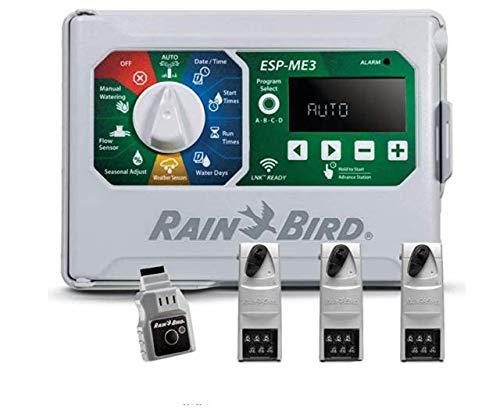
Expansion, rather than a sensor feature alone, is the strongest reason to move up to the ESP-ME3. A supported modular configuration can grow to as many as 22 stations, while the dial and LCD keep programming visible at the unit. Verify the base model and modules in the exact package; the maximum supported count is not necessarily the number of outputs included.
Rain Bird specifies a normally closed sensor on the SENSOR terminals. The manual calls for removing the jumper when a sensor is installed; without one, the circuit must be closed with the jumper or the input setting adjusted as instructed. Do not borrow a wiring assumption from another brand, especially if the existing sensor uses normally open contacts.
The panel keeps local programming straightforward, while an appropriate LNK module can add Wi-Fi access later. That gives a buyer a staged setup, but it adds accessory and configuration decisions if app control becomes important. Make the sensor plan first, then decide whether connected access is worth adding.
A large chassis is useful only when the valve plan may grow. Separate turf sections, trees, beds, and future planting can justify expansion when they require different runtimes. A settled four-zone map gains little from paying for a modular controller that will remain mostly empty.
Pros
- Expandable station capacity can accommodate a valve map that grows beyond a fixed six- or eight-station controller.
- A documented normally closed sensor path makes it easier to verify the wiring before installation.
- Local dial programming remains available when the optional Wi-Fi module is not installed, so sensor operation does not depend on app access.
- Compatible station modules can increase capacity in measured steps as new valves are added to the landscape.
Cons
- Station expansion requires matching modules, so the maximum capacity should not be mistaken for included outputs.
- Remote app control depends on adding a compatible Wi-Fi module rather than using built-in Wi-Fi.
When the valve count is likely to rise, ME3 gives room to expand without abandoning the local dial-and-screen routine. If the system is compact and fixed, the modular capacity is a promise the garden may never need.
To buy this product, click here.
Netro Spark: Weather-Based Alternative, Not a Sensor-Input Pick
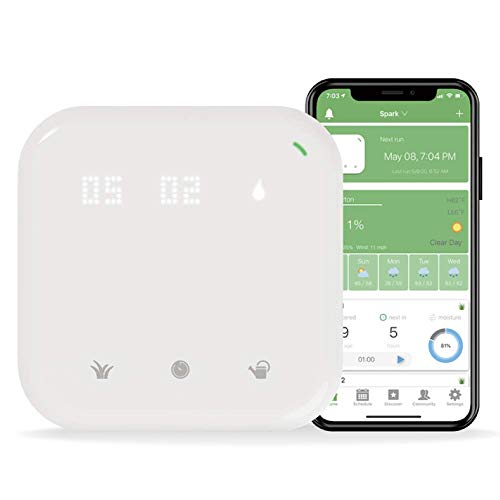
Netro Spark is a weather-based alternative, not a physical rain-sensor controller. It lacks dedicated terminals for a traditional add-on rain sensor; its rain-related automation uses weather information and scheduling. That can be enough for a buyer who wants forecast-driven skips and prefers not to mount or wire a separate device.
Eight zones, app control, touch controls, and plant-focused schedules give Spark a different appeal from a conventional sensor panel. The connected history and schedule may help organize a garden, but none of those features turn a forecast into a rainfall reading from the property itself.
Local conditions can diverge from a regional weather source. A brief shower, an overhang, or a large lot with different exposure can make an automatic skip less representative. Keep a manual pause option and review the schedule. Anyone who needs a hardwired or receiver-based sensor should select a controller with a documented physical input.
Pros
- Plant-oriented scheduling and activity history can help organize a garden’s watering plan from the app.
- Weather-based adjustments avoid sensor wiring for owners who only need forecast-driven delays.
- Because it uses weather information instead of a wired sensor input, Spark can suit a retrofit where running sensor cable to the controller is impractical.
- Selecting a zone and run duration at the touch panel allows a one-time watering adjustment without rewriting its app schedule.
Cons
- No dedicated external rain-sensor input makes it unsuitable when local sensor compatibility is required.
- Weather-based decisions may not reflect a brief shower or a microclimate at the property.
Spark belongs on this list only for the reader whose real need is automatic weather skips. If the requirement is a wired sensor that physically reports rain at the site, the missing input is decisive and another model is the better purchase.
To buy this product, click here.
RAINPOINT Smart 8-Zone: Best for a Straightforward Connected Retrofit
RAINPOINT combines an eight-zone layout, app access, and buttons on the unit, with product information that claims physical rain-sensor compatibility. That mix can suit a conventional retrofit where the owner wants a local way to test a station and a connected path for schedule changes.
Keep the sensor input separate from rain skips and freeze delays described in the product details. Those connected functions use weather information; the physical sensor depends on the correct contact type and wiring. The controller also uses 2.4 GHz Wi-Fi, so check both the router configuration and the signal where the panel will be installed.
Before ordering, verify the exact sensor model and wiring diagram for the current package. Then label every station and run the valves manually to confirm the correct zone responds. Eight outputs are enough only if the existing map fits; a larger expansion plan may be better served by a 12-station option.

Pros
- Buttons plus app control let the owner work at the controller or adjust a schedule remotely.
- Eight independent stations can keep lawn and planting circuits on separate routines in a standard retrofit.
- A compatible physical sensor can respond to rainfall at the property rather than relying solely on regional weather data.
- Treating the sensor input separately from forecast skips helps the owner choose the pause method that matches the site’s actual conditions.
Cons
- The 2.4 GHz network requirement limits fit at properties with only a 5 GHz Wi-Fi network.
- The exact sensor contact type and wiring should be confirmed before reusing an existing rain sensor.
The RAINPOINT is worth a look after its sensor connection and the eight-valve count are confirmed against the actual installation. If either detail is uncertain, verify the manual before replacing a working controller.
To buy this product, click here.
How to Choose a Controller for a Physical Rain Sensor
Start with the sensor’s contact type
Rain sensors commonly interrupt a circuit when their moisture element reaches a threshold, but controller inputs are not identical. Some models specify normally closed sensors, while others document a broader contact range or a brand-specific accessory family. Look at the sensor label and wiring diagram, then check the controller manual for the exact input. A statement that a controller “supports a rain sensor” is not enough to confirm that it will accept every sensor already installed at the property.
If the controller requires a normally closed sensor, do not substitute a normally open unit without verified instructions. Wireless models may need a receiver or power connection even when the sensor itself is battery-free or mounted far from the controller. Treat the sensor and timer as a matched system rather than a pair of products that happen to use two wires.
Know what the sensor will pause
Many controllers use one sensor to suspend automatic watering across the system. Rain Bird ESP-TM2 includes a per-station sensor-bypass option, which can be useful when one circuit should respond differently. Do not assume a sensor can make separate decisions for every zone unless the controller and sensor combination document that behavior.
A rain sensor also does not shorten every runtime or fix poor coverage. It reacts to rain at its mounting location. A lawn with mixed sun, shade, slopes, and drip areas still needs separate schedules where their water needs differ.
Place the sensor where rainfall is representative
Mounting determines what the sensor measures. A unit tucked under a deep eave may miss rain, while one beneath a roof edge can receive concentrated runoff. Keep it away from sprinkler spray and choose an exposed position that reflects the areas you intend to manage. For wireless products, confirm that the receiver remains within the manufacturer’s stated range; do not estimate range from the controller’s Wi-Fi coverage.
Sensor drying behavior can also vary with sun and shade. The manufacturer guidance for Orbit notes that placement changes how quickly its sensor engages and clears. Choose a position with reliable exposure, then monitor the first few weather events before assuming the pause timing is ideal for the yard.
Check the jumper before powering the controller
Some controllers ship with a jumper closing the sensor circuit. If the jumper is removed while no sensor is attached, the controller may interpret the open circuit as an active sensor and hold programmed cycles. Orbit and Rain Bird manuals describe this circuit behavior for their products. Keep the jumper with the controller, follow the model-specific diagram, and confirm the sensor status on the screen after wiring.
When installing a sensor, do not remove a wire or jumper based on a photo of another model. Terminal labels and bypass controls can differ even within one brand. Photograph the existing wiring before a replacement, label every station wire, and check the first automatic run after setup.
Decide whether connected weather features add real value
A physical sensor and online forecast can complement one another, but both add setup choices. Forecast data can pause a program before expected rain; a physical device responds to rain that reaches its own location. Buyers who want remote adjustments may value Wi-Fi, while a stable system with local access may be easier to manage through a dial and display.
Pick the extra feature that solves a recurring problem. If local rain sensing is mandatory, verify that first. If the goal is simply fewer unnecessary runs around changing weather, compare the app’s weather scheduling and the manual delay controls as separate functions.
Frequently Asked Questions
Does every smart sprinkler controller support a physical rain sensor?
No. Some controllers provide sensor terminals or a documented wireless sensor path. Others rely on weather data and do not have an input for an external rain sensor. Confirm the exact model’s support page or wiring diagram before buying a sensor.
Is a forecast-based rain delay the same as a rain sensor?
No. A forecast feature uses weather information to decide whether to delay a scheduled cycle. A physical sensor measures conditions at its mounting location and sends a signal to the controller. A manual rain delay is entered by the user. The three can reduce watering in different situations, but one should not be described as another.
Can I reuse the rain sensor already connected to my old controller?
Possibly, but check its model, contact type, wiring, and any wireless receiver before reconnecting it. Some controllers specify normally closed sensors; others support more contact types or particular accessories. Take a photo of the old terminal layout and compare it with the replacement manual before moving wires.
Where should an external rain sensor be mounted?
Choose an open position that receives rainfall and avoids roof runoff, overhangs, and sprinkler spray. The location should represent the parts of the landscape that the sensor is meant to protect. A wireless sensor also needs a reliable signal path to its receiver.
Can one rain sensor control multiple irrigation zones?
Often a single sensor can pause automatic watering for the controller, but the exact effect depends on its settings. Some models offer a bypass for selected stations. Check whether the sensor is systemwide or can be ignored by particular zones, then set that behavior deliberately.
What happens if I remove the sensor jumper but do not install a sensor?
On models that expect a closed circuit, the controller may read the open terminals as an active sensor and hold scheduled watering. Store the jumper and reinstall it when no sensor is connected, unless the manual gives another method such as turning the sensor input off.
Does a rain sensor stop a watering cycle that is already running?
Response behavior depends on the controller and sensor configuration. Many systems use the sensor to suspend automatic irrigation while it is active, but timing and manual-cycle behavior can differ. Check the specific model’s instructions and test the sensor with the controller in the mode you plan to use.
Final Verdict
For a connected controller with a clearly documented rain-sensor setup, Rachio 3 is the strongest overall match in this group, provided its eight-zone capacity and indoor mounting suit the property. Hunter PRO-HC is more compelling when a larger valve map and multiple sensor inputs matter. Orbit B-hyve XR stands out for keeping its physical sensor terminals separate from forecast-based WeatherSense delays, while Rain Bird ESP-TM2 favors buyers who want visible local controls and station-level bypass.
Before choosing, identify the sensor already on site, confirm its contact type, and read the terminal diagram for the exact controller version. Then count the valves, decide whether forecast scheduling is useful, and choose a mounting point with reliable sensor exposure and service access. Those checks prevent a mismatch that a longer feature list cannot fix.

- Ryan
Ryan Mitchell covers sprinkler controllers, smart irrigation, and watering technology at Best Sprinkler Controllers, with a focus on clear comparisons, practical features, and helping homeowners choose the right setup for their yard.
- Best Irrigation Controllers With Rain Sensor Support November 4, 2026
- Best Sprinkler Controllers for Large Yards: 9 High-Capacity Picks November 2, 2026
- Best WaterSense Irrigation Controllers: 7 Certified Picks October 29, 2026
- Can I Replace an Old Sprinkler Controller With a Smart Controller? October 27, 2026
- Best Weather-Based Irrigation Controllers: 9 Smart Picks October 25, 2026